


The repo is clean, the deploy is green, and your first users are signing up. But there’s no company behind the product yet. That means no entity to sign contracts, no EIN, and no business bank account. Forming one usually means closing your editor and spending a week with forms, tabs, and email threads.
Now you can form the company in Cursor, where you already write your code. Add doola to your MCP config, sign in once, and ask the agent:
“Help me form an LLC with doola.”
The agent handles the rest: it asks the right questions, sends you a checkout link, and files your Wyoming LLC with the state. You stay in your editor the whole time.
What Is doola MCP?
MCP (Model Context Protocol) is an open standard that lets AI agents use external tools. doola MCP connects your agent to doola’s formation system, so it can do the work instead of just describing it.
- Without doola MCP: The agent explains how to form an LLC. Then you go and do it somewhere else.
- With doola MCP: The agent collects your details, opens checkout, and submits your filing.
Why Cursor?
Cursor Is Where the Product Gets Built
Many founders now build and ship their products in Cursor. They write the code, review it, and deploy it, often from a single window.
The company behind the product is usually the last piece still handled somewhere else.
The Workflow Broke at Incorporation
Up to now, forming an LLC meant leaving the tool you build in and starting over in a separate process. That handoff is gone.
The agent that helped you write the code can now help you form the company.
What doola MCP Can Do Inside Cursor
Before you start, here’s what the doola MCP server supports:
- Form a Wyoming LLC. Wyoming is the only state currently available.
- Check your progress. The agent can see where your formation stands and what comes next.
- Take payment securely. You pay on a Stripe checkout page, and your card details never pass through the agent.
- Manage more than one company. You can start a new company and switch between the ones on your account.
- Pull company info. The agent can return your company’s profile, members, addresses, and EIN.
What the Experience Looks Like
The agent works through formation in 2 phases, with checkout in between.
Phase 1: Before Payment
The agent collects:
- Your legal name, as shown on your ID
- Your country of residence
- Your company name, without “LLC” at the end
Once these are saved, the agent shows you live pricing for your doola package and sends a Stripe checkout link. You pay, then tell the agent you’ve paid.
The agent confirms your payment before it asks anything else.
Phase 2: After Payment
The agent then collects the rest of your filing details:
- Your industry and a short business description
- Up to 2 backup company names
- Your registered address and mailing address, which can use doola’s registered agent and mailing address
- Your LLC members
- Your IRS responsible party
- The ownership split, which must add up to 100%
The IRS responsible party is the person who signs your EIN paperwork. Double-check their email address, because the IRS forms (Form SS-4 and Form 8821) go there for signature. The agent never asks for an SSN, ITIN, or signature in the chat.
Before anything is filed, the agent shows a summary table of everything you’ve entered. Your filing goes to the state only after you review it and reply “Submit.”
Submission can’t be undone, so read the summary carefully.
Step-by-Step: How to Connect doola MCP in Cursor
You only need to do this once.
- Open ~/.cursor/mcp.json in your editor.
- Add the doola server:
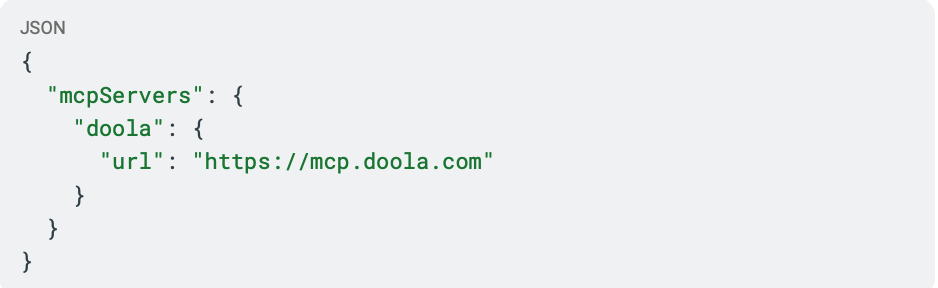
3. Save the file and restart Cursor.
4. Open the MCP panel. You’ll see doola with a login or authorize prompt.
5. Click the prompt, then sign in to your doola account or create a new one.
6. Complete the OAuth flow. doola’s tools then appear in the MCP panel.
7. Open the agent and ask it to help you form an LLC with doola.
Launching a US LLC as a Non-US Founder
Many founders building in Cursor live outside the US. doola MCP works the same way for them.
- No US address needed. Your registered address and mailing address can use doola’s.
- No SSN needed. The agent never asks for one, and you don’t need one to form your LLC.
- No trip to the US. The whole process happens online.
doola has helped 32,000+ founders across 175+ countries start their US businesses.
doola MCP in Other AI Tools
Cursor is one of eight AI platforms where doola MCP is active:
What Happens After Your LLC Is Formed
Once your LLC is filed, doola can run the back office for your US business:
- Registered agent service
- EIN support
- US business banking setup, including for eligible founders without an SSN
- Bookkeeping
- Compliance and annual reports
- Business taxes
Ready to Launch?
Your product already lives in Cursor, and now your company can start there too.
- Prefer the traditional way? Start here →
- Want to add company formation to your platform? Talk to us →