This guide explains what a business formation API is, how it works behind the scenes, and how platforms can embed US company formation directly into their existing products.
If your platform serves founders, freelancers, or small businesses, you have likely encountered this friction point firsthand:
A customer reaches the stage where they need a US entity, whether to sign contracts with US clients, open a US business bank account, or unlock global payouts, and their journey on your platform abruptly stops.
They leave for an unfamiliar filing website, type in details you already have, and wait through weeks of emails about filings and signatures. Some come back. Many don’t.
It isn’t only a tech-platform problem. An accounting firm advising a client in Bengaluru hits the same wall when that client asks about a US LLC. So does HelloGov, which helps people with passport renewals and other government paperwork, when its customers need a US company to bill US clients.
A business formation API closes that gap. You keep the customer and the experience, and a specialist provider handles the state filing, registered agent and EIN in the background.
This guide covers what a formation API is, how a request moves from your product to the state, what integration involves, and how to choose a provider.
By the end, you will have the technical and operational context needed to evaluate providers, brief your engineering team, and present an executive recommendation to leadership.
What Is a Business Formation API?
A business formation API lets a platform form US companies for its users through a formation provider, without the founder leaving the platform.
The founder enters their details in the platform’s own screens, the platform passes them to the provider, and the provider files with the state and sends back progress updates and documents.
Most APIs your team has used probably fetch data. A formation API sets real work in motion instead: a state filing, a registered agent appointment and often an EIN application.
In a white-label setup, the founder may never see the provider’s name at all.
The work divides between the two like this:
- The platform handles: The screens where founders enter their details, checkout and pricing, the customer relationship and first-line support. It decides where formation appears in the product and how it looks.
- The formation provider handles: Checking each request against state rules, preparing and filing documents with the state, acting as or assigning the registered agent, applying for the EIN where offered, and producing the final documents.
How Is It Different From a Traditional Incorporation Service?
| Separate formation website | Embedded formation | |
|---|---|---|
| Where the founder goes | Leaves your product for a third-party site | Stays inside your product |
| Founder details | Typed in again from scratch | Passed along from your own forms |
| Payment | Paid to the formation service | Taken in your own checkout |
| What you can see | Nothing once they click away | Each filing milestone, from submission to approval |
| Who the customer remembers | The formation service | Your platform |
The defining difference lies in user retention and data continuity.
- Traditional incorporation service: The founder navigates away from your platform, creates a third-party account, re-enters their information from scratch, and completes payment off-site. Your product loses end-to-end visibility the moment the user clicks away.
- Embedded formation: The founder completes the entire filing flow natively inside the software they already use, allowing your platform to track filing milestones from submission to approval without losing user attribution.
Consider a creator selling digital goods on a marketplace:
- Before: The creator encounters a payout roadblock, reads an external help article, opens a filing service in a separate tab, fills out lengthy repetitive forms, and eventually emails scanned PDF formation documents back to marketplace support to verify their business account.
- After: The creator clicks “Set up your US company” directly inside their seller dashboard, verifies pre-filled details, and monitors state filing progress directly on the same screen where they track daily sales.
Who Is Involved?
Every API-driven formation involves four parties, each with a distinct job:
- The Partner Platform: The customer-facing application, such as a fintech, an AI agent workspace, an accounting practice, or a marketplace, that collects entity data and displays progress updates.
- The Formation Provider: The specialized infrastructure provider behind the API that validates payload schemas, executes state filings, and coordinates registered agent services and tax registrations.
- The Founder / End User: The entrepreneur or business owner forming the entity who inputs corporate details, signs necessary IRS forms where needed, and receives final entity documents.
- The Government Filing Authorities: The relevant Secretary of State (which legally registers the entity) and the Internal Revenue Service (IRS, which issues the federal EIN).
Payloads flow outward from the founder through the platform to the provider and government authorities, while webhooks and legal formation outputs return through the same pathway.
Not the Same as a KYB API
A KYB (Know Your Business) or business registration API looks up or verifies a company that already exists. A formation API creates one that doesn’t exist yet. A neobank might use both: KYB for applicants who already have a company, and formation for those who don’t.
What Can a Business Formation API Do for Your Platform?
What a formation API gives you depends on what your product needs it to do.
In most cases, whether adding formation to your product makes sense comes down to three basic factors:
- Do your users need a registered company to use your product? (For example, opening a business bank account or taking card payments).
- Where do your users live? (Whether you need to support US founders with Social Security numbers, or international users who don’t have them).
- Do you want to handle ongoing filings? (Whether you just want to set up the business once, or keep users coming back by handling their yearly state requirements).
Every formation API handles basic company filings. Where providers differ is in the extra steps:
- Tax ID (EIN): Businesses need an IRS tax number to open bank accounts or take payments. Good APIs let you request an EIN in the same step as company registration. Weaker APIs leave this out, making your users go file by themselves on the IRS website.
- Registered Agent: Every US business legally must have an address in the state where it registers to receive court and state mail. Some APIs include this in the base price across all 50 states; others make you pay for a separate service.
- Yearly Filings: States make companies file reports and pay taxes every year to stay open. An API can either automate these annual reports for you, charge for them separately, or ignore them completely.
For example, doola Formation API covers both LLCs and C Corps in all 50 states and Washington, D.C.. It includes registered agent service and lets your users get an EIN in the same signup flow, whether the founder lives in the US or abroad.
Create LLCs and Corporations
Entity support dictates addressable market reach. Most providers emphasize the LLC formation API use case, while advanced providers also support C Corporations:
- Limited Liability Company (LLC): The standard choice for small businesses, bootstrapped founders, consultants, and international creators requiring pass-through taxation, flexible ownership distributions, and liability protection with lightweight administrative overhead.
- C Corporation (C Corp): Preferred by venture-backed technology startups requiring formal share issuance, stock option pools (ESOPs), and the equity structure that institutional venture capital funds expect.
Check C Corp Support Early
Some providers only form LLCs. If your users include startups that may raise money, confirm C Corp support before you commit to an integration.
Collect and Submit Formation Information
A standard request includes the business name, state, entity type, founder details and addresses. Providers also ask for conditional information that depends on the entity or the state. A request to doola’s API, for example, includes:
- Up to three name options, in order of preference, so a taken name doesn’t stall the filing
- An industry chosen from doola’s industry reference list (official NAICS titles don’t always match it exactly), plus a short business description of up to 50 characters
- A responsible party for IRS purposes
- A mailing address and a business address, either of which can be the registered agent’s address
- Members and ownership percentages for an LLC, or officers, directors and share details for a C Corp
States can add their own rules on top. Some states, for example, won’t accept the registered agent’s address as the company’s business address. The more of this your forms collect correctly up front, the fewer follow-up requests your users see later.
Track Status and Receive Updates
After submission, the provider reports progress in two ways. Status fields let your platform check where a company stands at any time, and webhooks push changes to your system as they happen. Together they let you show a live progress view, send your own emails and flag stuck applications.
The step-by-step section later in this guide shows how these events fit together.
Retrieve Documents and Access Related Services
Once the state approves the filing, the provider makes the formation documents available through the API as each one is ready:
- For an LLC: Articles of Organization (or Certificate of Formation) and the Operating Agreement.
- For a C Corp: The Certificate of Incorporation and Corporate Bylaws.
Because the IRS issues the EIN only after the state formally confirms company existence, the EIN confirmation letter is delivered as a distinct secondary milestone.
| Capability | Platform Architectural Impact |
|---|---|
| Company creation | Initiate LLC or corporation formation |
| Customer management | Link founders to formation requests |
| Status tracking | Display filing progress |
| Required actions | Request missing information |
| Documents | Give users access to available output |
| Related services | Potential EIN or compliance flows, where supported |
Why Do Platforms Integrate Business Formation APIs?
Knowing what the API can do, the next question is why a platform would add formation in the first place.
The benefits of embedded company formation and white-label business registration below are potential ones. How much each matters depends on your customers and where they tend to get stuck.
Keep Customers Within the Product
When a white-label formation flow sits inside your platform, customers finish the task without leaving. You know the company exists, you can see when it’s ready, and you can offer the next step at the right moment.
Referring customers elsewhere hands that moment, and often the relationship that follows, to another business. With a fully white-labeled setup, the entire registration runs behind your own brand and interface while the API handles the state filings.
Example: A client of an accounting firm in India who wants a US LLC starts formation from the firm’s client portal, instead of being referred to a separate website and losing touch with the firm.
Reduce Onboarding Friction
Fintechs, payment platforms, and cross-border tools often require a legal company and a tax ID before a user can unlock core features like business cards or payouts. Offering a white-label formation flow inside your signup stops users from dropping off to handle legal paperwork on an outside site.
Example: A neobank embeds white-label company registration directly into its signup flow. Founders without an existing company can set one up immediately, and their bank application automatically resumes as soon as the state approves the entity and the IRS issues the tax ID.
Create Additional Revenue Opportunities
A white-label setup gives you complete control over your customer pricing. You can sell company formation as an add-on fee, or bundle it into a paid monthly subscription. Because partners set their own end-user prices with doola, you decide your own profit margins.
Example: An accounting firm adds a paid US company registration package to its onboarding portal, or an e-commerce platform includes free company formation inside its top-tier seller plan.
Avoid Building Filing Operations From Scratch
Running formation in-house means tracking requirements across 50 states, preparing paperwork, fixing rejected filings, chasing missing signatures and answering a steady stream of support questions. That’s an operations team, not a feature.
A formation provider takes on most of that work, and your team handles the product experience.
Example: An AI app builder offers formation without hiring a team to monitor 50 sets of state rules or handle IRS paperwork for international users.
Support a Wider Customer Lifecycle
Formation is often the first of several business services a customer needs. After the company exists, it needs a registered agent each year, annual reports in most states and tax filings. Platforms that start with formation are well placed to offer these too, where their provider supports them.
Example: After a client’s company is formed, an accounting firm or fintech adds compliance services that keep the company in good standing each year.
What Happens When Your Platform Receives a Formation Request, Step-by-Step?
Company registration is inherently asynchronous: sending an API request does not instantly register a company. State offices and the IRS must review and approve documents on their own schedules.
Here is how the end-to-end process works in practice, using an example of Priya, an independent UX designer living in Bengaluru who sets up a US LLC through her accounting firm’s web portal using doola’s Partner API.
Key Takeaway
A submitted request is not a registered company. Formation is asynchronous: the state approves the entity on its own timeline, and the IRS issues the EIN after that.
company_formation_completed
company_ein_issued
Step 1: Create a Customer Record
Priya navigates to the “US Expansion” section inside her accounting firm’s web portal and enters her personal contact details. Her firm’s backend takes this data and calls doola’s customer creation endpoint:
- Endpoint: POST /v1/partner/customers
- Request: Passes Priya’s legal name, email, telephone number, and three-letter country code (IND).
- Response: Returns a unique identifier, doolaCustomerId. The accounting firm saves this ID in Priya’s account record in their database.
Why Idempotency Matters Here?
Customer and company creation requests carry an Idempotency-Key header with a unique value.
If Priya’s Wi-Fi drops while she submits her details and the firm’s backend retries the request, the API recognizes the key and returns the existing record rather than creating a duplicate customer or company.
Step 2: Submit the Formation Request
Priya now enters her company details: she chooses a Wyoming LLC, inputs three name ideas (e.g., Indigo Design Studio LLC, Kaveri Creative LLC, Priya UX LLC), selects a design industry from the firm’s dropdown as her industry, and enters her local physical address in India.
- Endpoint: POST /v1/partner/companies
- Response: doola accepts the payload and sets the status to pending. At this stage, the order is safely received, but the state has not approved anything yet. The response also lists any IRS forms Priya will need to sign for her EIN.
Step 3: Provider Processes and Files
Behind the scenes, doola’s system reviews Priya’s application. It confirms that her business name meets Wyoming’s legal naming rules (e.g., that it contains an approved entity designator like “LLC”) and confirms all required personal address fields are present.
doola assigns a Wyoming registered agent and files her Articles of Organization with the Wyoming Secretary of State.Priya’s status changes to submitted.
Step 4: Receive Webhook Status Updates
Instead of the accounting firm constantly polling the API to ask, “Is Priya’s LLC done yet?”, the firm sets up an automated webhook listener. When events happen, doola sends an HTTPS POST message to the firm’s server:
- company_formation_submitted: Wyoming has accepted the filing for review. Priya’s in-app dashboard shows: “Application under state review.”
- company_formation_completed: Wyoming has approved the entity.Priya’s status updates to: “Company formed! Securing your EIN…”
- company_ein_issued: The IRS has issued the federal tax identification number. The portal updates to: “Your company is ready to do business.”
The portal updates Priya’s dashboard each time an event arrives. If the firm’s server is down, doola retries a failed delivery up to five times over roughly a day and a half, so a brief outage doesn’t lose updates.
Events can occasionally arrive more than once or out of order, so the firm reads Priya’s company record for the current state rather than relying on event order.
Step 5: Resolve Required Actions
Filings do not always go smoothly. When doola needs something from the founder, it opens a required action and sends a webhook explaining what’s needed. In Priya’s case, two situations could come up:
Issue A: All business names are taken
If the state rejects all three of Priya’s name choices because similar names already exist in Wyoming, doola sends a company_name_options_required webhook, with a reason that usually lists the rejected names.
The accounting firm’s UI shows a banner: “Wyoming needs a new name for your LLC.”
Priya types in two new name options, clicks Submit, and doola refiles with the state without starting over. If she had already signed her SS-4, she’ll be asked to sign it again under the new name.
Issue B: IRS signatures
Because Priya lives in India and does not have a US Social Security Number, her EIN application goes to the IRS on a signed Form SS-4, and she may also need to sign Form 8821, which authorizes doola to deal with the IRS on her behalf.
These signing steps are known as soon as the order is created. The portal shows an embedded signing link, which expires after two hours, so the firm requests a fresh one each time Priya opens it.
The platform’s job is to show these requests clearly, ideally with an email or in-app prompt, and send her response back. A name request pauses the state filing until she answers. A pending signature doesn’t hold up the state filing, but the EIN can’t be requested until she signs.
Step 6: Deliver Official Corporate Documents
Once the state approves her LLC and the IRS processes her paperwork, Priya’s accounting portal displays her final documents. Because corporate and tax documents contain sensitive personal and financial data, doola provides temporary download links that expire after about an hour.
Whenever Priya clicks “Download Articles of Organization” or “Download Operating Agreement,” her firm’s backend requests a fresh, secure link on the spot rather than storing an old one.
How long does this take in the real world?
- The state filing: State filing takes about a week on average and varies by state and workload. Some states file the same day; others take up to two weeks.
- The federal EIN: Priya does not have a US Social Security Number, so her SS-4 goes to the IRS by fax, which doola estimates at 8 to 11 weeks, or 6 to 9 weeks with its expedited EIN option. The upper end applies in the IRS’s busy season, from mid-December to the end of April.
When doola can apply online, for example for an LLC whose owner has an SSN, the EIN usually arrives in 1 to 2 business days. These are IRS-driven estimates, not guarantees.
How Long Does It Take to Integrate a Formation API and Go Live?
There is no single launch timeline. In practice, connecting to the API endpoints takes minimal time; the bulk of the engineering work goes into what your team builds around the formation API.
A team embedding prebuilt screens into an existing onboarding funnel will move faster than a team designing a bespoke UI from scratch, configuring custom webhook listeners, and wiring formation events directly into internal billing, CRM, and support workflows.
To plan accurately, separate two distinct timelines that often get conflated:
- Integration Time: How long your engineering and product teams take to build, test, and ship the feature to production.
- Formation Time: How long it takes government agencies to actually form a customer’s company once you are live. This duration depends on state processing queues and IRS workload, not your engineering team. EIN issuance runs on a separate timeline, particularly for international founders applying without a US Social Security Number (SSN).
The Integration Lifecycle: From Docs to Production
Your team’s integration work typically follows seven sequential steps:
- Review documentation and jurisdiction coverage: Verify supported entity types (LLC vs. C Corp) and state-specific filing rules.
- Configure authentication: Generate separate sandbox and production keys, enforcing server-side storage and HTTPS transport.
- Build customer and order flows: Capture founder identity, address details, and business preferences, then wire your forms to the customer and entity creation endpoints.
- Implement webhook handlers: Build listeners to ingest asynchronous state updates, ensuring cryptographic signature validation, rapid acknowledgments, retry management, and deduplication.
- Handle edge cases and required actions: Design user-facing flows to remediate state name rejections, invalid addresses, or missing IRS signatures without breaking the onboarding session.
- Test in the sandbox: Validate the end-to-end happy path, mock webhook deliveries, and test document retrieval links.
- Prepare production infrastructure: Swap in live API keys, set up event monitoring, and establish clear operational ownership for Tier 1 customer support and escalation paths.
Key Variables That Dictate Your Build Timeline
Four main factors determine whether your integration takes days, weeks, or months:
- Frontend and UI Scope: Using the API gives you complete control over your branding and user experience, but your timeline depends on whether you build custom signup screens from scratch or plug the endpoints into an existing onboarding flow.
- Functional Scope: Launching standalone company formation requires far less engineering than building an end-to-end experience that bundles automated EIN processing, registered agent assignments, and recurring annual compliance workflows.
- Exception and Edge-Case Handling: Building resilient workflows for network timeouts, out-of-order webhook events, and government filing rejections requires intentional architecture. Because a developer sandbox cannot simulate every state registry failure, production-level alerting and reconciliation routines must be accounted for.
- Cross-Functional and Legal Sign-Off: Non-technical deliverables often take longer than writing the code. Commercial negotiations, wholesale pricing structures, data privacy reviews, partner agreements, and internal customer support playbooks require alignment across product, legal, and finance teams before production keys can be issued.
doola’s developer documentation and sandbox let engineers test the main formation flow before going live. For a technical timeline estimate tailored to your product stack and intended scope, speak directly with doola’s partnerships team.
Where Are Business Formation APIs Used? Real-World Use Cases
The same flow fits very different businesses. While the underlying state filing mechanics are consistent, the point of friction, and where the integration lives, depends on your product. Several doola partners show how this works in practice.
Corporate Spend Platforms and Neobanks (e.g., Ramp)
The Onboarding Bottleneck:
Commercial neobanks and corporate card providers typically require an approved corporate entity and a federal tax ID (EIN) before issuing cards or opening accounts. Applicants without an existing company have had to form one elsewhere and then come back to finish onboarding.
Where It Fits:
Embedded directly inside the initial account creation flow.
How Ramp Uses It:
Ramp launched Ramp for Agents, an AI agent that lets entrepreneurs incorporate, apply for Ramp and set up their finance stack from a single prompt.
doola Formation API powers the incorporation step, so founders start their company inside the same flow instead of on a separate website.
Autonomous AI Builders and Agent Platforms (e.g., Naïve)
The Commercialization Bottleneck:
Developers can build a functional, revenue-generating AI agent in an afternoon, but without an entity, the business behind it can’t sign commercial agreements, hold intellectual property, or open a Stripe account to collect payments .
Where It Fits:
At the deployment stage, right when an AI application begins processing revenue.
How Naïve Uses It:
There is a fundamental difference between an AI assistant that only gives formation advice and an integration that can execute filings.
Naïve bridges this gap by calling doola’s white-label formation API directly from its platform. When a builder commercializes an app, the platform’s agents can form an LLC or C Corp in any of the 50 states, keeping the developer inside the build environment.
Digital Marketplaces and Creator Platforms (e.g., Whop)
The Growth Bottleneck:
Digital creators who scale quickly selling software, templates, or community memberships often start as sole proprietors.
As revenues rise, they need personal liability protection and dedicated business payout structures to keep personal and business finances separate.
Where It Fits:
Inside the seller dashboard, directly within merchant payout and compliance settings.
How Whop Uses It:
Whop originally offered formation through doola’s embedded iFrame and later moved to a direct company formation API integration.
Now, creators set up their US LLC right where they track digital sales, allowing Whop to formalize its merchant base without sending creators away to external filing sites.
Global Incorporation and Cross-Border Hubs
The Expansion Bottleneck:
Platforms that register businesses across Europe, the UK, or Asia frequently have international clients who need access to the US market. Building in-house legal operations to handle filings across 50 separate Secretary of State offices requires years of administrative overhead.
Where It Fits:
As a selectable jurisdiction inside the platform’s multi-country catalog.
The Platform Benefit:
By connecting a US-focused B2B formation API, international platforms add the United States as a filing option in their jurisdiction dropdown.
The customer selects the US and completes their details in the platform’s own flow, while the backend API partner manages state filings, registered agent coverage, and non-SSN EIN procurement behind the scenes.
International Tax and Advisory Firms
The Client Retention Bottleneck:
Advisory and accounting firms in international markets like Bengaluru and Lagos manage bookkeeping and tax filings for growing local businesses. When those clients begin exporting software or services to US enterprises, they often want a US LLC to bill clients and receive payouts.
Where It Fits:
Directly inside the firm’s client portal during onboarding or annual planning.
The Firm Benefit:
Instead of referring clients to an unfamiliar US filing website, the advisory firm embeds a formation API into its portal.
The firm collects the necessary business information, submits the formation through the API, and keeps the client relationship intact, which positions it to offer annual compliance and its own US tax filing services (such as Form 5472 for foreign-owned companies) year after year.
Administrative and Government Document Portals (e.g., HelloGov)
The Cross-Border Paperwork Bottleneck:
Even platforms outside corporate services serve customers who urgently need legal entities. HelloGov helps users navigate government paperwork such as passport renewals. Many of their customers manage cross-border operations and need an American legal entity to invoice US partners.
Where It Fits:
Alongside personal document workflows.
How HelloGov Uses It:
HelloGov launched a white-label integration powered by doola Formation API. HelloGov users can form a US LLC or C Corp directly on HelloGov’s website, solving an adjacent legal need without being sent to an outside filing company.
Integration Patterns Across Industries: At a Glance
How Do You Integrate a Formation API Into Your Platform?
Once you know where formation fits in your product, the build itself follows seven steps.
The examples use doola company formation API, and doola’s developer documentation has the full technical detail.
1. Review Docs and Coverage
Before writing code, confirm the basics:
- The states and entity types your users need are supported
- The endpoints and request schemas match the data you can collect
- Documented limitations don’t block your use case
- The changelog has no recent changes that affect your forms. doola’s changelog, for example, made the industry field required in October 2026.
2. Set Up Sandbox Credentials
Request sandbox access from the provider. doola, for example, issues sandbox keys on request before you sign, and production keys after the partner agreement is in place.
Good providers keep the two environments separate:
- dk_test_… keys that interact only with mock sandbox data.
- dk_live_… keys that initiate real legal filings with state governments.
Always store these keys securely on your backend server. Never expose them in client-side code like React or Vue, and ensure all communications use HTTPS.
3. Build Your Onboarding Screens and API Requests
Create the onboarding forms where users enter their name, business description, and address details.
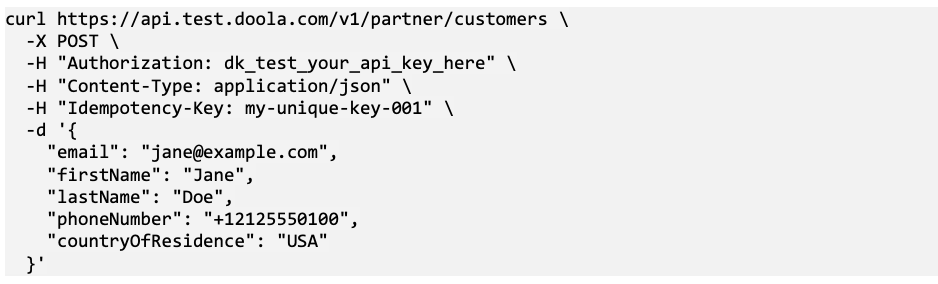
Your backend takes this information and calls the provider’s customer creation endpoint:
Two Common Gotchas
Send your API key as a raw token in the Authorization header, without the word Bearer. Format countryOfResidence as an ISO-3166-1 alpha-3 code, such as USA or IND.
Save the doolaCustomerId returned by this call so you can attach it to the company creation payload in the next step.
4. Implement Webhooks to Ingest Asynchronous Updates
Webhooks need the most care in an integration, so build these in from the start:
Verify Webhook Signatures: Always check the X-Doola-Signature header using HMAC SHA256 before processing an incoming event, ensuring the message truly came from your formation partner.
Acknowledge Events Quickly: Return a 2xx response as soon as your server receives an event. doola treats anything slower than 60 seconds as a failure and retries on a schedule. It doesn’t follow redirects, so point the webhook URL at its final address.
Deduplicate Events: Network issues can cause the same webhook event to arrive twice. Track the unique event ID in your database so you don’t send duplicate confirmation emails to your users. Events can also arrive out of order, so read the company record for its current state.
Run a Daily Status Reconciliation: If your webhook listener experiences downtime, doola will eventually disable the endpoint after exhausting its retries. Schedule an automated daily check comparing your local database records with the provider’s API to catch any status updates you might have missed.
5. Build Flows for Exceptions and Edge Cases
Make sure your application handles real-world filing roadblocks gracefully:
- State Name Conflicts: Build a user interface that lets a customer pick an alternative business name if the state rejects their first choices, without forcing them to re-enter all their personal details from scratch.
- Form Validation: Catch invalid characters and bad postal codes on your frontend before sending the data to the API.
- Timeouts and Network Drops: If a request fails due to a network timeout, retry the exact same payload using the original Idempotency-Key to safely confirm the status of the order.
6. Test Your Flow in the Developer Sandbox
Use the provider’s sandbox environment to verify your integration end-to-end.
- What you can simulate: Trigger synthetic company_formation_completed and company_ein_issued events to test how your system handles webhook updates and displays sample PDF documents to users.
- What you cannot simulate:
.doola’s playground doesn’t simulate failed formations, signing milestones or required actions such as a rejected name. Its engineering team can raise a required action on a sandbox company on request, so you can test that flow before launch.
7. Prepare for Production Launch
Before opening the new feature to your users, run through this pre-flight checklist:
- Replace test keys with your verified production credentials.
- Set up internal system alerts for any failed webhooks or stuck applications.
- Define your customer support escalation path: clarify which questions your team answers (e.g., billing, UI issues) and which get escalated to the formation provider (e.g., state filing questions, IRS delays).
- Sign your formal commercial partner agreement, which covers commercial terms, data security standards, and production API access.
Do You Need a Custom API Integration, or Are There Other Options?
A full API integration isn’t the only route. The right model depends on how much control you want and how much engineering time you can give it.
Partner API
Your engineering team builds the entire user experience from scratch and communicates with the provider using backend endpoints.
Embedded SDK
The provider supplies pre-built screens that run inside your web application, in your branding, while you keep your own checkout.
Formation MCP (Model Context Protocol)
MCP connects conversational AI assistants directly to formation tools.
For example, doola MCP allows an entrepreneur to form a Wyoming LLC conversationally while chatting with an AI assistant, signed in to their own doola account. It’s built for individual founders, not for platforms offering formation to their users.
Referral Partnerships
Users are sent to a separate formation service, usually through a referral link, and complete the process there. doola’s referral and affiliate program, for instance, pays a commission on each first subscription sold.
Which of these fits depends mostly on how much engineering time you have, which the next section covers.
How to Choose a Formation API (and Whether You Need Engineers)
Picking the right approach comes down to two simple practical questions:
- How much control do you want over the user experience
- How much developer time can you spare?
Every embedded route requires at least some engineering work. The real difference is how much code you need to write upfront, and who maintains the setup once it goes live.
If You Have No Engineering Capacity
A referral partnership is your best starting point. You simply share a link, the customer sets up their company directly on the provider’s website, and your team doesn’t write a single line of code.
The downside is the friction mentioned earlier: your customer leaves your platform to finish the job. It is also worth noting how providers actually trigger filings.
With doola, for instance, you cannot create a company manually from an administrative dashboard, it must be initiated through the API or the Embedded SDK. That means any truly embedded experience will always require some development effort.
If You Have a Developer for a Quick Project
An embedded SDK is usually the sweet spot.
With doola’s SDK, a developer only needs to handle three basic steps:
- Set up a backend route to generate a short-lived session token for the user.
- Drop doola’s prebuilt component into your product’s page.
- Notify doola once the user completes payment in your checkout.
The entire formation workflow, IRS document signing, and status tracking run inside your product under your brand colors. Better yet, sensitive tax IDs never touch your servers.
You can spin up a working sandbox test in about 15 minutes using the quickstart guide. Your actual launch timeline will just depend on your existing checkout flow, tech stack, and deployment schedule, without your team having to design or maintain a single legal form.
If You Have a Full Product and Engineering Team
A complete Partner API integration gives you total creative and technical control. Your developers design every screen, transmit data from your own servers, and handle webhooks, edge cases, and IRS signatures directly inside your native interface.
This model is ideal if formation must blend seamlessly into a custom onboarding flow or run inside an autonomous AI agent (the way platforms like Ramp and Naïve do it).
You don’t have to pick just one forever, either.
With doola, an entity created via the SDK shares the exact same backend records and webhook events as one created via the API. Your team can easily launch fast using prebuilt screens today, then transition to custom API calls down the road.
Comparing Your Options
What Should Platforms Consider Before Choosing a Provider?
Once you determine that an integration aligns with your strategy, the primary choice becomes selecting the right partner.
The critical evaluation factors below are structured as key questions for demo discussions, catering to the specific priorities of engineering, product, and operational teams.
Entity and State Coverage
Coverage gaps show up as customers you can’t serve, so check them against your real user base.
- Does the provider support LLCs, C Corps or both?
- Are the states your users need covered, including Washington, DC?
- Do any of those states have extra requirements?
International Founder Support
If many of your users live outside the US, this area decides whether the product works for them at all.
- Which countries does the provider support?
- How does it handle EIN applications for founders without an SSN, and how long do they take?
- How do signatures on IRS forms work, and what extra documents might founders need?
- Can founders sign IRS forms inside your product, or are they sent somewhere else to do it?
Developer Experience
Your engineers will live with this integration, so its documentation and tooling matter as much as its features.
- How clear are the docs, sandbox and SDKs?
- Is there a maintained changelog?
- What implementation support is available?
- If you start with prebuilt screens, can you move to a custom API build later without migrating existing companies?
Reliability and Exceptions
The cases that go wrong are where an integration costs your team the most time, so give this area extra attention on a demo call.
- What happens after timeouts, out-of-order events, blocked filings or failed requests?
- Are create requests idempotent?
- Are webhooks signed and retried?
Branding, Data and Billing
These questions decide how much of the experience feels like your product.
- Who owns the user experience and checkout?
- Who sets the price and answers support questions?
- How is sensitive information handled, and does the provider ever contact your customers directly?
- Do founders’ Social Security numbers and other tax IDs have to pass through your servers?
- Who handles correspondence with the state and the IRS, and will the provider train your support team?
- Is there a public security or trust page you can share with your own security team?
After-Formation Services
Formation is a one-time event, while compliance repeats every year, so this area shapes the long-term value of the partnership.
- Are annual report filing, registered agent renewals, bookkeeping or tax support available?
- Do they run through the same integration or need separate arrangements?
Commercial Terms
Pricing structure affects whether formation can pay for itself on your platform.
- How does pricing work, and how are state fees passed through?
- Are there minimums?
- What does the partner agreement cover before you get production access?
| Evaluation Area | Key Buyer Question |
|---|---|
| Entity and state coverage | Which LLC/corporation types and jurisdictions are supported? |
| International founder support | What countries, no-SSN EIN process, signatures and additional documents are supported? |
| Developer experience | How good are docs, sandbox, SDK, changelog and implementation support? |
| Reliability and exceptions | What happens after timeouts, out-of-order events, blocked filings or failed requests? |
| Branding, data and billing | Who owns the UX, sensitive information, state and IRS correspondence, checkout, price and support? |
| After-formation services | What is available for annual reports, registered agent renewals and other compliance needs? |
| Commercial terms | How do pricing, state fees, minimums and partner agreements work? |
What Happens After a Company Is Formed?
Getting a company approved by the Secretary of State is only the first step. To operate properly, businesses usually need to complete several follow-up tasks:
EIN and Formation Documents
Once the state confirms the entity exists, the company will usually need its federal Employer Identification Number (EIN). Most businesses need this number to:
- File federal and state business tax returns
- Hire employees and run payroll
- Open a dedicated business checking account with a bank
Remember that state corporate registration and federal EIN issuance are run by two entirely different government bodies with different timelines.
While a state may approve an LLC within a week or two, international founders without an SSN often wait two months or more for the IRS to issue an EIN.
Ongoing State Compliance
Most US states require registered entities to meet ongoing requirements to stay active:
- Filing annual or biennial reports (a few states, such as Alabama and Ohio, don’t require one)
- Paying annual state fees or, in some states, franchise taxes
- Keeping an active registered agent with a physical street address in the formation state
If a business neglects these duties, the state can assess late penalties and eventually revoke the company’s legal status, leaving the business out of good standing.
Services Beyond Formation
Many platforms don’t stop at formation; they use post-formation compliance to build recurring revenue.
doola Formation API, for example, also covers annual report filing and a compliance calendar for each company, so partners can keep their users in good standing year after year through the same integration.
How to Get Started With doola Business Formation API?

doola Formation API offers two main ways to integrate:
- Partner API: for teams that want to build their own screens and control the full experience
- Embedded SDK: places doola’s formation flow inside your product, in your branding, while you keep checkout
Both support LLC and C Corp formation across all 50 states and Washington, DC, for US and non-US founders. Teams can test in a sandbox before going live, and production keys are issued once the partner agreement is signed.
Partners set their own pricing for their customers, and the partner agreement covers commercial terms, data handling and brand usage.
Where to go next, depending on your role:
- Technical teams: start with doola’s developer documentation to review endpoints, webhooks and the sandbox.
- Business and partnerships teams: visit the doola Formation API page to see partnership options and book a demo.
FAQs

Can a formation API register LLCs and C-Corps in every US state?
It depends on the provider. Some support only LLCs or a limited set of states, while others cover both entity types nationwide.
doola Formation API supports LLCs and C Corps across all 50 states and Washington, DC. Before integrating, confirm coverage for the states your users need and check for any state-specific requirements.
Can non-US founders form US businesses through a formation API?
Yes, if the provider supports international founders.
Non-US founders can generally form a US LLC or C Corp without US residency. The EIN process is different without a Social Security number and usually involves signing IRS forms, so ask providers which countries they support and how they handle no-SSN applications.
How long does formation take through an API?
State filing and EIN issuance run on separate timelines. State processing varies by state and workload, averaging about a week with doola.
For the EIN, doola estimates one to two business days when it can apply online (for example, an LLC whose owner has an SSN), and eight to 11 weeks when the application goes by fax, typical for founders without an SSN, or six to nine weeks with its expedited option.
Does a formation API help obtain an EIN?
Many do. Some providers include the EIN application in the formation order, while others treat it as a separate service.
With doola’s API, an EIN can be requested alongside formation, and an expedited option is available for founders without an SSN. The EIN arrives after state approval.
Does implementation require a large engineering team?
Usually not. A Partner API integration involves backend work for authentication, requests and webhooks, plus frontend screens for collecting details and showing status.
Teams that want less frontend work can use an embedded SDK with prebuilt screens. The effort depends on how custom the experience needs to be.
Can company formation be fully white-labeled?
With some providers, yes. In a white-label model, the formation flow runs under the platform’s brand and the provider works in the background.
HelloGov, for example, runs doola Formation API on its own site. Confirm with each provider how branding, communications and support are handled.
Can a formation API and embedded SDK work together?
Often, yes. An embedded SDK typically runs on the same backend services as the API, so a platform can use prebuilt screens for the founder-facing flow while its backend uses API calls and webhooks to track status.
Check the provider’s documentation for how the two connect.
How is a formation API different from business registration / KYB APIs?
A formation API creates a new company by filing with the state on the founder’s behalf. A business registration or KYB API looks up or verifies a company that already exists, usually to confirm its details or good standing.
Some platforms use both: KYB for existing businesses and formation for new ones.