Form Your LLC Today. Foreign Founders Welcome.


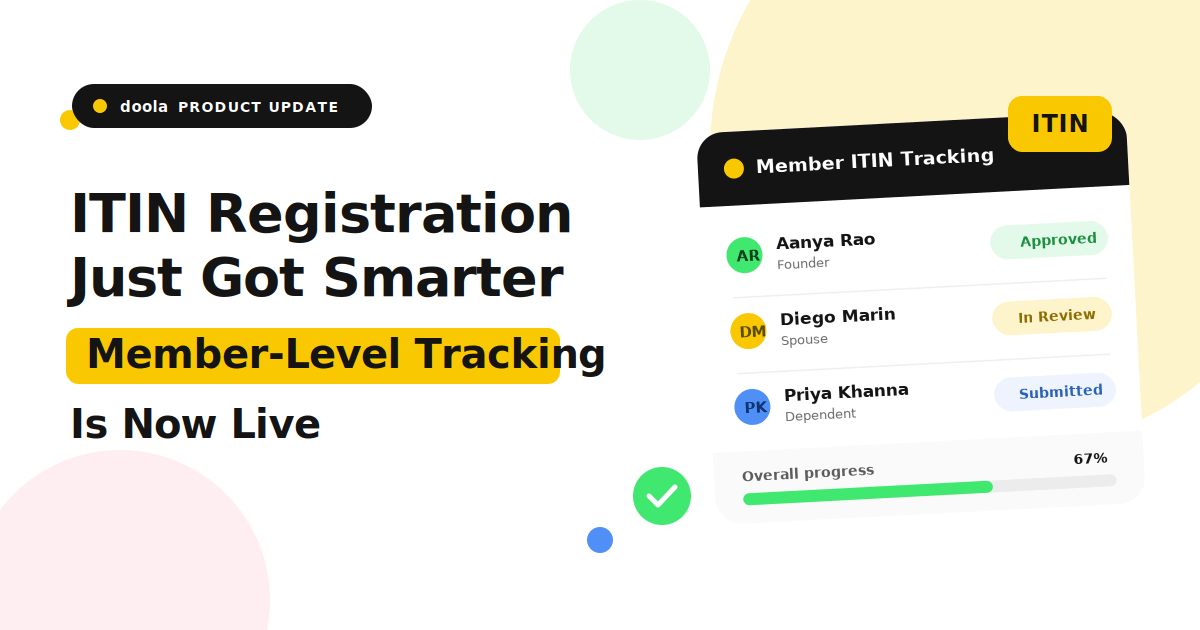
International entrepreneurs can now apply for and track ITIN registrations individually inside doola. Member-level ITIN workflows are now live.
TL;DR
International entrepreneurs can now apply for an Individual Taxpayer Identification Number (ITIN) directly from their doola dashboard, and for the first time, ITIN applications are now managed per eligible company member instead of at the company level.
Each eligible foreign national member can now:
✔️ Apply individually
✔️ Upload documents securely
✔️ Track status in real time
✔️ Receive dashboard notifications once their ITIN is issued
As an international entrepreneur, starting a US company is already complicated enough. So, the last thing you need is confusion around your ITIN registration, where to apply, or how to track the process once it’s underway.
Until now, ITIN workflows felt disconnected from the rest of company operations. Entrepreneurs had limited visibility into who was eligible. Especially, teams with multiple international members had no clean way to track where each application stood.
And the process itself lived largely outside of doola, scattered across email threads, spreadsheets, and manual follow-ups.
That changes today.
doola has officially launched in-dashboard ITIN registration with individual member-level workflows and real-time application tracking. Instead of managing ITINs at the company level, global entrepreneurs can now manage them the way they actually work in ‘real’ life: per person.
Why This Update Matters for International Entrepreneurs
As global entrepreneurship becomes increasingly collaborative, people are building and operating US businesses across multiple countries, time zones, and ownership structures. But while modern businesses have evolved, many administrative workflows haven’t kept pace.
And as a result, processes that should be simple often become unnecessarily difficult to manage, especially when multiple international company members are involved.
That’s exactly the problem this update is designed to solve.
ITINs Are Personal. The Tools Should Be Too.
An ITIN is tied to an individual, not a company. But traditional workflows often treated ITIN handling like a shared operational task, which created friction for multi-member LLCs, international founding teams, and businesses with multiple foreign national owners.
The mismatch between how ITINs actually work and how they are being managed creates unnecessary confusion, especially for founding teams spread across countries.
With doola’s new member-level workflow, ITIN management finally reflects real-world business operations.
Each eligible member now has their own application journey, document submission process, status tracking, and issuance milestone, creating a more intuitive experience for everyone involved.
Visibility Has Been the Biggest Pain Point
For many international entrepreneurs, the main challenge isn’t just applying for an ITIN, it’s knowing what’s happening after the application is submitted.
Precisely why people have consistently told us they lack visibility into critical questions such as:
- Which members actually need an ITIN?
- Whether an application is already submitted?
- What stage the process is currently in?
- Whether any additional action is required?
- When the ITIN would finally be issued?
Without a centralized system, these updates often live across multiple emails, documents, and conversations, making it hard to stay informed and keep business operations moving efficiently.
That operational blind spot is now gone.
With real-time visibility built directly into the doola dashboard, entrepreneurs can now track every eligible member’s ITIN journey from application through issuance, all from a single, centralized workspace.
What’s New Inside the doola Dashboard
The new ITIN experience inside doola is designed to eliminate the operational friction international businesses traditionally face during tax registration workflows.
Instead of managing disconnected forms, scattered communications, and unclear application visibility, entrepreneurs can now handle the entire ITIN process directly inside the doola dashboard through a centralized, member-level experience built for modern global teams.
Here’s what’s now live inside the platform:
1. Eligibility Detection Per Member
doola now identifies which company members are eligible for an ITIN directly inside the dashboard. Instead of manually determining who needs to apply, entrepreneurs can instantly view eligible members via the new member-level workflow system.
This is especially valuable for multi-member LLCs, international co-founding teams, and businesses with multiple foreign national owners.
2. Guided ITIN Application Flow
Each eligible member can now complete a fully guided application process inside doola. The workflow covers personal information collection, passport upload, secure payment, and step-by-step onboarding guidance, all in one place.
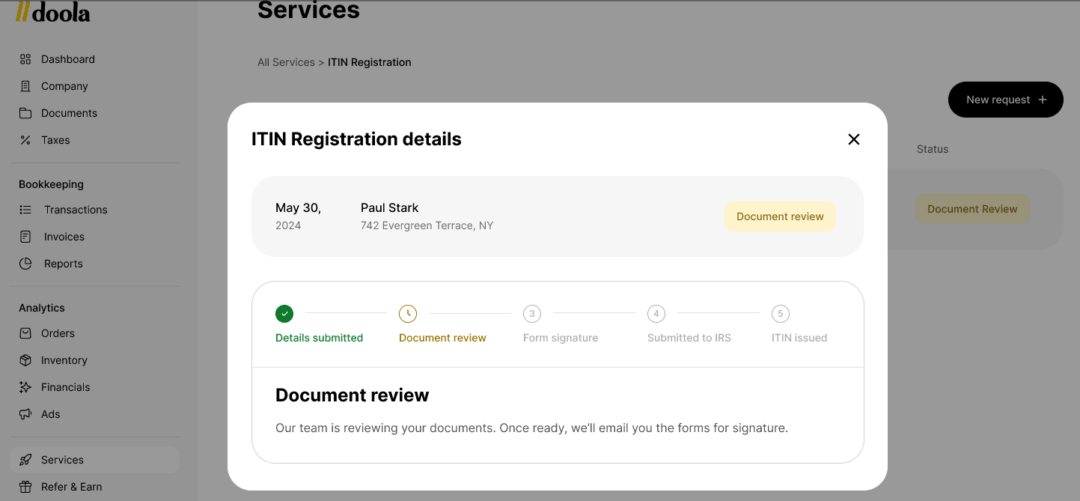
Once you submit the required details and make a one-time payment, you’ll be automatically moved to the “document review” step as shown below.
After your documents are reviewed and approved, we’ll email you all the necessary forms for signature.
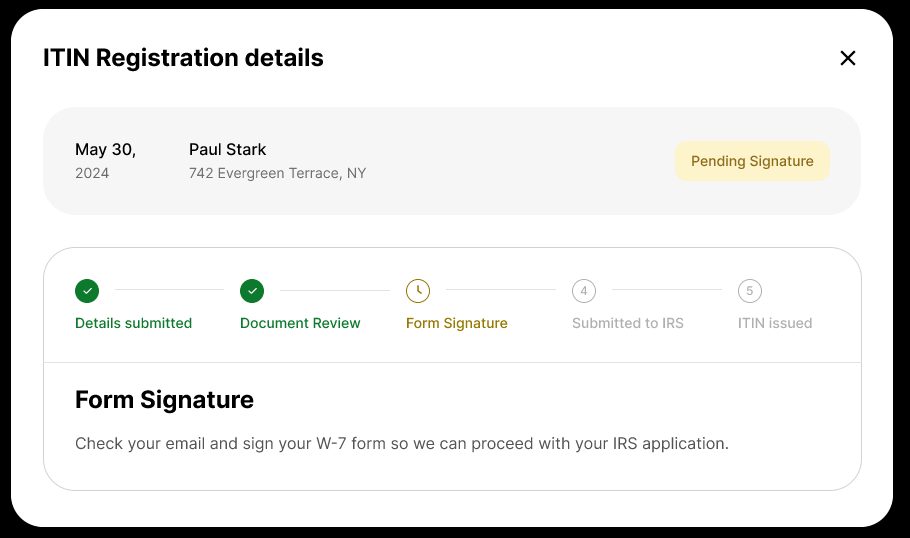
In the next step, you’ll need to sign the W-7 form so we can proceed with your IRS application.
Once the application is submitted to the IRS, you’ll be able to check the status directly as shown
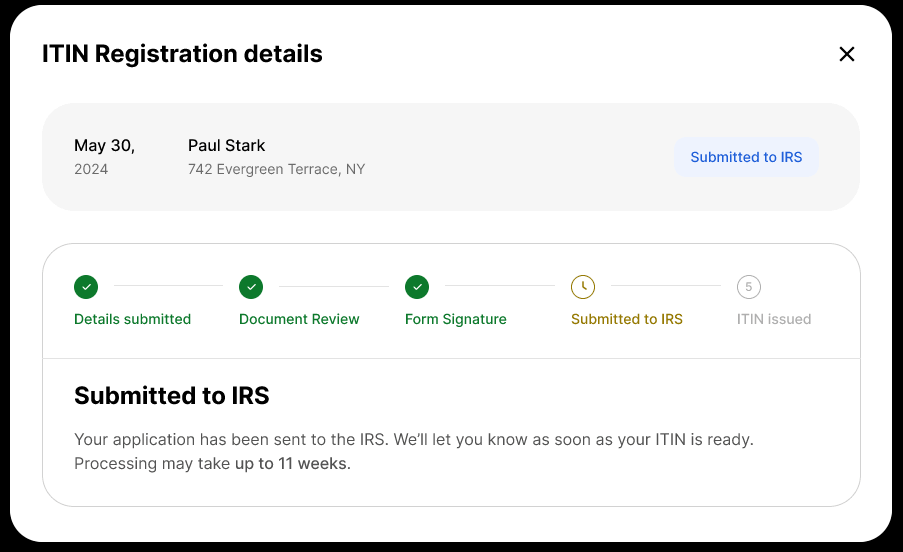
So, instead of navigating external paperwork systems and fragmented processes, you can now complete the entire workflow from a single operational dashboard.
3. Real-Time Status Tracking
Every ITIN application can now be tracked individually from submission through to issuance.
The dashboard provides real-time visibility into every stage of the workflow, including:
- Submitted: Application successfully received
- In Review: Documentation currently being verified
- Processing: Final application Submitted to the IRS
- Issued: ITIN officially confirmed and completed
This removes one of the biggest operational blind spots for international founding teams.
4. Dashboard Notifications When ITIN Is Ready
Once ITIN is issued, you’ll receive a notification directly inside the doola dashboard. The system proactively surfaces completion updates the moment ITIN is available, helping everyone on the team stay aligned on what’s done, what’s still pending, and what operational steps come next.
What This Solves for International Teams
✔️ Better visibility across multiple members: For LLCs with multiple foreign national owners, this update makes coordination between co-founders and operators dramatically simpler. Every member’s application status is visible in one place.
✔️ Less administrative overhead: Manual spreadsheet tracking, monitoring statuses, and receiving updates across email threads are now replaced and handled by the doola dashboard.
✔️ A more centralized back-office experience: ITIN workflows now live alongside formation, EIN support, bookkeeping, dedicated US business banking, and compliance, enabling a unified operating system for international entrepreneurs.
How the New ITIN Workflow Works: Step-by-Step Guide
The new ITIN experience inside doola is designed to make registration dramatically simpler for international businesses and multi-member teams.
Instead of navigating fragmented paperwork and disconnected email threads, you can now complete the entire process through a guided, centralized workflow directly inside the doola dashboard.
Step 1: Log Into the doola Dashboard
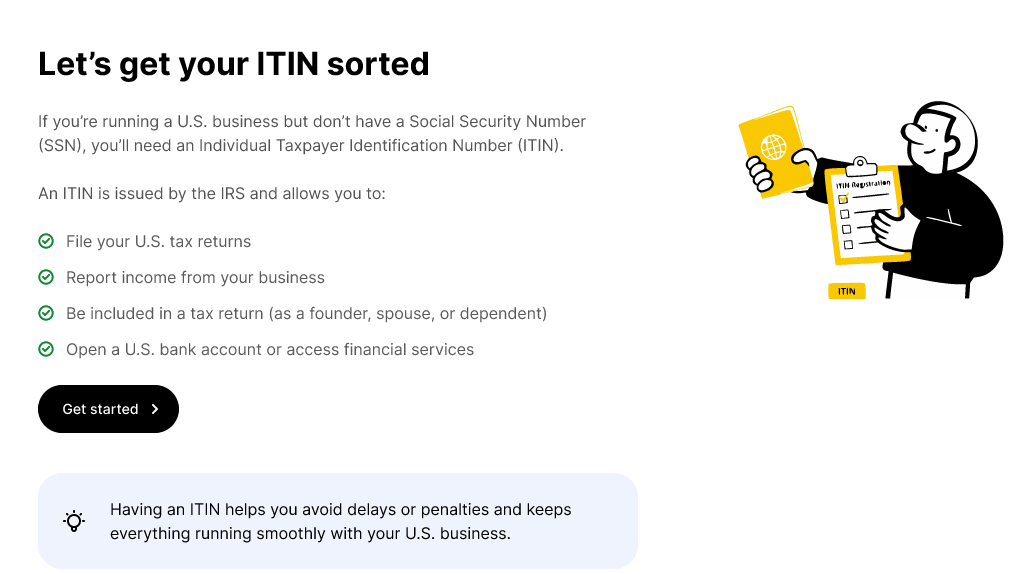
The dashboard provides a unified experience for managing ITIN applications alongside other core business operations such as company formation, bookkeeping, US business banking, compliance, and tax workflows.
Step 2: View Eligible Members for ITIN Registration
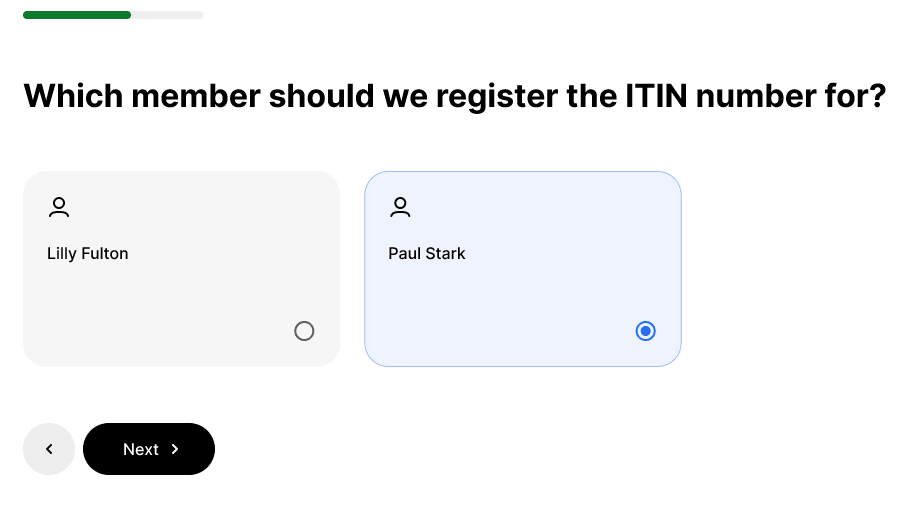
Once inside the dashboard, you can view the list of eligible company members who may require an ITIN. The new member-level workflow makes it easy to identify and select the specific individual for whom the ITIN application should be initiated.
This is especially useful for multi-member LLCs and international founding teams where multiple foreign national owners may need separate registrations.
Instead of treating ITIN processing like a single company-wide task, the experience now mirrors how international businesses actually operate: person by person.
Step 3: Start an Individual ITIN Application for Each Eligible Member
After selecting the appropriate member, you can begin a dedicated ITIN application flow tailored specifically to that individual’s registration process.
Each application here is managed independently, enabling clearer visibility and better operational control across multiple members.
Step 4: Upload Passport & Required Details Through the Guided Flow
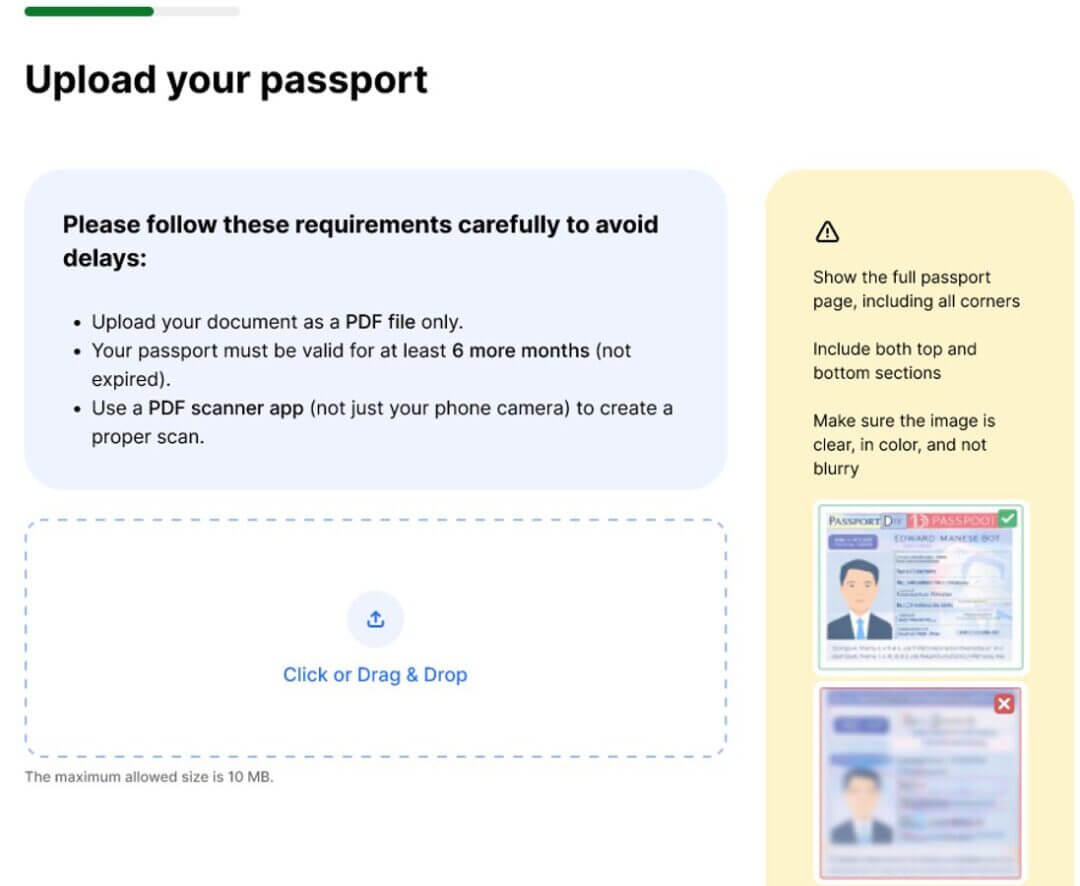
As shown above, the onboarding flow now guides you through document submission and verification requirements directly inside the dashboard.
To avoid delays, the upload process clearly outlines the key passport submission requirements:
- Documents must be uploaded as PDF files only
- Passports must remain valid for at least 6 more months
- Always use a proper PDF scanner app instead of a standard phone camera for cleaner, higher-quality scans
The interface, as you can see, also provides visual guidance showing how the passport image should appear, including full-page visibility, all corners included, and a distinct, non-blurry scan.
Step 5: Review and Complete the ITIN Application
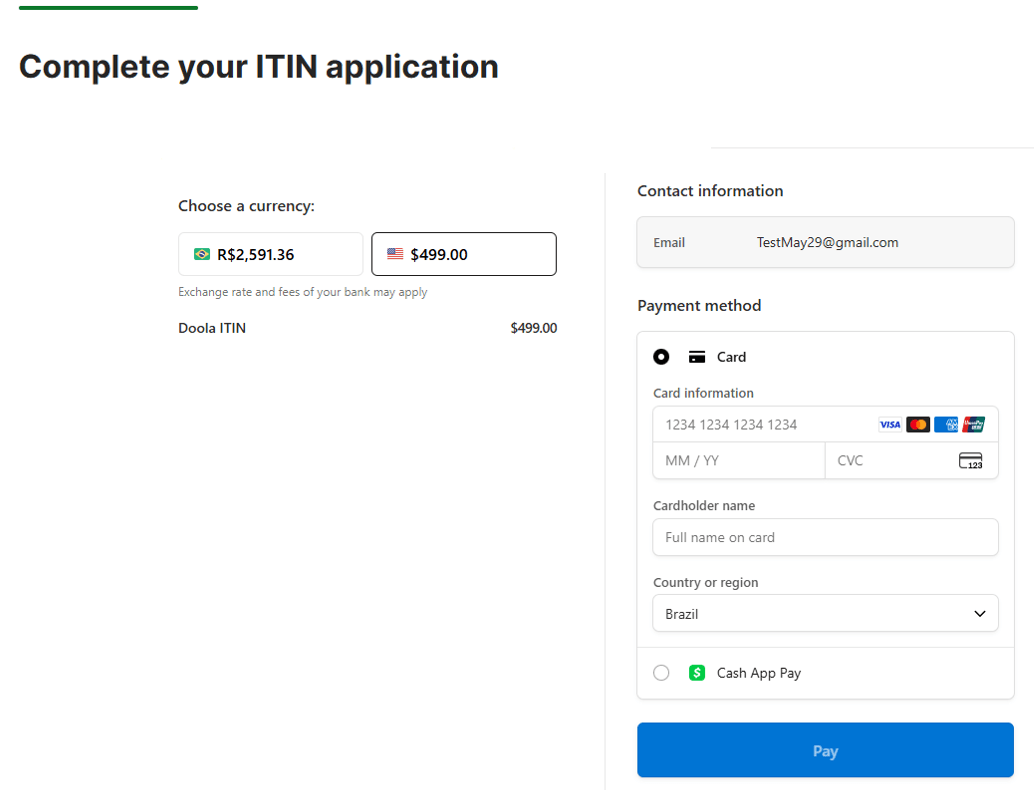
After uploading the required documents and information, you can review the application and complete the submission process directly through the integrated payment and checkout flow inside the dashboard, as shown above.
Step 6: Track Progress in Real Time From the Dashboard
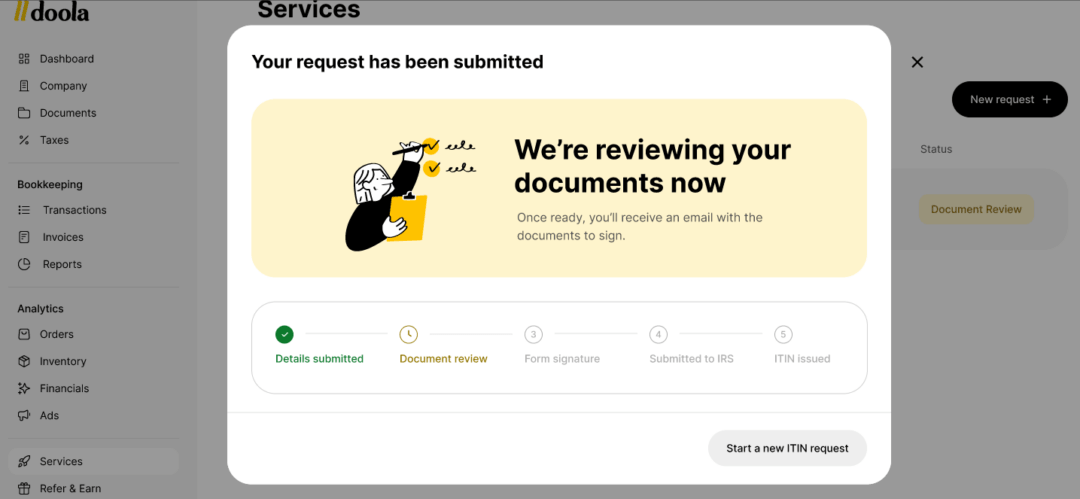
As a final step after submission, you can track the progress of each ITIN application directly inside the doola dashboard through real-time status updates. The dashboard provides a clear operational overview of every stage in the workflow.
You can immediately see that the doola team is actively reviewing the uploaded documents before moving the application to the next stage of processing.
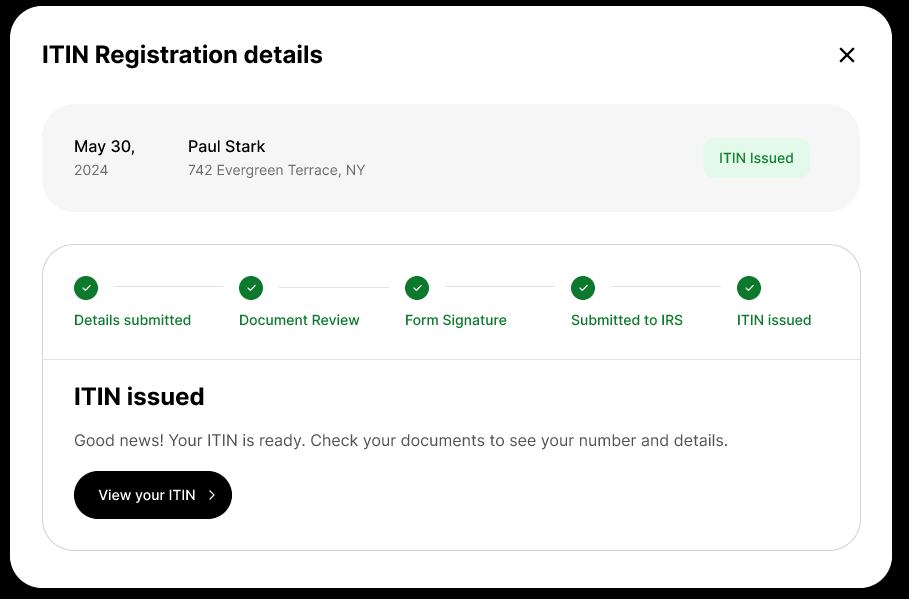
As the application progresses, the dashboard continues updating each milestone in sequence, providing real-time visibility into exactly where the ITIN registration stands and what steps have already been completed.
Step 7: Receive a Notification Once the ITIN Is Issued
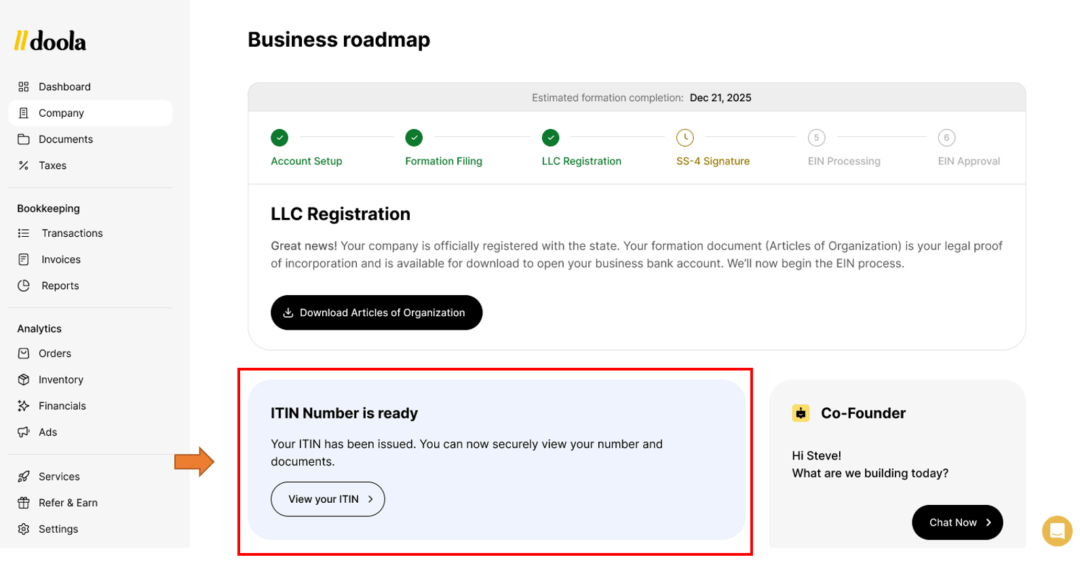
Once the ITIN is officially issued, you’ll receive an e-mail as well as a notification directly inside the doola dashboard, making it easy to know when the process is complete without manually following up or checking multiple communication channels.
With real-time updates and centralized tracking built directly into the platform, you can log into the dashboard anytime to view ITIN details, monitor application progress, and manage the remaining steps required for business operations.
Built for Global Entrepreneurs

Modern businesses have co-founders across countries, distributed ownership structures, and multiple non-US members. The operational tooling around these businesses needs to support that complexity natively without forcing people to work around it.
The challenge isn’t simply forming a US company anymore. It’s managing everything that comes after: tax registrations, compliance requirements, US banking requirements, bookkeeping, and the countless operational workflows that keep a business running smoothly.
That’s why doola continues to invest in building products that remove friction from every stage of the business.
The new member-level ITIN workflow is a perfect example. With eligibility detection, guided applications, real-time tracking, and issuance notifications in a single centralized experience, doola is making one of the most important tax-related processes significantly easier for international entrepreneurs.
And this is just one more step toward a much bigger vision: creating the operational infrastructure global entrepreneurs need to start, run, and scale US businesses with confidence from anywhere in the world.
All set to simplify your business operations beyond company formation?
Log in to your doola dashboard to explore the new ITIN experience, or discover how doola can help you manage everything from formation and bookkeeping to compliance and tax support, all from one place.
FAQs

What is an ITIN?
An Individual Taxpayer Identification Number (ITIN) is a tax processing number issued by the IRS to individuals who are required to have a US taxpayer identification number but are not eligible to obtain a Social Security Number (SSN). It is used exclusively for federal tax reporting purposes.
Who needs an ITIN?
Foreign nationals who have US tax reporting obligations, including non-US members of US LLCs or corporations who receive income from the business, typically need an ITIN. You do not need an SSN or US residency to apply.
Can every company member apply for an ITIN?
Not necessarily. ITIN eligibility depends on whether a member has a US tax filing requirement.
doola’s dashboard identifies which of your company’s members are eligible so you don’t have to determine this on your own.
How do I know which members are eligible?
Once you log into your doola dashboard, eligible members are automatically surfaced within the ITIN section. You’ll see clearly who can apply and who already has an active application or issued ITIN.
Can I apply for an ITIN directly inside doola?
Yes, you can. The entire application flow, from eligibility check through passport upload to payment, is now available inside the doola dashboard.
What documents are required for ITIN registration?
The primary document required is a valid passport. doola’s guided flow walks each applicant through exactly what’s needed and where to upload it securely.
Can I track each ITIN application separately?
Yes, absolutely. Each eligible member now has their own individual application with its own status tracking.
You can monitor every application independently from submission to issuance.
How long does ITIN processing take?
ITIN processing times vary and are ultimately determined by the IRS.
Typical timelines range from 7 to 11 weeks, though this can vary depending on the time of year and application volume.
Will I be notified when the ITIN is issued?
Yes, once an ITIN is issued, you’ll receive a notification directly inside the doola dashboard, there’s no need to manually check or follow up.
Does this work for entrepreneurs outside the United States?
It absolutely does. This update is built specifically for international entrepreneurs managing US business operations from anywhere in the world.