
![Which Payment App Is Better in [year]? Venmo vs Cash App](https://doolastaging2.wpenginepowered.com/wp-content/uploads/2025/11/banner-cta-new.png "Which Payment App Is Better in [year]? Venmo vs Cash App")
The Easiest Way to Start and Scale Your U.S. Business.


Usually, you don’t bother comparing “Venmo or Cash App?” until they get in your way.
Maybe an instant transfer fee felt a little too much like a “convenience tax.” Maybe you hit a sending limit right as you were trying to settle up for rent.
Or maybe you realized that while one app is perfect for splitting a pizza, it feels completely useless when you want a little privacy or a way to grow your balance.
That’s when the real question pops in. It’s not about which app has more users or the louder marketing. It’s about alignment.
Which one actually fits the way you move money?
For most of us, Venmo is the “social” one. Its identity is built on the shared experience.
Whether you’re splitting the power bill with a roommate or chipping in for a friend’s birthday gift, Venmo has always leaned into that “we’re all in this together” energy.
Even as they’ve added new features like debit cards, the “heart” of the app hasn’t changed. It remains the digital ledger for our social life, everyday money, just with more ways to spend it.
Cash App, meanwhile, plays for the individual.
Its campaigns don’t focus on “splitting”; they focus on “cashing in.” By embedding itself in music, creator culture, and sports, Cash App has positioned itself as more than a P2P tool.
It’s built for the person who wants to do a bit of everything, send a payment, buy a little Bitcoin, or get a paycheck deposited, all in one place.
But we’ll be honest: If you’re starting to think beyond casual payments, you’ll quickly outgrow what these apps can offer.
That’s where doola helps. Instead of just helping you move money, doola helps you structure it—from forming your business to setting up the right financial systems from day 1.
The Devil in the Daily Details
Despite looking like clones, these apps are built for two different lifestyles:
- Venmo excels at managing shared expenses within a community.
- Cash App excels at providing individual control over a personal ecosystem.
At a glance, they both do the same three things: Send. Receive. Cash out.
But once you start using them daily, you’ll notice the little differences.
In this guide, we’ll break down Venmo vs Cash App fees, transfer speed, limits, security, business use cases, and the features that actually change your day-to-day experience.
We’ll also look at where each app is genuinely strong, where each one falls short, and which one makes more sense depending on how you actually use money in real life.
Our goal isn’t to tell you which one to pick; it’s to give you the info you need to choose the best payment app that feels right for you.
Ready? Let’s get started.
What Is Venmo?
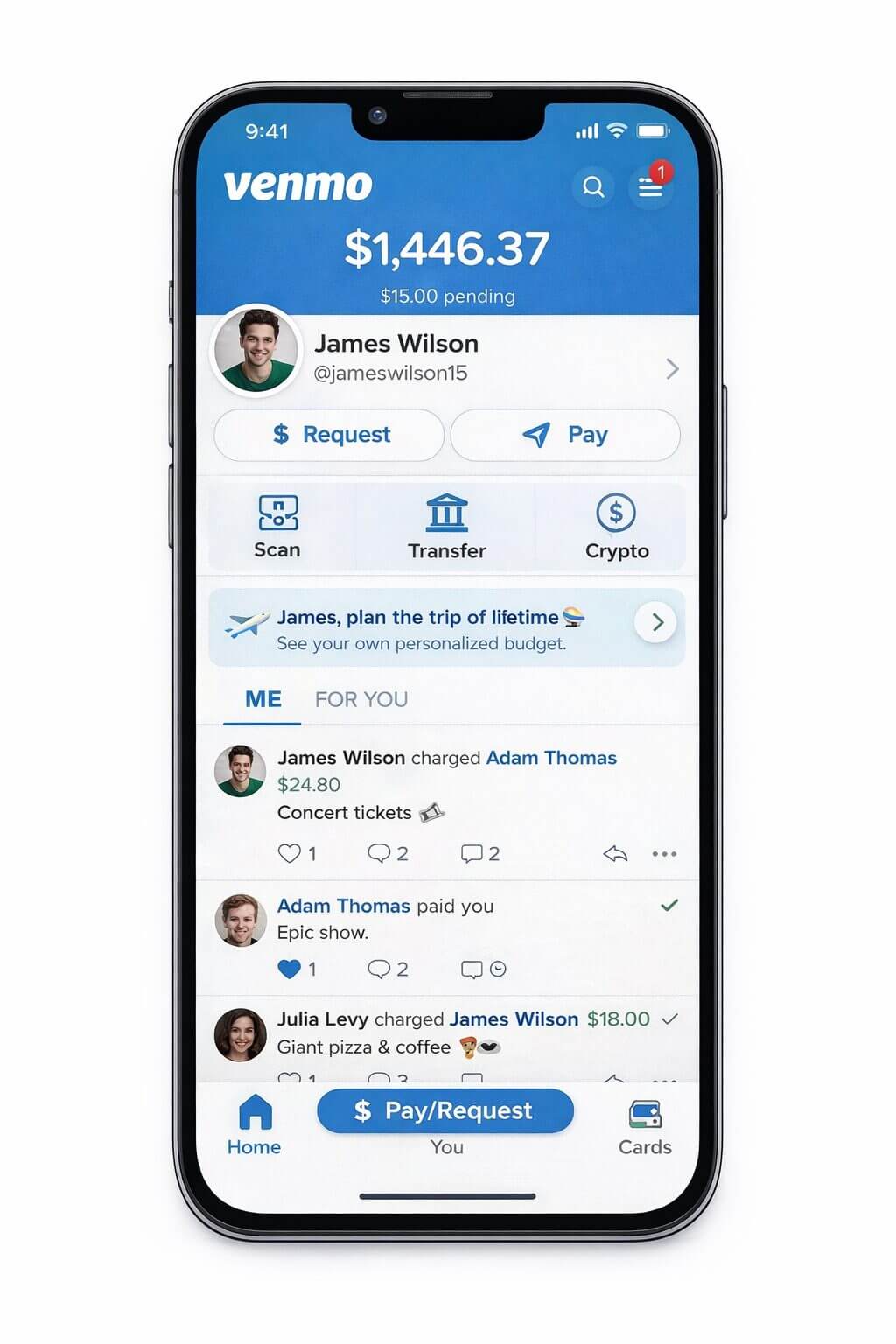
Think of Venmo as the social network for your wallet. Owned by PayPal, Venmo is a mobile payment service designed to make sending and receiving money feel as easy as sending a text message.
While other apps focus on “banking,” Venmo focuses on the social side of spending. It’s built for the moments when you’re out with people and need to settle up without the awkwardness of cash or the formality of a bank wire.
The Core Venmo Features: How It Works
✔️ The Digital Wallet
When someone sends you money, it sits in your “Venmo Balance.” You can leave it there to pay for future things, or “cash out” to your linked bank account.
✔️ The Social Feed
This is Venmo’s signature. Every transaction includes a note or an emoji. By default, your friends can see that you paid someone (and the funny caption you wrote), though the dollar amount is always kept private.
✔️ Splitting & Requests
You don’t have to wait for someone to remember they owe you. You can send a “Request,” and they can pay it with one tap.
✔️ The Venmo Card
Venmo offers a physical debit card (and a credit card) that lets you spend your Venmo balance anywhere Mastercard or Visa is accepted, often with “cash back” offers at big retailers.
When Do People Actually Use Venmo?
Venmo tops in peer-to-peer (P2P) situations. And it excels at making casual money transfers simple and social.
Here are the most common ways people use it:
- Splitting Bills with Friends: Easily divide costs like an $80 restaurant tab where one person pays with their card and three friends instantly Venmo their $20 share.
- Household Expenses: It’s the standard, convenient way for roommates to split monthly obligations such as rent, utility bills, or communal purchases like paper towels.
| 📌 Privacy Tip
If you prefer that your friends not see your transaction history (e.g., that you paid your roommate for “Rent 🏠”), you can easily change your default privacy setting to Private. This ensures the transaction is only visible to you and the person you paid. |
- Collective Gifts: Organizing group contributions for events, like when an entire office chips in $5 each for a coworker’s baby shower gift.
- Paying for Services: Tipping or paying individuals for casual services, such as your barber, yoga instructor, or a dog sitter..
| 📌 Why Venmo became the undisputed heavyweight for younger users?
The “Just Venmo Me” Habit: The app became so ubiquitous that it turned into a verb. This “viral marketing” meant that if you wanted to get paid back at a college party or a group dinner, you need to have the app. |
What Is Cash App?
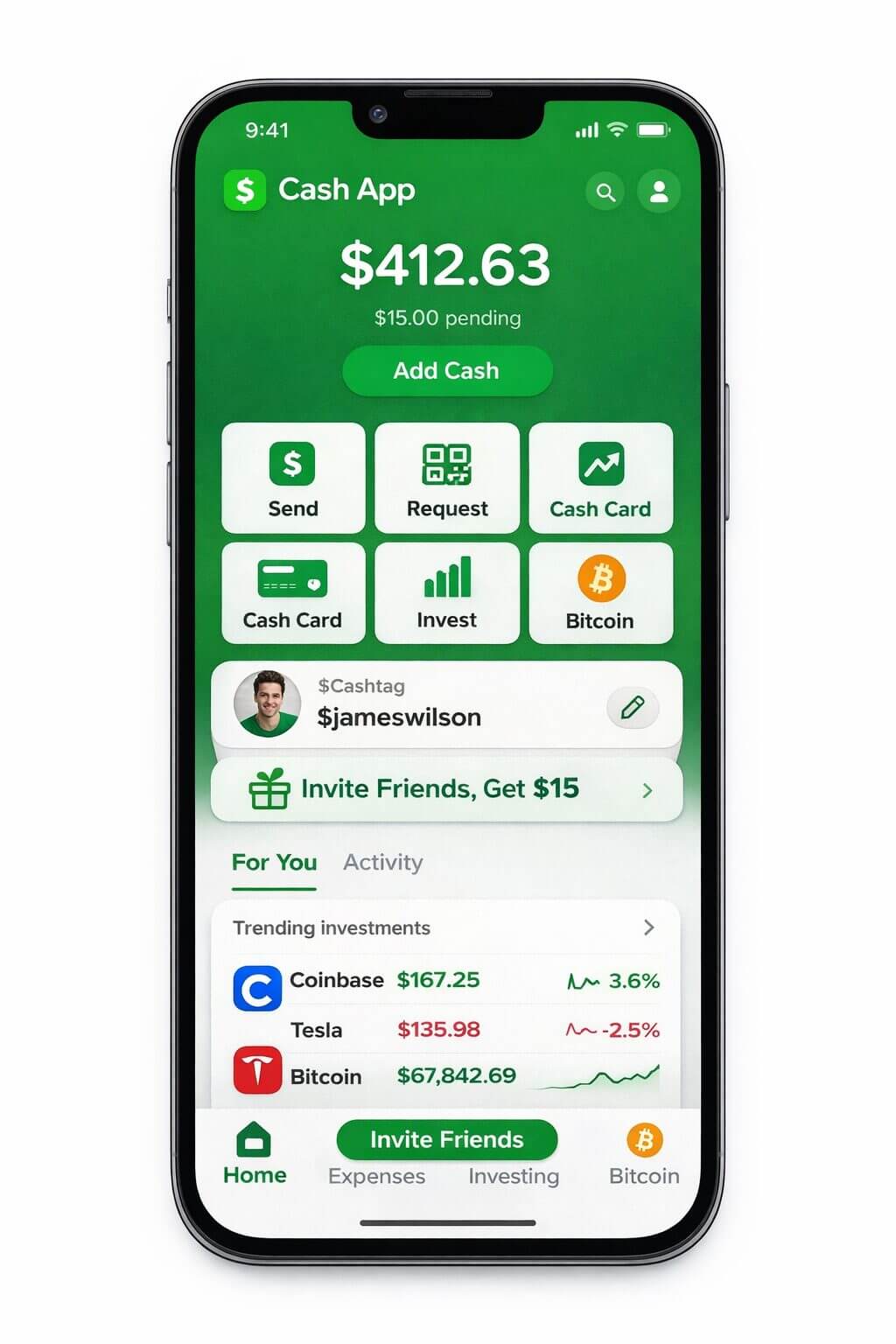
Developed by Block, Inc. (formerly Square), Cash App has evolved from a simple way to send money into a comprehensive financial platform.
At its heart, Cash App is a mobile-first financial service that allows users to send, receive, save, and invest money.
It’s known for its clean, high-contrast aesthetic and its “$Cashtag”, a unique username that makes receiving money as simple as sharing a handle.
The Core Cash App Features: How It Works
✔️ Instant Peer-to-Peer Payments
Like its competitors, Cash App allows for near-instant money transfers. What sets it apart is the speed and the lack of “social fluff”, it’s built for quick, direct utility.
✔️ The Cash Card
A customizable Visa debit card is offered, allowing you to use your balance wherever Visa is accepted.
Its key feature is “Boosts”, which are instant, tap-to-activate discounts available at various locations such as coffee shops, grocery stores, and major retailers.
✔️ Direct Deposit & Banking
You can have your paycheck deposited directly into Cash App.
As of 2026, users with direct deposit can often access their funds up to two days early and enjoy higher interest rates on their savings.
✔️ Investing in Stocks
Cash App lowered the barrier to entry for the stock market. You can buy fractional shares of your favorite companies for as little as $1, making it a “starter” brokerage for many.
✔️ The Bitcoin Hub
Cash App is one of the most vocal supporters of digital currency.
Users can buy, sell, and even receive their paycheck in Bitcoin.
They’ve added features for seamless Bitcoin withdrawals and “round-ups,” where your spare change is automatically invested in BTC.
When Do People Actually Use Cash App?
Cash App is usually used when someone wants to send, receive, or use money quickly without turning the transaction into a social interaction.
Here are some common uses of this app:
- Sending Money Quickly to One Person: If you owe someone money and want to send it right away, Cash App makes that easy. People often use it when they do not want to add comments, emojis, or deal with a public payment feed.
- Getting Paid for Freelance Work or Small Services: Cash App is commonly used by freelancers, tutors, designers, pet sitters, and other service providers who need a simple way to collect payment from clients.
- Accepting Money From a One-Time Buyer: If someone is selling clothes, furniture, concert tickets, or other items through a one-time transaction, Cash App is often used because the payment process is quick and direct.
- Using the App Like a Spending Account: Some people keep money inside Cash App and use the Cash Card to pay for groceries, transport, fuel, coffee, or subscriptions without first moving the money to a bank account.
- Buying Bitcoin or Stocks in the Same App: Cash App is also used by people who want to make small stock or Bitcoin purchases without downloading a separate investing app.
- Splitting Expenses Without a Social Feed: If two or more people are splitting a dinner bill, travel cost, or household expense, Cash App works well for those who want to settle the payment quietly and move on.
| 📌 Why the “Investor” Crowd Loves Cash App! Cash App has become the go-to for the crypto and investing crowd. And, it all comes down to frictionless access. The Low Bar: Traditional brokerages can feel intimidating. Cash App makes buying $5 of Bitcoin feel as casual as buying a latte. The Cultural Connection: By partnering with creators, rappers, and athletes, Cash App made “investing” feel like a part of modern culture. Instant Liquidity: Since your bank, wallet, and brokerage are one app, you can sell a stock and instantly spend the money with your Cash Card. |
Venmo vs Cash App Comparison
| The Goal | Best Payment App | Why? |
| Splitting a big bill | Venmo | Built-in “Split” button and group tracking. |
| Investing spare change | Cash App | “Round-ups” into Bitcoin or Stocks. |
| Sending money to the UK | Cash App | One of the few P2P apps with a US-UK link. |
| Lower business fees | Venmo | 1.9% + $0.10 vs Cash App’s 2.5%–2.75%. |
| Buying Crypto | Venmo | Support for BTC, ETH, LTC, and SOL (Cash App is BTC only). |
Venmo vs Cash App: 2026 Key Differences at a Glance
To help you decide between these two giants, we’ve put together a Venmo vs Cash App comparison that breaks down the hard numbers and core features as they stand in 2026.
While they both let you send money to friends, they serve very different roles in your financial life.
Use the table below for a quick “at a glance” decision.
| Feature | Venmo (Social Ledger) | Cash App (Financial Hub) |
| Transfer Fees (Standard) | Free (1–3 business days) | Free (1–3 business days) |
| Instant Transfer Fee | 1.75% (Min $0.25, Max $25) | 0.5% – 1.75% (Min $0.25) |
| P2P Limits (Verified) | Up to $60,000/week | Up to $7,500/week |
| Business Support | 1.9% + $0.10 per transaction | 2.75% flat fee |
| International Support | US only | US & UK (Free P2P between both) |
| Investing Features | Crypto only (5 types) | Stocks & Bitcoin (plus Tax Filing) |
| Debit Card | Venmo Mastercard (Cashback) | Cash Card (Customizable + “Boosts”) |
| Security | PIN, Biometric, Social privacy settings | PIN, Biometric, Private by default |
Deep Dive: Explaining the Differences
1. Transfer Fees & Speed
Both apps offer free “Standard” transfers, but the instant transfer fees differ slightly.
- Venmo charges a flat 1.75%, which is great for small amounts but is capped at $25, making it cheaper for very large transfers.
- Cash App uses a dynamic range (0.5% to 1.75%). This is often cheaper for mid-sized transfers, though they don’t always have the same $25 “ceiling” as Venmo.
2. Transfer Limits
If you are moving large sums (like rent for a 4-bedroom house), Venmo is the powerhouse.
Once verified, it allows a massive $60,000 weekly limit. Cash App is more restrictive, generally capping verified users at $7,500 per week, making it better for everyday spending rather than major life expenses.
3. Security & Privacy
Both use high-level encryption and 2FA, but their philosophies differ:
- Venmo is “Social-First.” If you don’t adjust your settings, your friends can see your transactions (though not the amounts).
- Cash App is “Privacy-First.” There is no feed. Additionally, Cash App offers FDIC pass-through insurance up to $250,000 on balances for users with a Cash Card, providing a “bank-like” safety net that Venmo only offers for specific eligible balances.
4. Business Support
- Venmo is the “Side Hustle” king. Its 1.9% + $0.10 fee is one of the lowest in the industry for casual sellers and freelancers.
- Cash App charges a higher 2.75%, but it offers much deeper integration with Square POS and advanced invoicing tools. It’s built for those who want their payment app to act like a professional storefront.
5. Crypto & Investing
This is where the Venmo vs Cash App comparison shows the biggest split:
- Venmo is a crypto “starter kit,” allowing you to buy Bitcoin, Ethereum, Litecoin, and Solana.
- Cash App is a full-blown financial tool. You can buy fractional stocks (starting at $1), trade Bitcoin, and even file your personal taxes for free through the app.
6. International Support
Venmo is strictly US-only.
Cash App allows for seamless, mid-market exchange rate transfers between the US and the UK, making it the only “social” app of the two with a global footprint.
| 📌 Final Verdict: Which One Fits You?
✔️ Choose Venmo if you prioritize social connection and high limits. It’s the “best payment app” for roommates, big friend groups, and anyone moving more than $10k a month. ✔️ Choose Cash App if you prioritize privacy and wealth building. It’s the “best payment app” for individuals who want to invest in stocks, save on coffee via “Boosts,” or send money across the Atlantic. |
Venmo vs Cash App Fees
While both apps are free for basic use, they make their billions by charging for speed, convenience, and business services.
Here is the verified 2026 fee structure for both platforms.
| Service | Venmo | Cash App |
| Sending (Bank/Debit) | Free | Free |
| Sending (Credit Card) | 3% | 3% |
| Instant Transfer | 1.75% (Min $0.25 / Max $25) | 0.5% – 1.75% (Min $0.25) |
| Standard Transfer | Free (1–3 business days) | Free (1–3 business days) |
| ATM Withdrawal | $2.50 (Free at MoneyPass) | $2.50 (Waived w/ $300 direct deposit) |
| Business Fee | 1.9% + $0.10 | 2.6% + $0.15 to 2.75% |
1. Sending Money: The “Credit Card Trap”
Both apps are identical here: sending money from your linked bank account or debit card is free.
However, both charge a 3% fee if you fund the payment with a credit card.
The Math: If you pay a friend $100 for concert tickets using a credit card, you are actually being charged $103.
2. Instant Transfers: The Capped vs Uncapped Battle
This is the most frequent fee users pay. Both apps offer “Standard” transfers for free, but if you want your money in minutes:
- Venmo charges a flat 1.75%. Crucially, this is capped at $25. If you are transferring $5,000, Venmo only takes $25.
- Cash App uses a sliding scale of 0.5% to 1.75%. While it can be cheaper for smaller amounts, it lacks a consistent high-dollar cap like Venmo, meaning large transfers can sometimes be more expensive.
3. ATM Withdrawals: The “Direct Deposit” Perk
Both apps charge $2.50 for out-of-network ATM withdrawals, but they offer ways to avoid it:
- Venmo: Free at over 37,000 MoneyPass ATMs in the US.
- Cash App: The $2.50 fee is waived entirely if you receive at least $300 in direct deposits per month.
4. Business Transaction Fees
If you use these apps to sell goods or services, the app takes a cut of every payment you receive:
- Venmo is the clear winner for small vendors with a lower 1.9% + $0.10 fee.
- Cash App is more expensive at 2.6% + $0.15 (or up to 2.75% for some account types).
Which App is Cheaper for Everyday Use?
For the average person splitting bills and moving small amounts of money, Cash App is often slightly cheaper because its instant transfer fee can dip as low as 0.5%.
However, for users moving large sums (like rent or used car payments), Venmo’s $25 fee cap makes it the more economical choice.
| 📌 Actionable Insight: How to Avoid Fees
✔️ The 3-Day Rule: Always plan ahead. If you don’t need the money this second, use the Standard Transfer. It’s 100% free on both apps and usually arrives in 1–2 business days. ✔️ Avoid Credit Cards: Never use a credit card for P2P payments unless it’s an absolute emergency. The 3% fee usually outweighs any rewards points you might earn. ✔️ Check the Map: If you have a Venmo card, use the in-app map to find a MoneyPass ATM to avoid the $2.50 “convenience” fee. ✔️ Verification is Key: Unverified accounts often have higher “hidden” costs in the form of stricter limits and fewer fee-waiver opportunities. |
Venmo vs Cash App Transfer Limits
When you compare Cash App vs Venmo transfer limits, the real difference shows up once you look at what happens before and after verification.
Start with Venmo. If your account isn’t verified, you can only send up to $299.99 per week.
Once you verify your identity, the limits change completely.
Venmo allows up to $60,000 per week in person-to-person payments, with purchase limits capped at $7,000 per week. Instant transfers to your bank are usually limited to $5,000 per transfer, with a $10,000 weekly cap.
Cash App is more restrictive in comparison. If you’re unverified, you can only send $250 per week and receive up to $1,000 per month.
After verification, sending is increased to $7,500 per week, while receiving becomes unlimited. Instant withdrawals can go up to $25,000 per transfer, depending on usage and account history.
Which One Is Better for Larger Transactions?
Now, if you’re thinking in terms of flexibility, Venmo clearly gives you more room once you’re verified.
A $60,000 weekly cap vs $7,500 isn’t a small difference. If you’re handling larger transfers, Venmo simply makes that easier.
Cash App works well for day-to-day use, but once amounts start increasing, the limits kick in pretty quickly.
📌 Pro tip: To maintain full account functionality, follow these steps:
- Verify your account without delay: Complete the verification process well before hitting any account limits.
- Ensure a perfect data match: The name and address used on your official ID, bank account, and the application profile must be exactly the same.
- Prevent service issues: Any minor mismatch in this personal information (e.g., a difference in spelling or address format) can result in delays in service or trigger account limits and restrictions.
Venmo vs Cash App Security
When we look at Venmo vs Cash App security, it’s important to know that most people who lose money don’t get “hacked.”
Instead, problems usually happen because of common human errors and tricks such as:
- Scams: Someone pretends to be a friend, a shopper, or even a support agent to trick you into sending money.
- Accidental Transfers: You might simply type the wrong username and send your money to a stranger.
- Phishing: Fake emails or texts try to panic you into clicking a link and “verifying” your account, which is how they steal your login details.
Both Venmo and Cash App are built with strong security on their end. The biggest security weakness is almost always us, the users.
What Actually Makes These Apps Secure
Both platforms rely on a similar security foundation, but how they implement and communicate it differs.
✔️ Encryption and Fraud Monitoring
Both Venmo (owned by PayPal) and Cash App (owned by Block, Inc.) use encryption to protect data in transit and at rest.
They also run continuous fraud monitoring systems that flag unusual behavior, like a login from a new device or a sudden high-value transfer.
Venmo leans heavily on PayPal’s infrastructure here, which has been around longer in handling disputes and fraud patterns.
Cash App is strong too, but more optimized for speed and simplicity.
✔️ Two-Factor Authentication (2FA)
Both Venmo and Cash App offer Two-Factor Authentication (2FA) through SMS or authenticator apps.
- Venmo uses multi-factor login and device-level verification.
- Cash App uses a PIN, biometric lock (Face ID/fingerprint), and login codes.
Cash App emphasizes device-level security (PIN/biometric) more strongly in practice, while Venmo prioritizes account-level verification.
✔️ Dispute Resolution
This is where things start to differ.
Venmo explicitly states that payments between friends are not meant for purchases, and once sent, they’re often hard to reverse unless flagged quickly.
Cash App follows a similar model. Payments are instant and not guaranteed refundable, especially if sent to the wrong person.
However, Venmo has slightly more structured dispute handling because of its PayPal backing, especially when payments are tagged as “goods and services.”
✔️ Scam Protection
While both platforms actively detect suspicious activity, neither guarantees fund recovery if you willingly send money to a scammer.
Cash App is more explicit in its warnings against sending money to unknown parties.
Venmo has similar policies, but its historical focus on social payments may have led some users to be less cautious.
So, Which One Is Actually Safer?
When comparing Venmo vs Cash App security, the overall safety is similar, but they have different strengths:
- Venmo leverages PayPal’s established, robust fraud detection systems and more mature dispute resolution processes.
- Cash App enforces stricter security controls at the user level (like mandatory PINs, biometric logins, and real-time alerts), which helps prevent common or casual unauthorized use.
Both services are secure, but neither offers much recourse if you personally make a transactional error.
What Actually Protects Your Money
Security isn’t just about the app. It also depends on how you use it.
In simple terms, staying safe is a mix of the app’s built-in protections and your own habits.
To better protect your transfers, here’s what you should do:
- Verify Usernames: Before sending money, open the recipient’s profile and cross-check details like past transaction history or mutual contacts. This is the best defense against sending money to the wrong person.
- Maximize Protection: Enable all security layers such as a strong PIN, biometric authentication (fingerprint/Face ID), and Two-Factor Authentication (2FA). Relying on just one layer is insufficient.
- Resist Urgency: Be skeptical of any message that pressures you to “send now and ask questions later.” This is a common tactic used in scams.
- Access Directly: Always open the app itself to log in. Never click login links or enter credentials via links sent through email or SMS.
- Test Transactions: For any significant transfer amount, always perform a small, test transaction first. This simple habit prevents major, irreversible financial errors.
Venmo vs Cash App for Businesses
If you’re looking at Venmo vs Cash App for business, both can work well when the main goal is to accept payments quickly and keep things simple.
That’s a big part of their appeal. You can share a username or QR code, get paid without much setup, and move on.
For freelancers, solo service providers, or anyone testing something small, that convenience is often enough in the beginning.
At the same time, these apps are usually best suited to simpler payment needs.
Once the business side becomes more structured, people often start looking for tools that offer more support around checkout, reporting, banking, and operations.
Venmo’s Business Setup
Venmo gives you a bit more structure through its business profiles. You can separate personal and business activity, show a business name, and keep things slightly more organized.
It also aligns well inside the PayPal ecosystem, which helps when you eventually want to connect it to something bigger.
And in terms of fees, Venmo charges 1.9% + $0.10 per transaction for business payments.
That’s reasonable when you’re just starting. But as payments become frequent, you start noticing how much you’re giving away without getting much in return beyond basic payment acceptance.
Cash App’s Business Setup
Cash App keeps things simpler. You can switch to a business account and start accepting payments, but it still feels like a direct transfer tool rather than a business system.
There’s no real storefront, no structured checkout, and fewer integrations if you’re trying to connect it to something like an online store.
It works well for quick payments and local businesses, but it doesn’t evolve much beyond that.
The Real Problem Starts When Money Becomes Consistent
Here is where the major hurdles appear. Initially, the process feels seamless.
However, as payments become routine, significant limitations emerge.
If you’re selling online, there is no proper checkout function. Integrations are restrictive.
Venmo relies on PayPal/Braintree, and Cash App lacks the direct connections to e-commerce platforms that specialized payment processors offer.
Reporting is also rudimentary. While you can view incoming funds, the financial data isn’t clean or structured enough for reliable accounting or informed business decisions.
At This Point, You Need More Than a Payment App
As payment volume becomes more consistent, many businesses start needing more than a simple way to receive money.
At that stage, it often helps to have a formal business entity in place, such as an LLC or corporation, so business income and personal finances stay clearly separated.
Without it, all the money coming in is tied directly to you personally. That makes things harder if there’s ever a dispute, a liability issue, or even just when you’re trying to understand how much the business is actually making.
With an entity, ownership, income, and responsibility are clearly defined.
🔖 Related Read: How Much Does an LLC Cost by State? A Complete Breakdown of Filing & Ongoing Fees
Compliance becomes more important too. Even if you’re using a payment app, you still need a proper way to handle taxes, bookkeeping, and income reporting.
If everything is sitting in one place without structure, it becomes difficult to track what’s income, what’s expense, and what needs to be reported. Getting this right early avoids a lot of cleanup later.
A dedicated business bank account also becomes useful once transactions pick up. It keeps business activity easier to track and makes bookkeeping much simpler.
At some point, manually managing payments becomes impractical as volume grows.
For businesses selling through a website or managing recurring transactions, a formal system is necessary.
This system should include a proper checkout flow, automatic tracking, and integration tools to connect with your existing store or systems, which are essential for scaling operations smoothly.
Venmo and Cash App can still be useful in many cases. But as operations become more established, they’re often used alongside a broader business and banking setup rather than as the only payment system.
Venmo vs Cash App: Which One Should You Choose?
If you’re deciding between Venmo vs Cash App, it really comes down to how you plan to use it.
Both apps overlap a lot, but they’re built with slightly different priorities.
Choose Venmo If You Mostly Pay Friends and Split Expenses
Venmo works best when money is social.
If you’re constantly splitting rent, dinners, trips, or shared expenses, Venmo is built for that.
The app literally revolves around that use case, there’s a social feed, comments, and an easy split feature.
Even banks describe Venmo as being best suited for “social payments with friends and casual spending”.
It also fits naturally if you already use PayPal, since Venmo is part of that ecosystem and can connect into it when needed.
Choose Cash App If You Want More Than Just Payments
Cash App is less social, more utility. It is designed as a more comprehensive financial tool compared to Venmo.
In addition to sending money, Cash App allows users to invest in stocks, buy Bitcoin, use a debit card (Cash Card), and even handle tax filing within the app.
A key differentiator is Cash App’s offering of stock investing and Bitcoin trading, which Venmo does not offer to the same extent.
Therefore, Cash App is a better choice for users seeking a single app for both payments and basic financial management.
Choose Based on How You Like to Use the App Daily
This decision relies on more than just features, it’s about the feel of the app in daily use.
✔️ Venmo offers a more social experience. Its feed shows payment activity, making transactions feel interactive and engaging, almost like a social media layer on top of a payment app.
✔️ Cash App focuses on functionality. It is faster, less cluttered, and purely centered on the essential tasks like sending, receiving, and managing money.
The superior choice depends entirely on whether you prioritize a social, interactive experience (Venmo) or a quick, functional one (Cash App).
Final Verdict: Venmo vs Cash App
Both Venmo and Cash App do the same core job, sending and receiving money, but they serve different mindsets.
If your priority is social, everyday payments with friends, Venmo feels more natural and engaging.
If you want speed, simplicity, and added financial tools, Cash App offers more value in a single app.
In short:
- Choose Venmo for social payments and shared expenses
- Choose Cash App for control, flexibility, and financial features
There’s no universal winner; just the one that fits how you use money daily.
Consider Other Options as Your Payment Needs Grow
For simple business payments, especially when you’re just starting out, both Venmo and Cash App can be really handy.
You can accept payments directly through both, and Venmo even offers special business profiles for sole proprietors and registered businesses.
Cash App has a business account option, too, which is great for selling goods and services.
However, as your business grows and your payment needs get more complicated, you might find yourself needing something more robust.
This usually happens when you want to add a professional checkout page to your website, set up recurring billing for subscriptions, connect more deeply with your online store, or start serving customers internationally.
Since Venmo is limited to the U.S. and Cash App also has market restrictions, neither is the most flexible choice for global payments.
That’s why many businesses bring in tools like Stripe, PayPal, or Square as they scale up, choosing the one that best fits their specific needs.
Stripe is a popular choice for businesses that want a built-in checkout experience, easy subscription management, and deep integration with their website.
PayPal shines when cross-border payments are important because it supports a wide international network and multiple currencies.
This doesn’t mean you have to abandon Venmo or Cash App entirely.
It just means that once your business needs more structure for things like checkout, detailed reporting, and banking, they often become just one useful piece of your overall payment system, rather than the whole solution.
Start a Real Business the Right Way With doola

In 2026, the IRS and banking regulations are tighter than ever.
If you’re hitting high transaction volumes on personal apps, you’re not just risking a frozen account, you’re missing out on the legal protections and tax advantages that come with a formal structure.
That’s where doola comes in.
We don’t just “file paperwork”; we provide a Business-in-a-Box™ experience designed to take you from a casual side hustle to a legitimate U.S. entity, no matter where you are in the world.
1. Form a U.S. LLC from Anywhere
doola allows entrepreneurs from 175+ countries to form an LLC in all 50 states (though we often recommend Wyoming or Delaware for their founder-friendly laws).
For example, we handle the Articles of Organization and provide a Registered Agent, a legal requirement, so you have a physical presence for official government mail without needing a physical office.
The Cost: Starter plans typically begin at $297/year plus state filing fees.
2. Obtain an EIN (The “Social Security Number” for your Business)
To hire employees, open a bank account, or even use the business versions of Venmo and Cash App legally, you need an Employer Identification Number (EIN).
For Non-Residents: If you don’t have a U.S. Social Security Number (SSN), getting an EIN from the IRS can be a bureaucratic nightmare.
doola manages this application for you, bridging the gap between you and the IRS.
3. Open U.S. Business Banking
Accepting business payments into a personal bank account is called “commingling,” and it’s the fastest way to lose your “Limited Liability” protection.
Seamless Integration: Once your LLC is formed, doola helps you open a U.S. business bank account remotely. This gives you a place to deposit your revenue, pay your expenses, and build a clean financial trail that makes tax season painless.
🔖 Related Read: 15 Questions to Ask When Opening a Business Bank Account
4. Manage Taxes and Compliance
The biggest fear for any entrepreneur is a surprise letter from the IRS.
doola doesn’t leave you after the formation is done. Our Total Compliance plan handles your annual state filings (like Annual Reports) and federal tax filings.
At $1,999/year, doola takes over:
- Annual State Filings: Keeping your company in “Good Standing.”
- IRS Tax Filings: Full federal tax preparation and submission.
Ready to doola it?
Don’t spend another day worrying if your “personal” Venmo or Cash App transactions are going to trigger an IRS audit.
Formalize your business, protect your assets, and start building your legacy the right way.
FAQs
Is Venmo safer than Cash App?
Both apps use bank-level encryption and two-factor authentication (2FA), making them equally secure from a technical standpoint.
However, Cash App is often considered “safer” for privacy because it is private by default, whereas Venmo defaults to a public social feed.
Note: Neither app offers “Buyer Protection” for person-to-person transfers. Once you send money to a stranger, it is nearly impossible to get back.
Which app has lower fees: Venmo or Cash App?
For small, standard transfers, it’s a tie (both are free).
For instant transfers, it depends on the amount:
- Cash App can be cheaper for small amounts (fees as low as 0.5%).
- Venmo is cheaper for large amounts because its 1.75% fee is capped at $25.
Can businesses accept payments on Venmo or Cash App?
Yes, but you must use a Business Profile.
- Venmo for Business charges 1.9% + $0.10 per transaction.
- Cash App for Business charges a flat 2.75%.
Using a personal account for business transactions can lead to your account being frozen and tax complications with the IRS.
Do Venmo and Cash App work internationally?
- Venmo: No. It is strictly for U.S.-based users with U.S. phone numbers.
- Cash App: Yes, it supports fee-free payments between the U.S. and the UK, making it the only option for international friends.
Which app has higher sending limits?
Venmo is the heavyweight here. Once verified, Venmo allows you to send up to $60,000 per week.
Cash App is much more restrictive, generally capping verified users at $7,500 per week.
Can you use Venmo or Cash App without a bank account?
Yes. You can receive money and spend it using their respective Debit Cards (Venmo Mastercard or Cash Card) at stores or ATMs.
However, without a linked bank account, you cannot “Cash Out” your balance to an external institution, and your account limits will remain much lower.
Which payment app is better for entrepreneurs and small businesses?
Venmo is better for volume and cost. It has more users and lower transaction fees (1.9%).
Cash App is better for functionality. It integrates with Square POS, allows you to invest business profits into stocks/Bitcoin, and even offers free tax filing.
![Which Payment App Is Better in [year]? Venmo vs Cash App](https://doolastaging.wpengine.com/wp-content/uploads/2024/12/black-butotn.png "Which Payment App Is Better in [year]? Venmo vs Cash App")
Table of Contents
What Is Venmo?What Is Cash App?Venmo vs Cash App ComparisonVenmo vs Cash App FeesVenmo vs Cash App Transfer LimitsVenmo vs Cash App SecurityVenmo vs Cash App for BusinessesVenmo vs Cash App: Which One Should You Choose?Final Verdict: Venmo vs Cash AppConsider Other Options as Your Payment Needs GrowStart a Real Business the Right Way With doola FAQsStart Your Dream U.S. Business Today.
![Which Payment App Is Better in [year]? Venmo vs Cash App](https://www.doola.com/wp-content/uploads/2025/05/5-sidebar.png "Which Payment App Is Better in [year]? Venmo vs Cash App")

![Which Payment App Is Better in [year]? Venmo vs Cash App](https://www.doola.com/wp-content/uploads/2025/06/construction-bottom.jpg "Which Payment App Is Better in [year]? Venmo vs Cash App")

![Which Payment App Is Better in [year]? Venmo vs Cash App](https://doolastaging2.wpenginepowered.com/wp-content/uploads/2025/11/pop-up-cta-1080x365.webp "Which Payment App Is Better in [year]? Venmo vs Cash App")
![Which Payment App Is Better in [year]? Venmo vs Cash App](https://doolastaging2.wpenginepowered.com/wp-content/uploads/2025/11/pop-up-cta-mobile.webp "Which Payment App Is Better in [year]? Venmo vs Cash App")
