Stripe Account Setup for US and Non-US Founders: End-to-End Process

Overview
This doola Doc provides a detailed, step-by-step technical framework for Stripe account setup for US and non-US founders to correctly set up, verify, configure, and activate a Stripe account.
It covers country eligibility rules, entity requirements, banking prerequisites, identity verification (KYC), tax documentation, payout activation, compliance considerations, and post-setup configuration.
| Founder Type | Description | Primary Goal |
| US Founders | Individuals and businesses legally operating in the United States | Activate Stripe with US KYC, US banking, and US tax documentation |
| Non-US Founders With a US Entity | Foreign entrepreneurs who formed a US LLC/C-Corp | Activate Stripe US, access USD banking, and operate as a US merchant |
| Non-US Founders Without a US Entity | Founders selling from their home country using Stripe’s local availability | Activate Stripe in the home-country jurisdiction and accept international payments |
By the end of this doola Doc, founders will have a fully compliant Stripe account with verified business identity, validated banking, completed tax documentation, and a complete operational checklist ready for payment acceptance.
Understanding Stripe’s Operating Model
Stripe is a global financial infrastructure provider combining three core components into one platform.
This section outlines the underlying mechanics (without a narrative explanation) to provide founders with the technical clarity needed for compliance and setup.
How Stripe Operates | Technical Breakdown
Stripe provides 3 functions simultaneously:
1. Payment Processor
Handles card payments, wallets (Apple Pay/Google Pay), bank debits, ACH, and alternative payment methods.
2. Merchant Account Provider
Unlike legacy acquiring banks, Stripe bundles the merchant ID and acquiring bank relationship inside its platform. This reduces onboarding friction but increases the requirements for compliance verification.
3. Payout Engine
Stripe transfers your processed funds to your linked bank account based on payout schedules, rolling reserves, and country-specific settlement timelines.
Stripe Country Availability
Stripe operates country-by-country with strict rules on:
- Identity documentation
- Local address requirements
- Local bank account requirements
- Tax compliance
- Supported currencies
Reference: List of Stripe Supported Countries
Founders must open a Stripe account in the same country where their business is legally registered.
Example:
- US LLC → must use Stripe US
- UK Ltd → must use Stripe UK
- India Pvt Ltd → must use Stripe India
A non-US founder cannot open a Stripe US account unless they have a US legal entity and a US bank account.
Why US and Non-US Founders Have Different Requirements
Stripe’s verification process depends on:
- Country of business registration
- Country of banking
- Country of identity documentation
- Risk/AML rating of the business industry
- Payment method availability by region
Stripe must meet:
- KYC (Know Your Customer) rules
- KYB (Know Your Business) rules
- AML (Anti-Money Laundering) compliance
- Sanctions and OFAC screening
- Local country financial regulations
This is why some founders may need:
- Additional identity proof
- Local address verification
- Proof of business operations
- EIN or SSN (US)
- W-8BEN-E (foreign entity)
Stripe verification is not one-size-fits-all. It adapts based on jurisdiction and risk category.
Key Compliance Layers Stripe Uses
Stripe validates all merchants through several regulatory filters:
| Compliance Layer | Purpose | Applies to |
| KYC (Identity Verification) | Validate the person responsible for the account | All founders |
| KYB (Business Verification) | Validate legal business entity | LLCs / Corporations |
| AML Screening | Prevent illegal/unauthorized financial activity | All |
| Sanctions Screening | Check for OFAC/UN/EU sanctions | All |
| Risk Underwriting | Review business model, product, and refund ratio | All |
| Tax Verification | W-9 (US), W-8BEN/W-8BEN-E (Non-US) | Based on the entity |
Stripe requests more documentation when:
- Documents do not match
- The entity and bank do not match
- Country inconsistencies are detected
- Business is high-risk (CBD, supplements, travel, etc.)
Restricted Businesses & Prohibited Industries
Stripe restricts or prohibits specific business models due to banking partner rules, risk categorization, and compliance requirements with card networks (Visa/Mastercard).
Founders must review these restrictions before proceeding with account setup to avoid automatic rejection, permanent “payouts disabled” flags, or ongoing verification escalations.
Reference: Stripe’s official restricted business list
This section categorizes the restrictions into operational buckets and provides a self-assessment checklist to determine whether your business model qualifies for Stripe.
The “High-Risk” Category List
Stripe utilizes a merchant risk framework similar to that of acquiring banks. Businesses with elevated chargeback risk, legal risks, or regulatory oversight fall into high-risk or prohibited categories.
1. Product & Commerce Restrictions
Category
Stripe Status
Examples
Dropshipping (unverified supply chain)
Restricted
Long shipping times, inconsistent quality, and no inventory control
Nutraceuticals & Supplements
Restricted / High-risk
Weight-loss pills, nootropics, and herbal extracts
Adult Content / Adult Services
Prohibited
Explicit content, escort services, pornography
Counterfeit / Replica Products
Prohibited
Fake branded goods, knockoffs
Firearms, Ammunition, Weapons
Prohibited
Guns, high-capacity magazines, weapon accessories
Tobacco / Vape Products
Prohibited
E-cigarettes, vape pens, nicotine kits
CBD / Cannabis
Prohibited (US)
Hemp-derived products, CBD oils, edibles
Telemedicine Without Licensing
Prohibited
Remote diagnosis, prescription services
2. Financial, Payments & Money Movement Restrictions
Category
Stripe Status
Examples
Crypto Exchanges / Wallets
Prohibited
Buying/selling crypto, token swaps
Forex / Commodity Trading
Prohibited
FX brokers, CFD platforms
Money Services Businesses (MSBs)
Prohibited
Remittance services, stored value, prepaid cards
NFT Marketplaces
Restricted
NFT selling and minting services
3. Services With Elevated Chargeback or Compliance Risk
Category
Stripe Status
Examples
High-ticket coaching / online courses
Restricted
Courses > $2,000, mentorship programs
Subscription billing with long fulfillment periods
Restricted
Pre-orders, subscriptions with >30-day delay
Multi-level marketing (MLM)
Prohibited
Downline-based structures
Escort or companionship services
Prohibited
Adult-oriented personal services
4. Regional-Specific Prohibitions
Some industries are prohibited only in certain countries due to local laws.
| Region | Prohibited Examples |
| Stripe India | Cryptocurrencies, tobacco, CBD, and political fundraising |
| Stripe UAE | Gambling, adult services, and alcohol without permits |
| Stripe EU | Non-compliant PSD2 models, unlicensed lending activities |
Note: Stripe evaluates the URL, checkout flow, product catalog, and domain content during the verification process. Even hidden or unlinked content may trigger flags.
Why Stripe Rejects Certain Models
Stripe’s restricted/prohibited classifications are not arbitrary. They are enforced due to deep structural constraints from:
1. Chargeback Risk
Businesses with issues listed below pose elevated chargeback exposure:
- Long delivery timelines
- High dispute ratios
- Inconsistent product quality
- Subscription billing disputes
Card networks require payment processors to maintain strict chargeback thresholds:
- <1% chargeback rate
- <100 disputes per month (depending on volume)
High-risk categories frequently exceed these thresholds, making them incompatible with Stripe’s standard-risk merchant model.
2. Regulatory / Licensing Risk
Some industries require federal or state licenses in many jurisdictions, such as:
- Crypto
- Lending
- Tobacco
- Supplements
- Telemedicine
Stripe’s acquiring banks cannot underwrite merchants where the legal compliance burden is high or ambiguous.
3. Reputational and Banking Partner Restrictions
Stripe operates through global acquiring bank partners (e.g., Wells Fargo, Deutsche Bank, Barclays). These partners prohibit certain industries regardless of risk.
Common categories banned due to partner rules:
- Adult content
- Illegal drugs
- Unlicensed gambling
- Firearms
These restrictions apply globally across Stripe products.
4. Anti-Money Laundering (AML) & Know Your Customer (KYC) Obligations
High-risk financial models may obscure:
- Source of funds
- Beneficial ownership
- User-to-user money movement
Stripe is legally required to prevent money laundering under:
- US Bank Secrecy Act (BSA)
- Anti-Money Laundering Act (AMLA)
- FATF guidelines
- Regional equivalents (PSD2, MAS, RBI, FCA)
To comply, Stripe bans industries where user-level verification is difficult or impossible.
Pre-Verification Self-Check
Before applying for Stripe, founders should conduct an internal audit.
Stripe performs automated and manual reviews, so your website, domain, product listings, policies, and checkout flow must align with allowed business types.
1. Review Your Website Content
Look for:
- Claims such as “miracle cure,” “instant results,” and “income guarantee”
- Unlicensed medical advice
- Unverifiable product images
- No refund/return policy
- Broken website links
- Incomplete product pages
Stripe flags these as high-risk indicators.
2. Validate Your Product Catalog
Remove products that fall into:
- Counterfeit categories
- Vape/CBD categories
- Unauthorized brand reselling
- High-risk supplements
- Weapons or accessories
Even one prohibited SKU can result in a full account rejection.
3. Ensure Business Identity Transparency
Stripe requires:
- Real business address
- Real founder identity
- Clear business model explanation
- Clear refund policies
- Visible contact information
Missing or vague details often result in “Verification Unable to Proceed.”
4. Check Operational Readiness
Stripe looks for evidence that:
- You can fulfill orders on time
- You have inventory or supply chain control
- You can respond to disputes
- Your delivery timelines match what is advertised
Dropshipping businesses are frequently rejected due to unrealistic shipping times and inadequate inventory oversight.
5. Confirm You Are Not Providing Prohibited Services
Review your site for:
- Live video chat content
- Escort descriptions
- High-risk financial advice
- Cryptocurrency trading widgets
- Adult-affiliated content
Stripe’s automated scanners detect explicit keywords and images even if pages are unlinked.
Outcome of Performing This Self-Check
A founder who performs this review before applying:
- Reduces risk of instant rejection
- Avoids verification escalations
- Improves approval speed
- Ensures the account remains stable long-term
Also read: Payoneer vs PayPal vs Stripe: Which Is Best for International Founders?
Stripe Setup for US Founders
This section provides operational details on how a US founder (individual or business entity) sets up Stripe from start to finish.
Prerequisites
Before creating a Stripe account, ensure the following requirements are met:
| Requirement | Accepted Options | Notes |
| Legal Business Entity | LLC, Corporation, Sole Proprietorship | Must match filings with IRS |
| Tax Identification | SSN (individual), EIN (business) | Mandatory for Stripe US |
| Government-Issued ID | US driver’s license, State ID, Passport | Must match account holder info |
| US Address | Residential or business address | No P.O. boxes |
| US Bank Account | ACH-enabled checking account | Must match business name |
| Business Website or Description | Website not mandatory, but helpful | Must describe product/service |
| Valid Email + Phone Number | US or international | For 2FA and notifications |
Note: Stripe rejects accounts with mismatched names between EIN, bank account, and business registration.
Account Creation
- Visit the Stripe dashboard to start the account creation process.
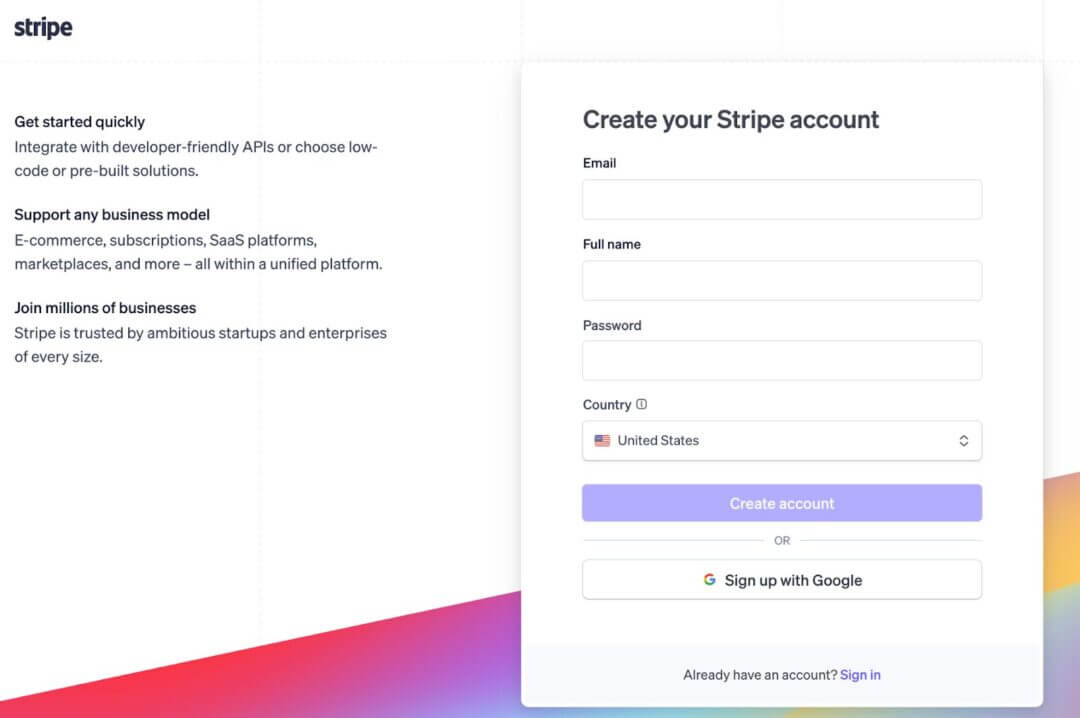
- Enter your email, full name, and create a password.
- Enable two-factor authentication (2FA) via SMS or an authenticator app.
- Choose business type: Individual | Company (LLC or Corporation) | Non-profit
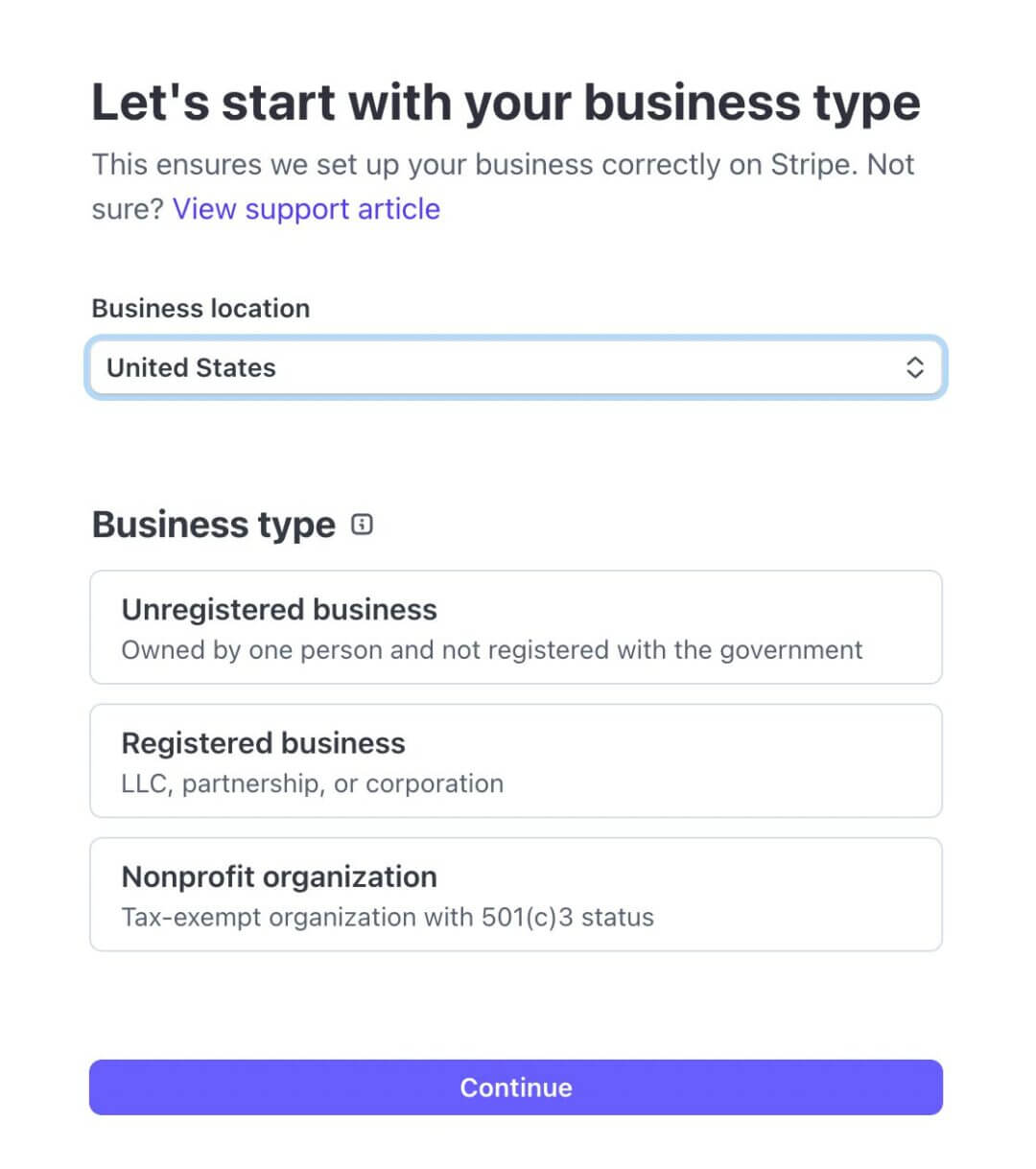
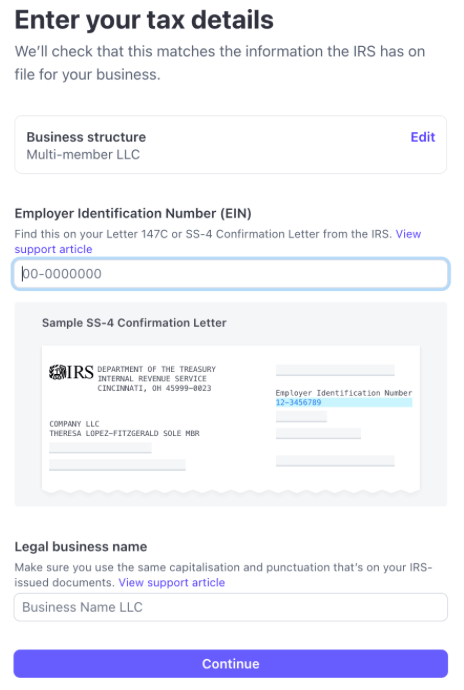
- Provide business details: legal business name, EIN, registered business address and business industry category.
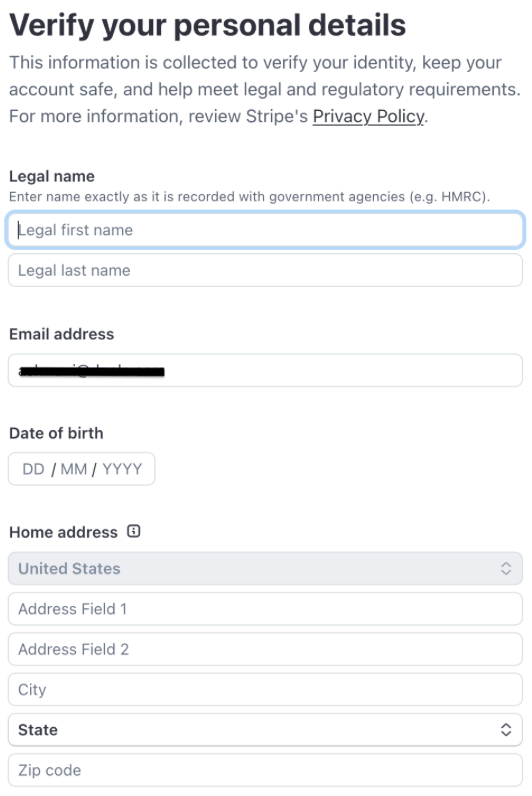
- Enter business owner / representative details: full legal name, date of birth, SSN (last 4 digits for US individuals) and home address.
- Confirm email address
- Access the Stripe dashboard
At this stage, Stripe creates an unverified account with limited functionality until the completion of KYC/KYB.
Business Verification
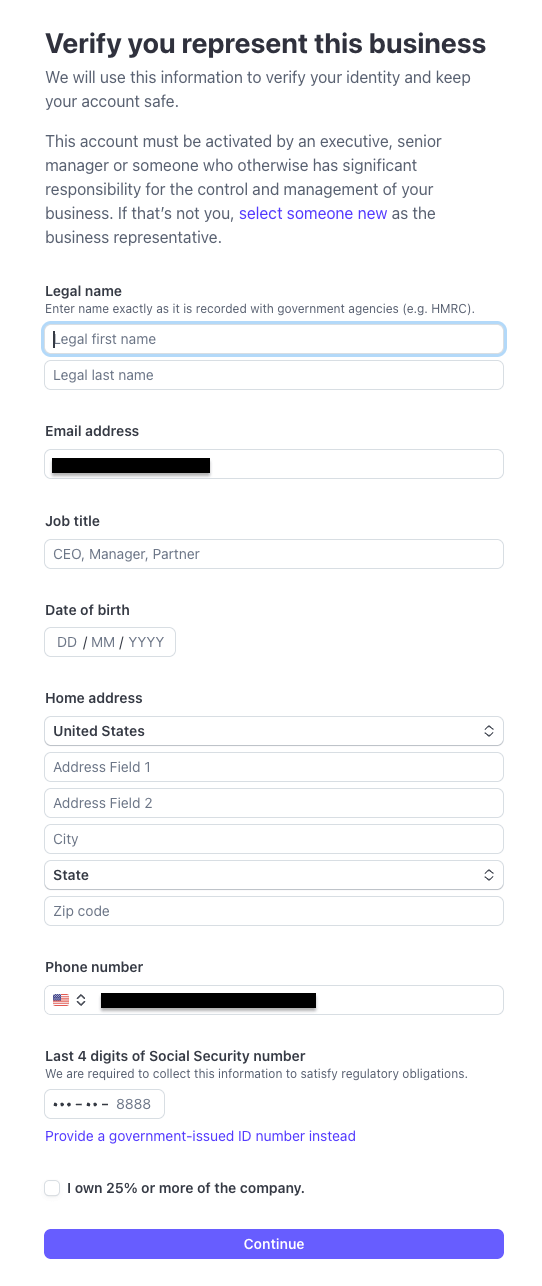
Stripe requires detailed business verification before enabling payouts.
Required documents:
- Valid government ID (passport, driver’s license)
- EIN confirmation letter (CP 575 or 147C)
- Articles of Organization/Incorporation (if applicable)
- Business address proof (utility bill or bank statement)
- Website or product/service description
Verification Steps
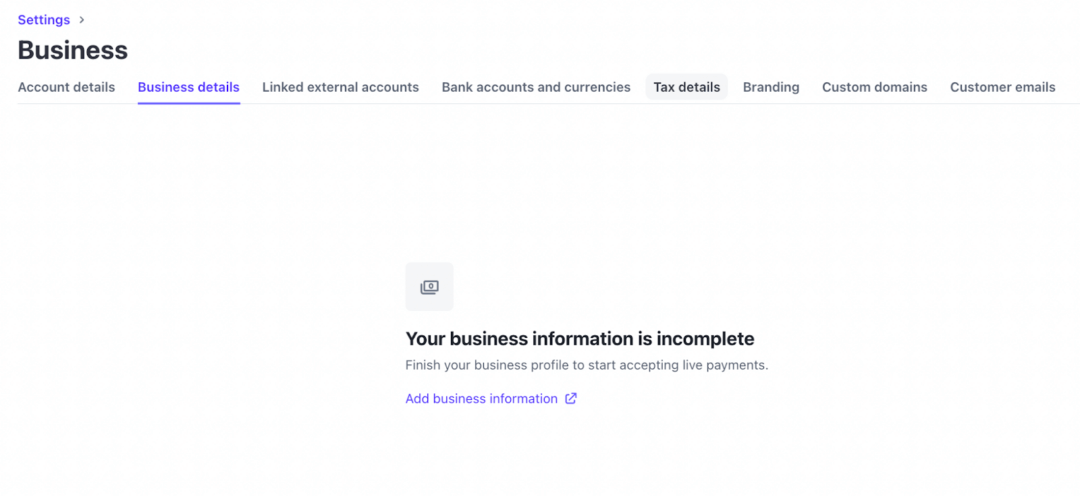
- In Stripe Dashboard → Settings → Business Details
- Upload an identity document
- Upload business registration documents
- Submit SSN or EIN for IRS validation
- Provide details about nature of business, product categories, refund policy and target markets
Stripe may request additional supporting documentation, especially if the industry = moderate or high risk.
Bank & Payout Setup
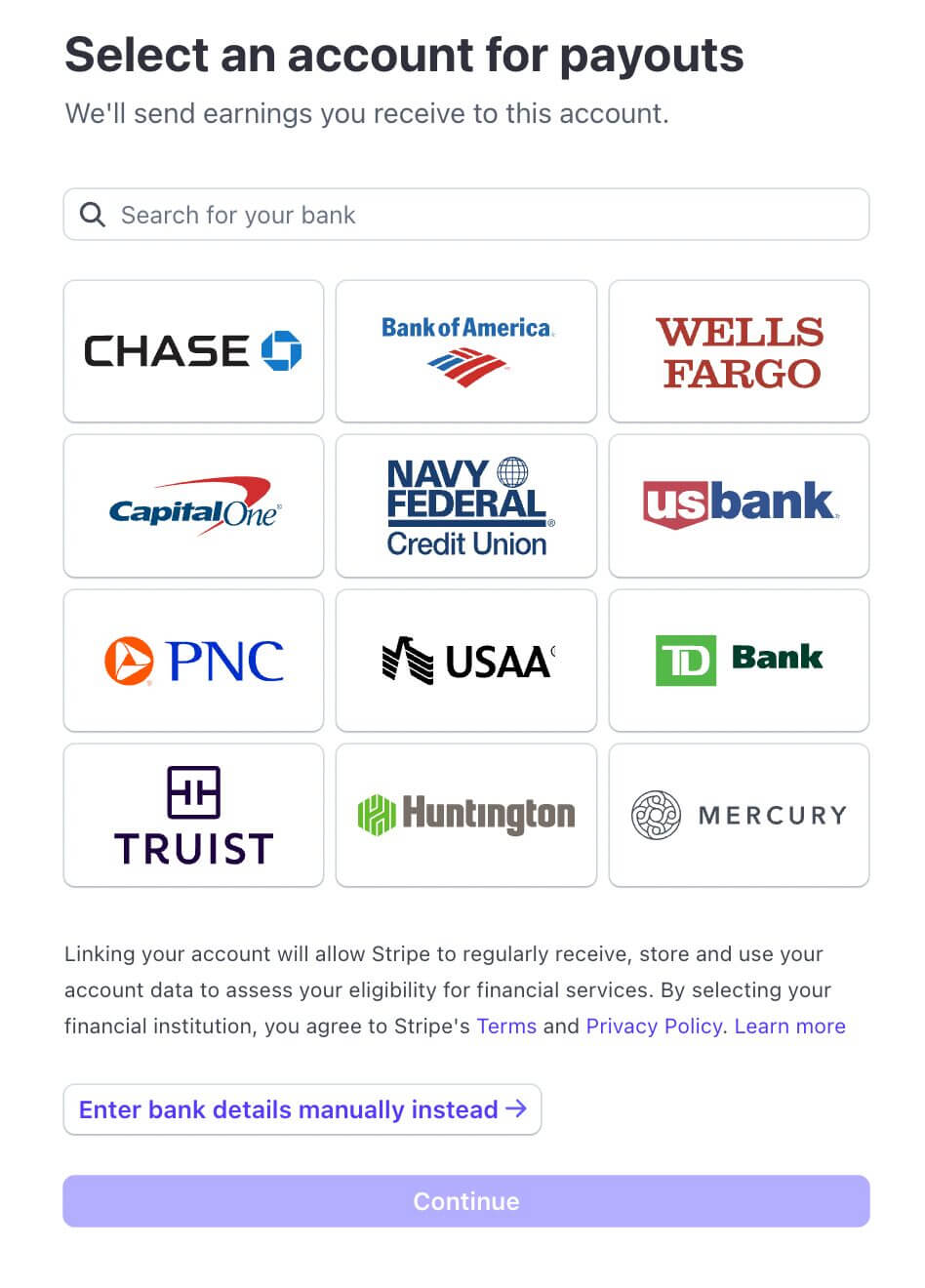
Go to: Dashboard → Settings → Payouts and Bank Accounts
You must add a US ACH-enabled checking account.
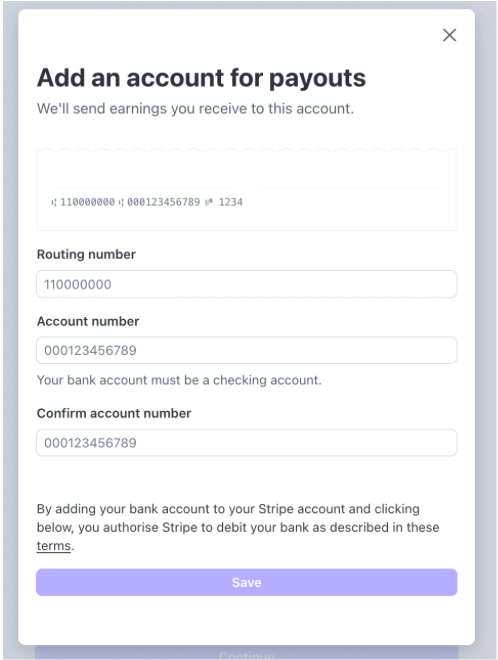
Requirements:
- Full account number
- Routing number
- Account holder name that matches entity name
Stripe may require:
- Bank statement (last 30–90 days)
- Void check
- Letter from the bank confirming account ownership
Micro-Deposit Verification:
Stripe sends 2 deposits:
→ You enter the amounts in your dashboard
→ Payouts become active after verification
Tax Information
Stripe collects tax data to meet IRS rules under 1099-K reporting. US businesses must complete the online W-9 form.
W-9 Information required:
- Business name
- Federal tax classification (LLC, S-Corp, C-Corp, Sole Prop)
- EIN or SSN
- Business address
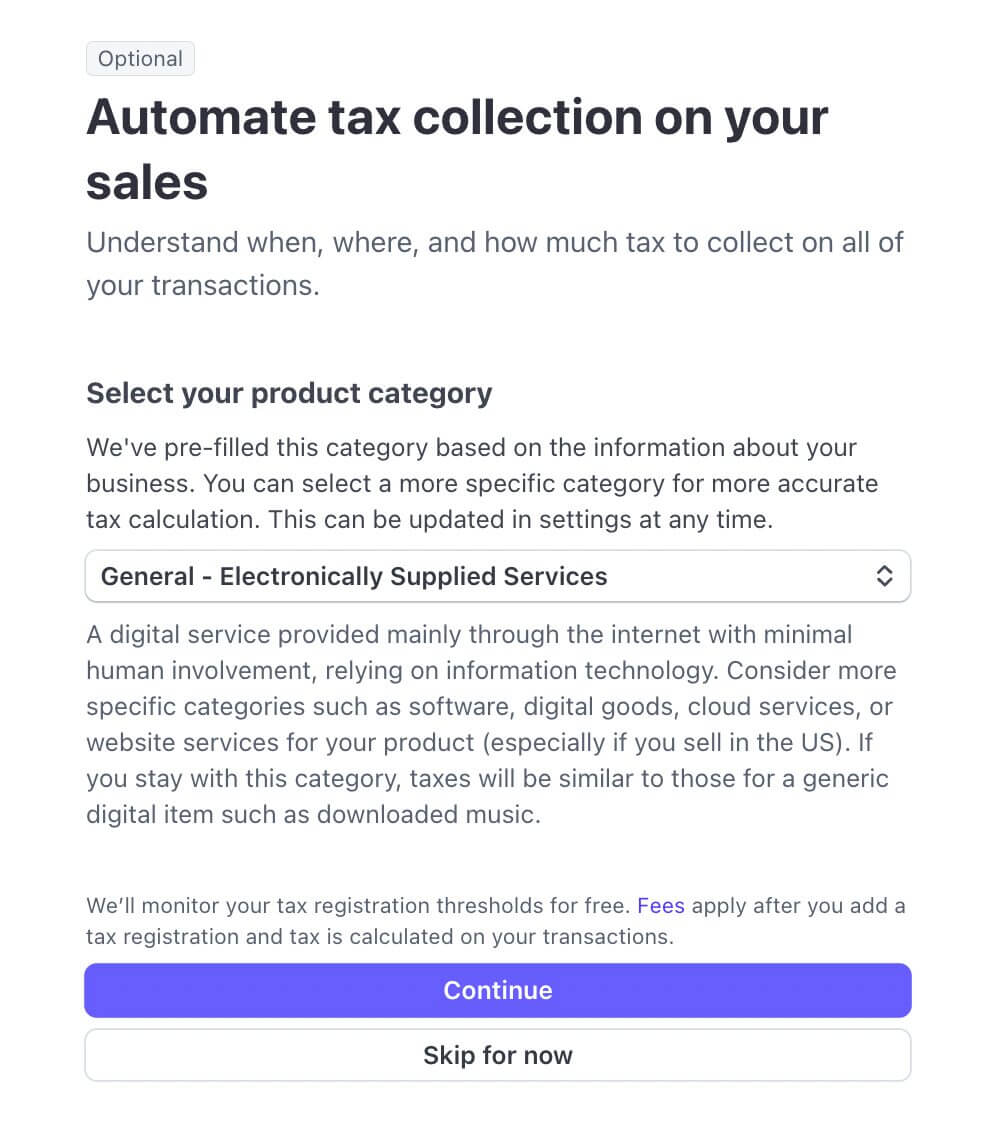
Stripe automatically uses this to determine whether to file Form 1099-K at year-end.
Reference: Stripe Tax Documentation
Verification & Activation
Stripe activates payments once:
✔ Identity is verified
✔ Business documents approved
✔ Tax form submitted
✔ Bank account validated
Activation statuses:
| Status | Meaning |
| Pending verification | Documents uploaded, under review |
| Restricted | Missing documents, limited payouts |
| Complete | Fully active |
| Rejected | Documents are invalid or do not match |
Payouts may still be delayed during:
- High chargeback risk
- Sudden volume spikes
- Suspicious activity screening
Stripe may enforce rolling reserves depending on business type.
Stripe Setup for Non-US Founders
Stripe provides two possible onboarding pathways for foreign founders:
- Non-US Founder WITH a US Entity (US LLC/C-Corp → Stripe US)
- Non-US Founder WITHOUT a US Entity (Use Stripe in your home country)
The two paths have different requirements, distinct KYC policies, and varying banking restrictions; therefore, they must be treated as completely separate onboarding workflows.
For Non-US Founders With a US Entity
This flow applies when a non-US founder has formed a:
- US LLC (most common)
- US Corporation (C-Corp or S-Corp)
- Partnership (rare)
Stripe considers this account a US Stripe account, meaning it must meet US KYC, US banking, and US tax rules, regardless of the founder’s personal citizenship.
Prerequisites
Before opening Stripe US, a non-US founder must have:
| Requirement | Accepted Options | Notes |
| US Business Entity | LLC or C-Corp | Must be active and in good standing |
| EIN (Employer Identification Number) | IRS-issued EIN | Mandatory for Stripe US |
| US Bank Account | ACH-enabled USD account | Must be under the US LLC |
| Responsible Person | Founder’s passport or national ID | Stripe accepts non-US IDs |
| US Address | Registered agent, virtual office, or physical office | PO boxes NOT allowed |
| Operating Agreement or Articles | LLC Agreement / Articles of Organization | May be requested |
| Business Website or Description | A simple landing page is acceptable | Must describe product/service |
Remember:
- Stripe does NOT require the founder to live in the US
- Stripe does NOT require an SSN for foreign owners
- Stripe accepts passports from 180+ countries for identity verification
Stripe Account Creation | US Entity Path
- Visit the Stripe dashboard to start your account creation process.
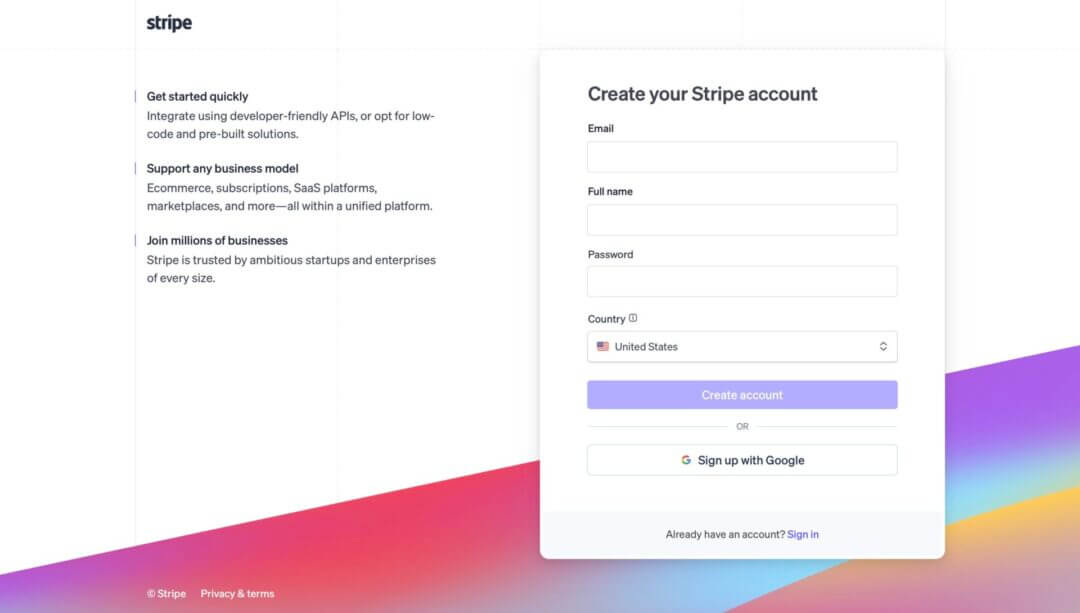
- Enter your e-mail ID, full name and password.
- Choose “Registered Business” as the account type and enter the US entity information like legal business name, EIN, US business address and industry classification.
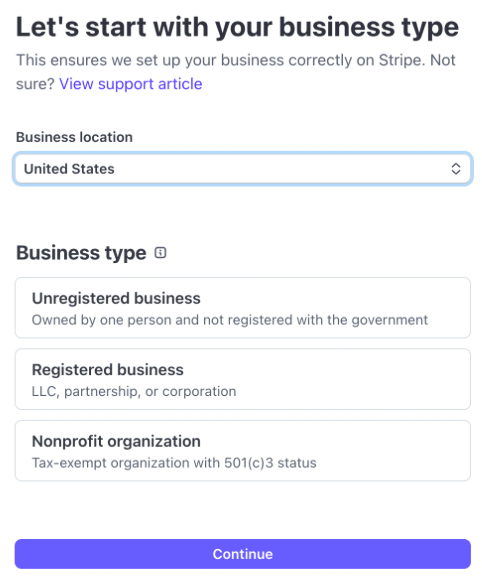
- Add the “Company Representative.” Stripe requires your full legal name, date of birth, country of citizenship, passport or national ID and residential address (foreign address is allowed).
- Enable 2FA (Two-Factor Authentication)
- Submit the form to proceed to verification.
At this stage, the account is created, but payouts are not yet enabled.
Bank Setup
Stripe US requires a US-based, ACH-enabled bank account that belongs to the US entity, not the founder personally.
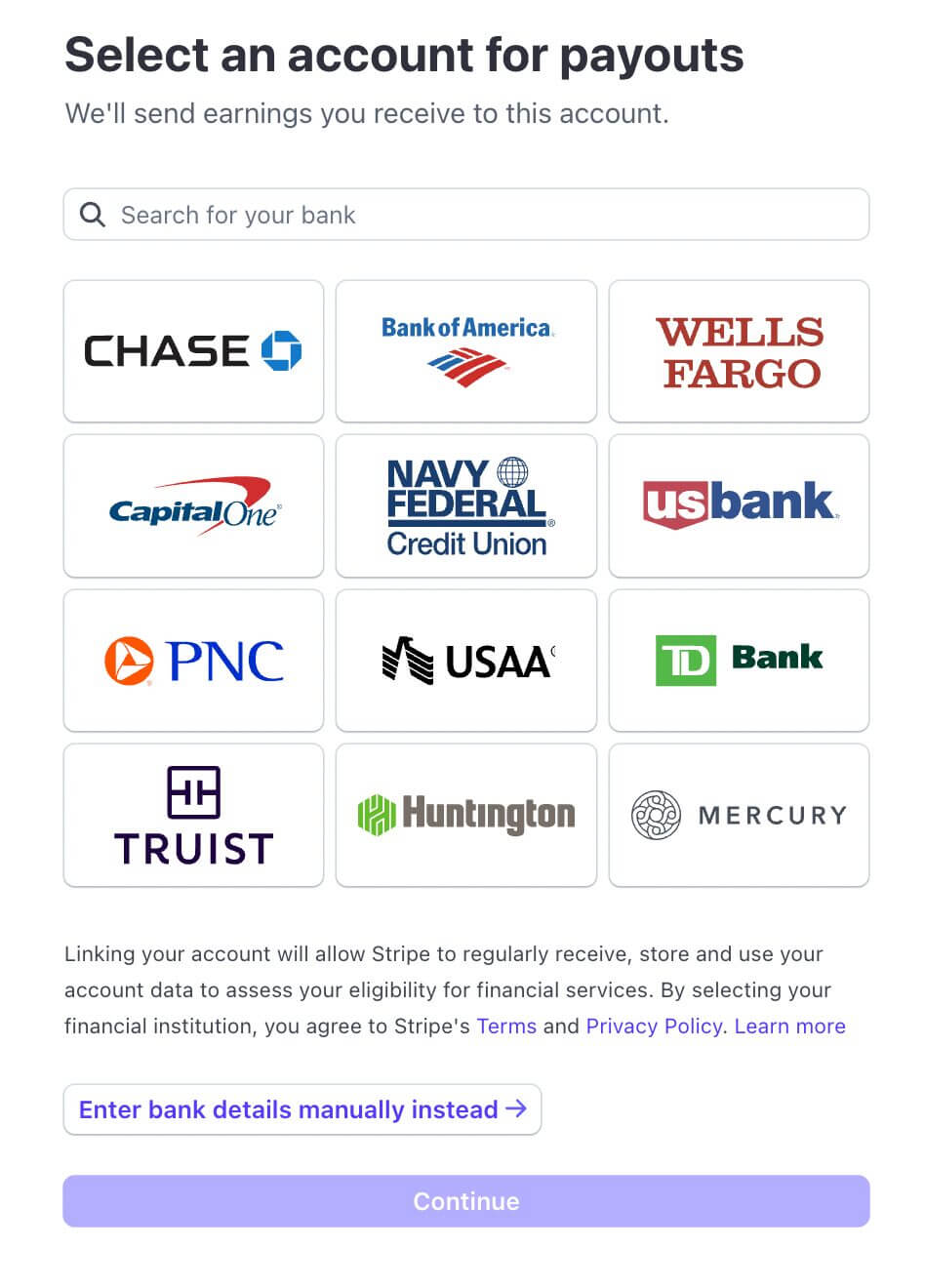
Acceptable banking options:
| Bank Option | Suitable For | Notes |
| Mercury | Foreign-owned US LLCs | 100% online |
| Relay Financial | US and foreign LLCs | ACH & wires |
| Wise US Business Account | Foreign-owned LLCs | ACH routing works |
| Traditional Banks (Chase, BofA, Wells Fargo) | US-resident founders | Usually requires in-person KYC |
Add bank details in Stripe:
Dashboard → Settings → Payouts → Add Bank Account
Stripe will request:
- Routing number
- Checking account number
- Account holder name (must match entity)
Stripe may additionally require:
- Bank statement
- Void check
- Account verification letter
Tax Forms
Non-US founders with a US LLC must complete the W-8BEN-E inside the Stripe dashboard. Stripe prompts this automatically.
| Entity Type | Required Form | Purpose |
| US LLC with foreign owners | W-8BEN-E | Declare foreign ownership & avoid backup withholding |
| Foreign individual with a US entity | W-8BEN | Foreign individual declaration |
| US citizen/resident | W-9 | Not applicable to this path |
Note: Stripe uses these forms to determine IRS reporting obligations. Stripe does not send tax forms to the IRS. They store internally for audit and FATCA compliance.
Official IRS forms:
Verification & Activation
Stripe typically activates foreign-owned US accounts faster than most banks, but it requires proper documentation.
Stripe may request:
- Passport scan (full color, clear)
- EIN letter (CP 575 or 147C)
- Articles of Organization
- Operating Agreement
- US address verification
- Bank statement
Once documents are approved:
- Status becomes “Payments active”
- Payouts begin according to US settlement timelines: Standard industries take 2 business days. For high-risk industries it takes up to 7-14 days.
For Non-US Founders Without a US Entity
This is the path for founders who want Stripe in their home country.
Examples:
- Indian Pvt Ltd → Stripe India
- UK Ltd → Stripe UK
- Singapore Pte Ltd → Stripe Singapore
Also read: How to open a Stripe account in India
Determine Eligibility
You must verify whether Stripe supports transactions in your country.
Stripe-Supported Countries Examples:
- US, Canada
- EU (UK, Germany, France, Spain, Netherlands, Italy)
- Australia
- Singapore
- Japan
- India
- UAE
Unsupported countries generally include:
- Pakistan
- Bangladesh
- Nigeria (limited rollout)
- Many African nations
Note: If Stripe does NOT support your country, you must form a US or other supported-country entity.
Setup Flow (Non-US Founder, Non-US Entity)
- Go to your local Stripe registration page. Create an account using your e-mail, password and 2FA setup.
- Select business type from the given options.
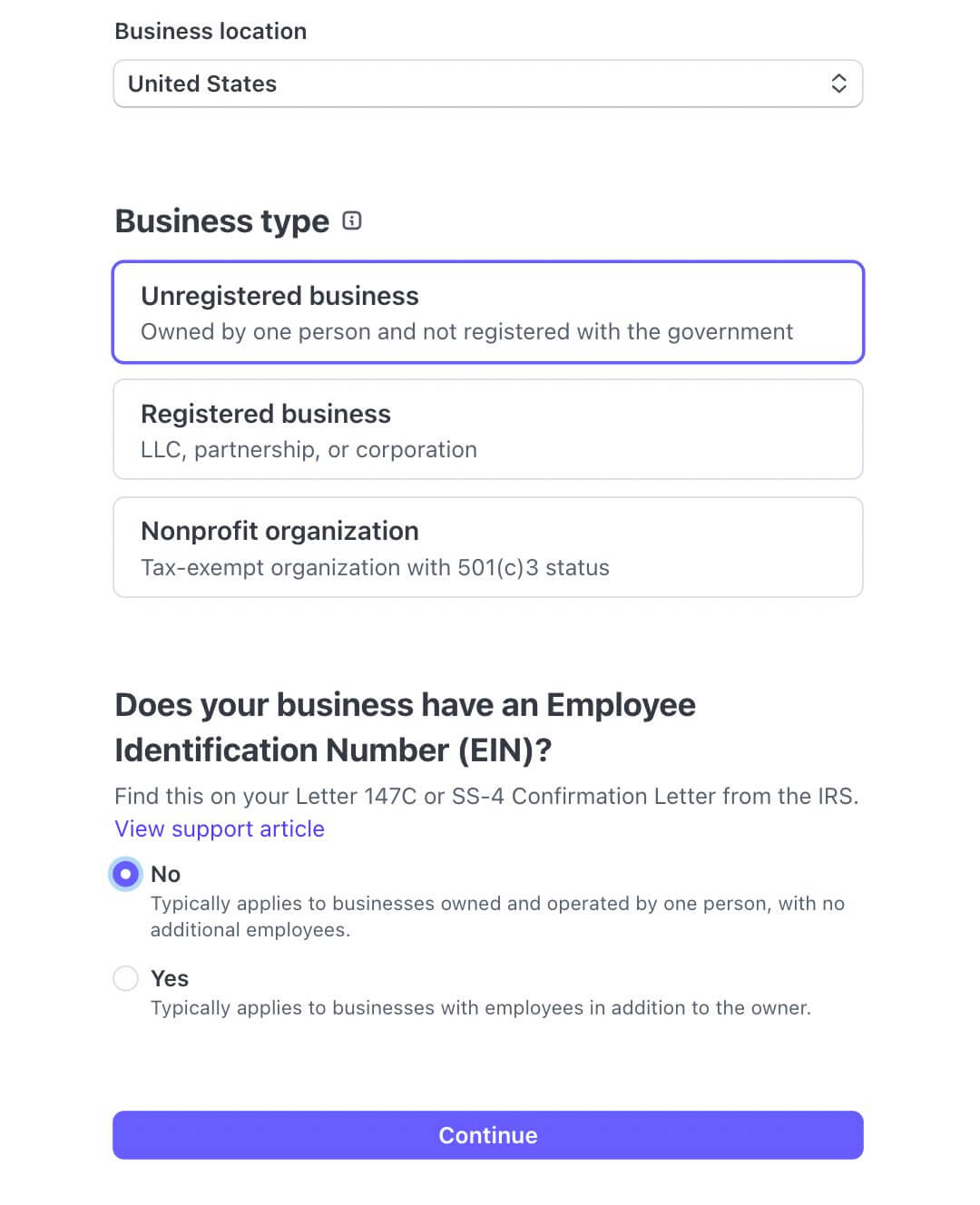
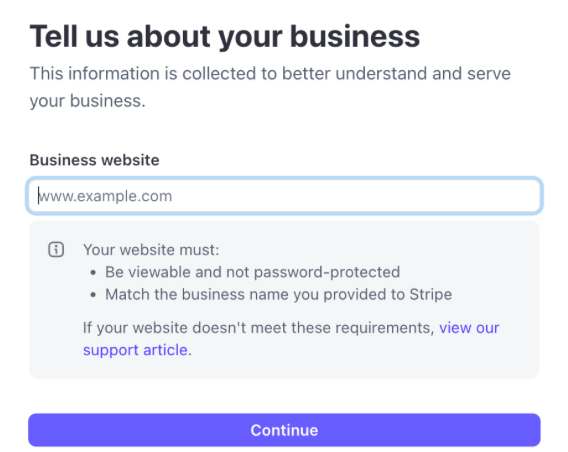
- Fill in business details like registered legal name, local tax ID (e.g., GSTIN, UTR, EIN-equivalent), registered address and local phone number.
- Identity verification such as passport or national ID, local address, date of birth and beneficial ownership information.
- Bank setup: Add a local bank in your country.
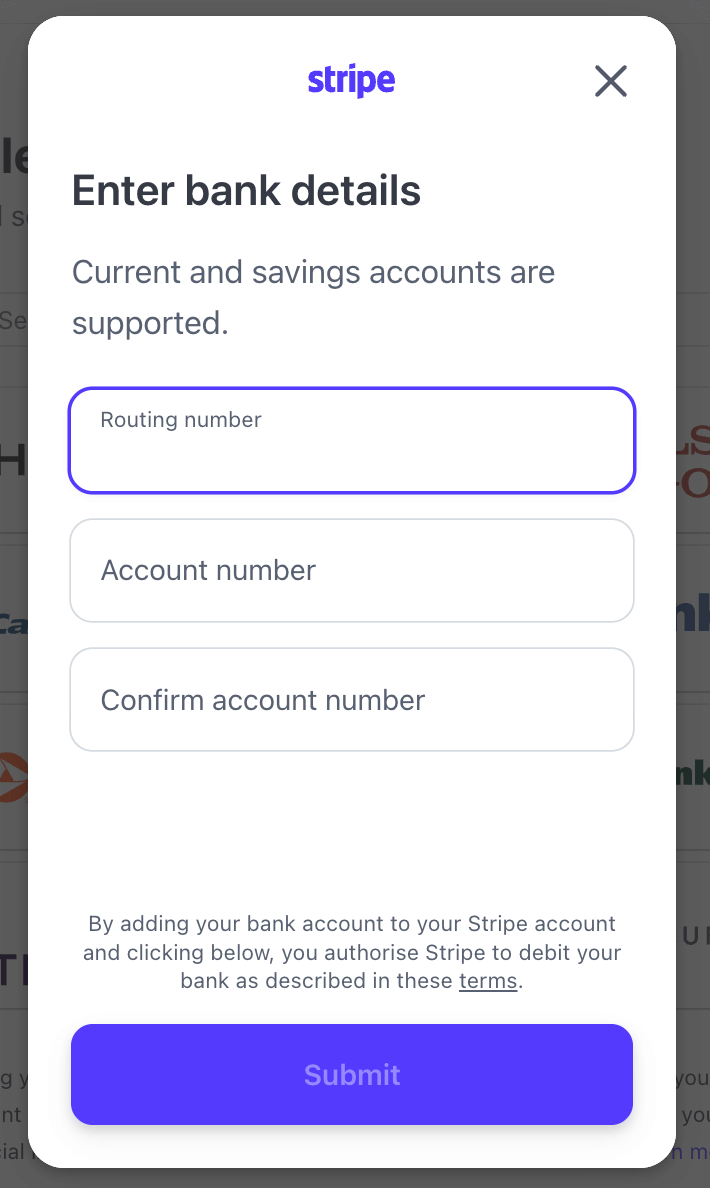
- Submit verification documents: incorporation certificate, local tax certificate and bank account verification.
Depending on the region, Stripe may also request:
- Proof of business operations
- Website verification
- Compliance documentation (e.g., RBI rules for India)
Limitations for Non-US Entity Stripe Accounts
Limitation
Explanation
Banking must match the entity’s country
Example: Indian entity → Indian bank only
Payouts only in local currency
E.g., INR for India; SGD for Singapore
Stripe Radar rules vary by country
Fraud prevention tools differ
Some payment methods are region-locked
e.g., ACH is only available to Stripe users in the US
Tax forms require a local tax ID
No W-8BEN-E since not a US entity
Post-Setup Configuration for US and Non-US Founders
After verification and account activation, configure the following:
1. Business Settings
The primary use of business settings for beginners is to transition from “test mode” to “live mode” and start accepting real payments.
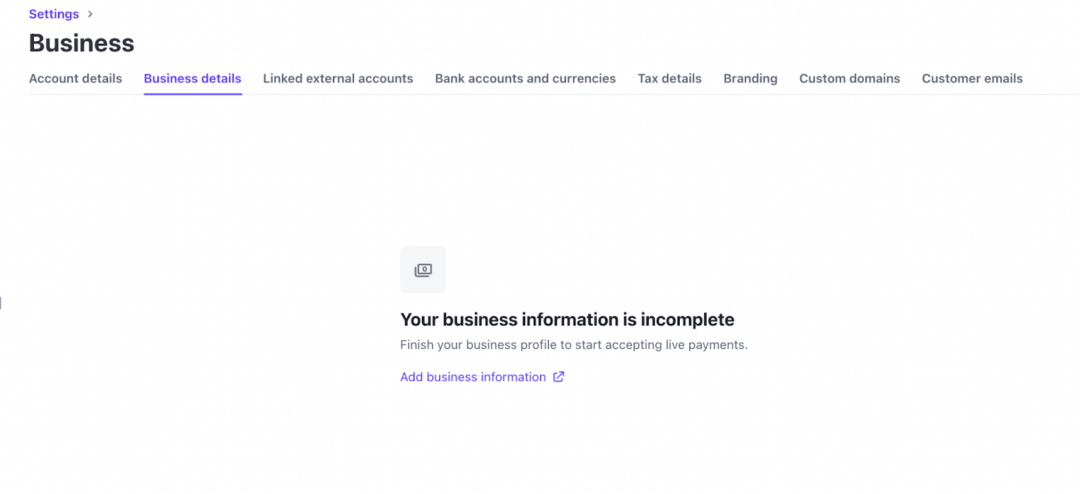
Go to Dashboard → Settings → Business Details
- Confirm business description
- Add support email & phone number
- Add refund policy
2. Payment Methods
Stripe makes accepting payments simple by offering user-friendly tools and supporting a wide range of local and global payment types, all managed from one central dashboard.
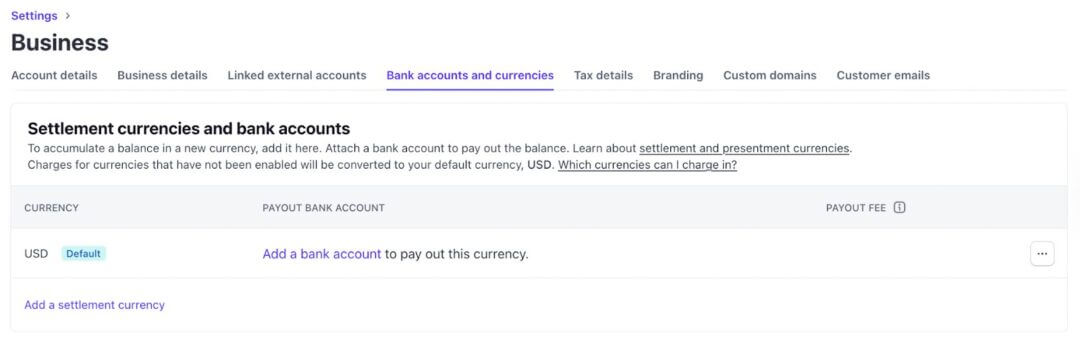
Go to Dashboard → Settings → Payment Methods
- Enable major card networks
- Activate Apple Pay / Google Pay
- Enable ACH (US only)
- Enable local payment methods (SEPA, iDEAL, FPX, etc., depending on region)
3. Payout Schedule
Stripe’s payout schedule determines how frequently funds from your sales are deposited into your bank account.
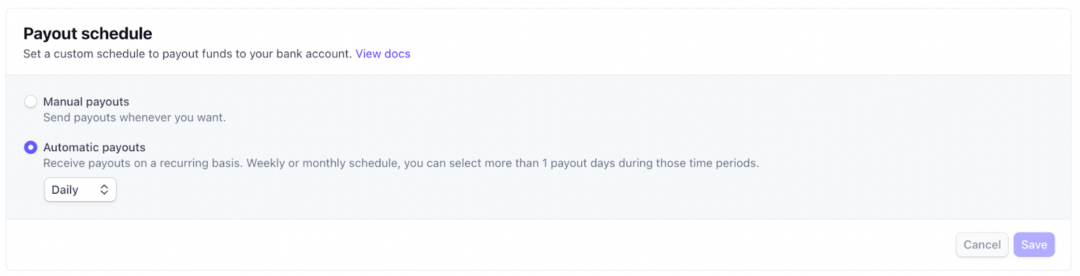
Go to Dashboard → Settings → Payouts and choose your payout schedule settings:
- Daily
- Weekly
- Monthly
4. API Keys
The API uses keys to authenticate requests. This process verifies that you have permission to access your account’s data. Go to Dashboard → Developers → API Keys
There are 2 main types of keys you will use:
- Publishable Key: This key is safe to use in client-side code (e.g., your website’s frontend). It typically has the prefix pk_test_ or pk_live_.
- Secret Key: This key should never be shared publicly and must only be used on your server-side or in secure backend environments. It has the prefix sk_test_ or sk_live_.
Your secret keys carry many privileges, similar to a password, so keep them secure.
Reference: Stripe Documentation
5. Branding
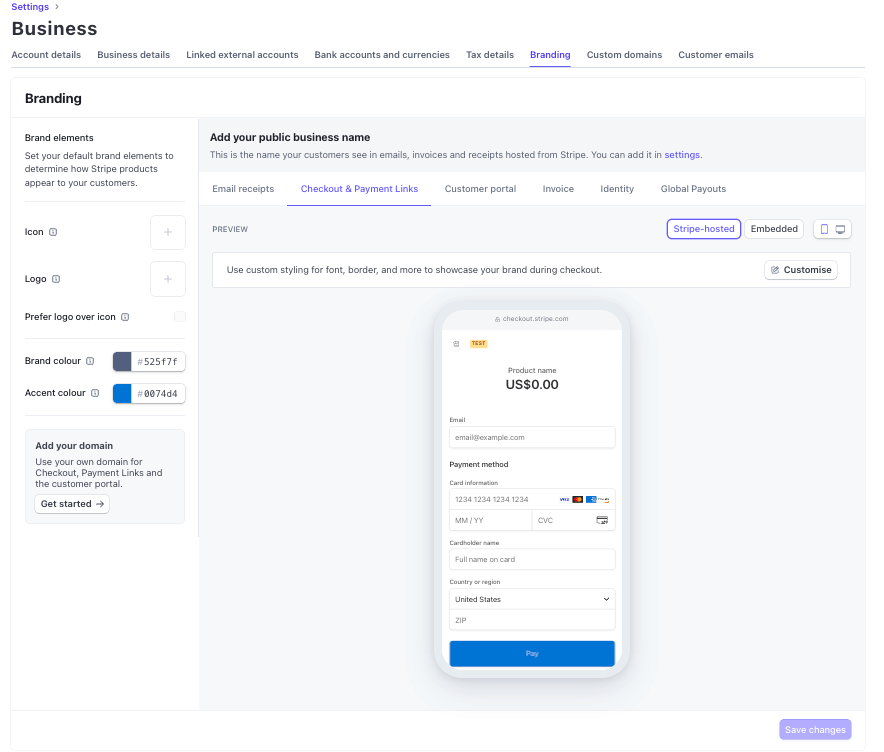
Go to Dashboard → Settings → Branding
- Upload logo
- Choose brand colors
- Customize the hosted checkout page
6. Team Roles
Go to Dashboard → Business Settings → Team
Add admin, developer, analyst, and finance roles.
Troubleshooting & Common Issues
Issue
Cause
How to Fix
“Payouts restricted”
Missing verification docs
Upload ID, bank statement, EIN letter
Bank account rejected
Name mismatch
The bank must match the entity name
Payments not activating
Unverified KYC
Complete identity verification
High dispute rate
Fraud or poor product quality
Enable Radar, improve product info
Stripe rejects US application
No US bank or EIN mismatch
Provide consistent US entity data
Country not supported
Stripe unavailable
Form a US/UK/Singapore entity
Also read: Can’t Use Stripe? The Best Stripe Payment Processor Alternatives for International Startups in 2026
Compliance & Tax
1. Stripe’s KYC/AML Responsibilities
Stripe must verify:
- Business identity
- Beneficial owners (25%+ ownership)
- Responsible person
- Source of funds in high-risk cases
2. PCI DSS Compliance
Stripe provides PCI DSS Level 1 compliance by default when using:
- Checkout
- Payment Links
- Elements
Developers processing raw card data must fill out SAQ-A or SAQ-D.
3. 1099-K Reporting (US Entities Only)
Stripe issues Form 1099-K if:
- Gross payments exceed IRS thresholds
- Business operates under a US EIN
4. FATCA (Foreign Account Tax Compliance Act)
Foreign-owned US entities must submit:
- W-8BEN-E
- Ownership declaration
Stripe stores these for audit purposes.
5. Documentation Storage
Founders should maintain:
- EIN letter
- LLC operating agreement
- Passport scan
- Bank statement
- Articles of Organization
Verification & Testing Checklist
Before marking your Stripe setup as complete, confirm the following:
Stripe Activation Checklist
✔️ Stripe dashboard shows “Payments active”
✔️ All KYC/KYB documents approved
✔️ Bank account verified with micro-deposits
✔️ Tax forms submitted (W-9 or W-8BEN/W-8BEN-E)
✔️ 2FA enabled for all team members
✔️ Test mode payment successful
✔️ Branding configured on hosted checkout
✔️ Refund/Dispute settings reviewed
✔️ Payout schedule configured
Outcome
By following the complete framework outlined in this doola Doc, both US and non-US founders can achieve a fully verified, compliant, and operational Stripe account.
This ensures uninterrupted payment processing, predictable payouts, and long-term platform stability.


Table of Contents
OverviewUnderstanding Stripe’s Operating ModelRestricted Businesses & Prohibited IndustriesStripe Setup for US FoundersStripe Setup for Non-US FoundersPost-Setup Configuration for US and Non-US FoundersTroubleshooting & Common IssuesCompliance & TaxVerification & Testing ChecklistHow Businesses Stay Compliant.