Form Your LLC Today. Foreign Founders Welcome.


A few weeks ago, a Reddit user shared a PayPal scam experience that honestly could’ve happened to any busy founder.
They received a simple email.
It said their PayPal account had been charged $488 for an “Advanced Web Security” subscription. The invoice looked completely normal, official logo, clean formatting, no obvious typos, nothing that screamed “scam.”
And then came the nudge that’s always the giveaway in hindsight: a line urging them to call a phone number within 24 hours to reverse the charge.
Naturally, they did what most careful people do when money is involved. Instead of clicking anything in the email, they opened PayPal separately and logged in directly, just to confirm what was going on.
And that’s where the story took a different turn.
There was no charge. No subscription. No transaction history. Nothing.
Which meant the e-mail wasn’t a PayPal mistake. It was a fabricated invoice designed to look real, and convincing enough to trigger a fast, emotional response of “Fix this now.”
Such scams are not new. But what’s new is how quickly scammers can produce “PayPal-perfect” assets now, invoices, email language, formatting, even support scripts that sound like a compliance team wrote them.
Thanks to the surge of AI tools and templates, creating professional-looking billing emails and invoices has become almost child’s play.
Founders and finance teams process invoices and subscription charges all day long.
And when your day is already stacked with bills, an e-mail that looks “normal enough” doesn’t always raise suspicion, right?
According to the FBI’s Internet Crime Complaint Center, payment fraud, impersonation scams, and non-payment fraud accounted for over $11 billion in reported losses, with business victims reporting significantly higher per-incident damage than individuals.
PayPal is repeatedly cited because it’s embedded into how companies move money.
So, if a scammer can convincingly impersonate PayPal, they can easily dupe businesses.
That’s what this article is about.
We’ll break down PayPal scams every founder should know about and what to watch for before one lands in your inbox.
Why Founders Are Prime Targets for PayPal Scams
Here are the reasons PayPal scams bite founders harder than users who have personal accounts.
High Transaction Volumes = Higher Exposure
In high-volume businesses, teams may not verify every PayPal notification manually.
This is why fake payment confirmation emails and spoofed invoices work so well during peak periods such as product launches, seasonal sales, and paid campaigns.
Phishing succeeds when it looks like a routine workflow and arrives when people are rushing. That’s exactly what scammers engineer.
For example: A junior ops hire sees a “Payment Received” email, ships the order, marks it complete in Shopify, and moves on. By the time finance realizes the transaction never existed, the goods are gone, and the scammer is already running the same play on ten other stores.
Cross-Border Payments and Currency Conversion Risks
Cross-border commerce offers an environment where fraud can easily go unnoticed.
PayPal is frequently used for cross-border commerce, which, according to the European Central Bank, inherently carries a higher fraud risk than domestic, in-person transactions.
Scammers exploit the complexity of international payments with messages that mimic real transaction issues, such as:
- Funds are pending due to international verification.
- A customs fee must be paid to release payment.
- Currency conversion triggered a hold. Call support to fix it.
These scams rely on the target’s difficulty in quickly discerning which of these messages are legitimate payment alerts and which are fake.
Reliance on PayPal for Cash Flow
For many businesses, PayPal isn’t just one more checkout option. It’s a working balance that sits in the middle of operations.
Here’s why we say that:
- Customer payments often hit PayPal first, before they reach your bank
- Refunds and reversals often go out from PayPal
- Disputes and chargebacks get managed inside PayPal
- For some companies, PayPal is also where recurring revenue is collected and where short, quick vendor payments happen because it’s convenient
So, when PayPal encounters disruption, whether from fraud, a sudden increase in disputes, or an automatic risk flag, the consequences go beyond a single transaction. This disruption directly impacts the speed at which your company can access and move its money.
The specific forms this disruption takes are: holds, reserves, limitations, delayed payouts, or restricted access to funds.
Even PayPal acknowledges that fund delays can occur to cover risks like disputes or chargebacks.
What many founders don’t anticipate is that the trigger for these restrictions can be scam activity, even if your company is the victim.
An unexpected surge in disputes, suspicious login attempts, or a sudden shift in transaction patterns can prompt an account review.
Critically, the initial review process across many financial platforms is increasingly risk-based and automated, meaning a human “common sense” evaluation might not happen immediately.
Based on these challenges, founders often learn a frustrating operational truth, which is:
You can do everything “right.” You can also be the victim. And you can still lose access to your own funds while the platform investigates.
Limited Seller Protection in Digital, Service, and International Transactions
PayPal Seller Protection is a narrow policy, not a comprehensive shield.
It offers decent coverage for physical goods with clear tracking, but founders selling digital goods, services, subscriptions, or conducting international business often find the protection inadequate.
Disputes over intangible services are particularly difficult to resolve fairly due to ambiguous proof (e.g., did the service meet expectations?), and outcomes often favor the buyer.
Moreover, international transactions add risk, as inconsistent delivery confirmation is exploited by scammers filing “Item Not Received” claims.
Founders lose these disputes not because they made a mistake, but because they operate in categories where PayPal’s protections are inherently weak.
The Most Common PayPal Scams Targeting Founders in 2026
Below are the most common PayPal-related scams founders run into, how they work, and the signals that should make you pause.
Phishing Emails, Messages, and Calls
What It Looks Like:
You receive an email, text, or call claiming to be from PayPal, warning about suspicious activity, account limitations, or urgent security issues.
The message pushes you to click a link, download a file, or call a phone number.
Why It Works:
The message creates urgency and mimics PayPal’s tone and formatting. Many founders react quickly instead of verifying inside their account.
What to Watch For:
- Requests for passwords, one-time codes, or account details
- Links that lead to login pages outside PayPal’s official site
- Phone calls claiming to be from PayPal asking for sensitive information
What to Do:
✔️ Never click links or call numbers included in these messages
✔️ Forward the message to phishing@paypal.com, then delete it
✔️ Log in to PayPal directly to check for real notifications
Invoice & Money Request Scams
What It Looks Like:
You receive an invoice or money request through PayPal for something you never ordered, software, crypto, a subscription, or a vague “service.”
Sometimes the invoice includes a note warning of a charge and urges you to call a phone number to “cancel” or “resolve” it.
Why It Works:
Invoices are a common part of business, making founders accustomed to processing charges and vendor bills.
Scammers leverage this routine familiarity and introduce a sense of urgency to trick founders into reacting and paying without properly verifying the legitimacy of the invoice.
What to Watch For:
- Invoices for products or services you don’t recognize
- Alarmist notes inside the invoice (“call immediately,” “charge will go through”)
- Phone numbers or links embedded in invoice descriptions
- Emails that look like PayPal invoices but don’t match anything in your account
What to Do:
✔️ Don’t pay the invoice
✔️ Don’t call numbers listed in the invoice or email
✔️ Log in to PayPal directly and report or dismiss the invoice from inside your account
Overpayment & Refund Manipulation Scams
What It Looks Like:
A buyer sends you more than the agreed amount and asks you to refund the difference, sometimes urgently, and sometimes to a different account or “shipping partner.”
Why It Works:
It appeals to goodwill and speed. The scammer wants you to send a refund before the original payment is reversed.
What to Watch For:
- Requests to refund outside PayPal’s normal flow
- Instructions to wire money or pay a third party
- Stories involving “mistakes,” bonuses, or shipping fees
What to Do:
✔️ Cancel the transaction instead of refunding
✔️ Never wire or transfer money separately
✔️ Refund only through PayPal, to the original payer
Prize, Lottery or Giveaway Scams
What It Looks Like:
You’re told you’ve won a prize or lottery but must pay a handling, shipping, or processing fee to receive it.
Why It Works:
The excitement of winning lowers skepticism, and the fee feels small compared to the reward.
What to Watch For:
- Requests for payment to release winnings
- Messages about contests you never entered
What to Do:
✔️ Don’t send any money
✔️ Legitimate prizes don’t require fees
High-Profit, No-Risk Investment Scams
What It Looks Like:
You’re pitched an investment promising guaranteed returns with little or no risk, often paired with urgency.
Why It Works:
This scam is effective because it creates a Fear of Missing Out (FOMO), and the language used makes the communication sound official or legitimate, leading the recipient to act quickly without thinking.
What to Watch For:
- Claims of guaranteed or risk-free profits
- Pressure to act immediately
- Lack of verifiable business or regulatory details
What to Do:
✔️ End communication
✔️ Verify independently before engaging in any investment
Fake Charity Scams
What It Looks Like:
Donation requests tied to natural disasters, humanitarian crises, or emergencies, often sent via email or social media.
Why It Works:
They exploit empathy and urgency during emotionally charged moments.
What to Watch For:
- No official website or verifiable records
- Requests for immediate payment
- Poorly documented or newly created charities
What to Do:
✔️ Research charities through trusted watchdogs
✔️ Donate only through verified channels
Shipping-Related Scams
Buyer-Provided Shipping Account
What It Looks Like:
The buyer asks you to use their shipping account or to wire shipping fees to their preferred shipper.
Why It Works:
It sounds like a cost-saving or convenience request.
What to Watch For:
- Requests to use buyer-controlled shipping
- Instructions to wire shipping fees
What to Do:
✔️ Use your own shipping account
✔️ Ship only to the address listed in the PayPal transaction
Prepaid Shipping Label Scam
What It Looks Like:
The buyer sends you a prepaid shipping label and instructs you to use it for the shipment.
Why It Works:
By providing the label, the buyer controls the shipping method and, more importantly, the final destination of the package, which they can change to a fraudulent address.
What to Watch For:
- Requests to use customer-provided labels
- Labels that route to PO boxes or untraceable addresses
What to Do:
✔️ Don’t accept customer-provided labels
✔️ Generate labels yourself and ship to the transaction address
Package Rerouting Scam
What It Looks Like:
The scammer buys an item, pays via PayPal, and asks you to ship it.
Once shipped, they contact the shipping carrier (like FedEx or UPS) to change the delivery address after it’s already in transit. They then claim they never received the package.
Why It Works:
PayPal’s Seller Protection requires proof of delivery to the address specified in the original PayPal transaction.
When the package is rerouted, you lose this proof, allowing the scammer to get their money back through a ‘non-receipt’ claim while still keeping the item.
What to Watch For:
- Delivery exceptions or rerouting requests
- Buyer monitoring tracking unusually closely
What to Do:
✔️ Block rerouting when possible
✔️ Validate addresses before shipping
✔️ Ship only to the transaction address
Reshipping Package Scams
What It Looks Like:
A scammer hires someone, often through a seemingly legitimate job posting, to receive packages (usually high-value electronics or goods purchased with stolen credit cards) and then forward them to an international address.
They may present it as a “shipping coordinator,” “package handler,” or “work-from-home logistics” role.
Why It Works:
The hired person acts as an intermediary, known as a “mule,” who moves stolen goods internationally, making it difficult for law enforcement and e-commerce companies to trace the fraudulent activity back to the original scammer.
What to Watch For:
- Packages frequently addressed to names other than yours or the company’s.
- Requests to immediately reship the packages overseas (often to Eastern Europe or Asia).
- The job requires receiving packages and sending them out with no logical business purpose other than forwarding.
- Requests for unnecessary personal or financial information during the hiring process.
What to Do:
✔️ Refuse delivery of the packages or return them to the sender immediately.
✔️ Report the activity to the postal carrier (FedEx, UPS, USPS), the company the goods are addressed from, and local law enforcement.
✔️ Never share personal details, bank account information, or other financial details with the supposed employer.
Employment-Based Product Scams
What It Looks Like:
You are tricked into acting as a financial intermediary for a scammer. This typically involves being asked to sell products, pay suppliers, or change your PayPal shipping/billing address on behalf of a supposed “business partner.”
Why It Works:
The scammer leverages your account legitimacy, making you handle the financial transactions (receiving and sending money) and shipping logistics. Once you’ve paid a supplier or shipped an item, the scammer disappears, and you are left responsible for the lost funds or products, as PayPal views you as the legitimate transacting party.
What to Watch For:
- Any request from a ‘partner’ to alter your PayPal account details, especially the shipping or billing address.
- Instructions to directly pay unknown suppliers or vendors using your personal or business PayPal account.
- Orders involving shipping to unverified P.O. boxes or repeated shipping to addresses in different overseas locations.
What to Do:
✔️ Never change your registered PayPal shipping or billing address for a third party.
✔️ Never pay suppliers or vendors on behalf of others; all transactions should be directly related to your own sales and procurement.
✔️ Always independently verify the legitimacy of any ‘partner’ or third-party business before agreeing to any financial arrangement.
PayPal Policies Founders Often Misunderstand (and Pay For)
We’ll walk you through a few common misunderstandings founders have about PayPal’s policies, which often lead to unexpected financial losses, disputes, or frozen funds.
The key areas of misunderstanding are:
Seller Protection Is Not Absolute
Founders often assume it covers all chargebacks.
The reality is that protection is limited, especially when a dispute escalates to an external bank or credit card company, which makes the final decision.
How This Plays Out in Real Life:
A seller on r/paypal shared that a buyer filed a dispute through PayPal first, which PayPal initially ruled in the seller’s favor. Weeks later, the same buyer went directly to their credit card issuer and filed a chargeback.
PayPal reversed the funds anyway, explaining that once a bank is involved, PayPal no longer controls the outcome. The seller lost both the product and the payment.
Funds Are Not Instantly Guaranteed
PayPal’s risk engine can unexpectedly hold or freeze funds for up to 180 days due to “risk review,” even without disputes, especially for new accounts or those with sudden changes in volume/payment patterns.
How This Plays Out in Real Life:
A small business owner on r/smallbusiness shared that PayPal froze over $15,000 after a sudden increase in sales volume. There were no chargebacks. The reason given was “unusual activity.”
The funds were locked while payroll and supplier payments were due, forcing the founder to scramble for cash elsewhere.
Protection Is Conditional
Not all transactions are equally protected. Protection depends on the payment source, product category, proof of delivery quality, and whether the dispute is internal to PayPal or external. This is a very common misunderstanding among founders.
How This Plays Out in Real Life:
A service-based founder on r/Entrepreneur described losing a dispute for a completed consulting engagement. Even with email evidence and deliverables shared, PayPal ruled that intangible services didn’t meet the required proof standards.
The transaction was marked ineligible for Seller Protection, and the funds were returned to the buyer.
Retroactive Account Review
Most founders often assume PayPal evaluates risk in real time: if the account is compliant today, it’s safe tomorrow. There’s an implicit belief that once transactions clear and funds are released, those activities are “done” and won’t be revisited.
That’s where the misunderstanding comes in:
PayPal doesn’t assess risk only at the moment a transaction occurs. It continuously evaluates historical activity patterns, sometimes weeks or months later.
This includes past disputes, sudden growth phases, category changes, buyer behavior trends, or compliance signals that only become visible over time.
So, an account can appear healthy for months, operate normally, and still be limited or reviewed later based on patterns PayPal flags retrospectively. When that happens, funds can be frozen and access restricted, even if nothing “new” went wrong that week.
How This Plays Out in Real Life:
A long-time seller on r/paypal shared that their account was suddenly limited after years of clean history. PayPal cited historical risk concerns tied to older transactions and patterns, not any current violation.
Funds were frozen while documentation was reviewed, despite the seller being fully compliant at the time of the limitation.
In short, founders often pay for unexpected losses because they assume PayPal offers an automatic, absolute shield and instant fund access, which the platform’s risk-driven policies and external chargeback systems contradict.
Hold Timeframes Are Not Fixed
PayPal holds are often described in approximate terms, most commonly as lasting “up to 21 days.”
Over time, that phrasing has taken on the weight of an expectation. It reads like a timeline, even though it isn’t meant to function as one.
In reality, hold durations are driven by ongoing risk assessment rather than a fixed countdown. A hold may be reviewed, extended, or reapplied if new signals appear, such as changes in transaction patterns, incomplete verification, or activity that triggers additional review.
The release of funds on PayPal is not solely based on the passage of a set time period. While holds exist, they are not always predictable. A hold might seem to be lifted, but continuous monitoring by PayPal can result in a new hold being placed.
This appears inconsistent to the user, but for PayPal, it is an ongoing security process rather than a single, one-time action.
How This Plays Out in Real Life:
A business owner on r/smallbusiness described a cycle where funds were partially released, then placed back on hold as part of ongoing review. Even without new disputes, access to cash remained uneven for months due to repeated risk checks.
Real Business Consequences of PayPal Scams
It’s heartbreaking to read what founders and small business owners share online about PayPal scams, and the damage they leave behind.
Some founders describe taking personal loans just to make payroll while PayPal reviewed their accounts.
Others talk about leaning on credit cards to keep vendors paid. And many admit the stress didn’t stay confined to work, it hampered their sleep, strained relationships, and affected their health as well.
In this section, we’ve gathered real experiences shared by business owners to show how PayPal scams have affected their business as well as personal lives.
The PayPal Checkout Switcheroo: When a $40 Buy Turns Into a $570 Charge
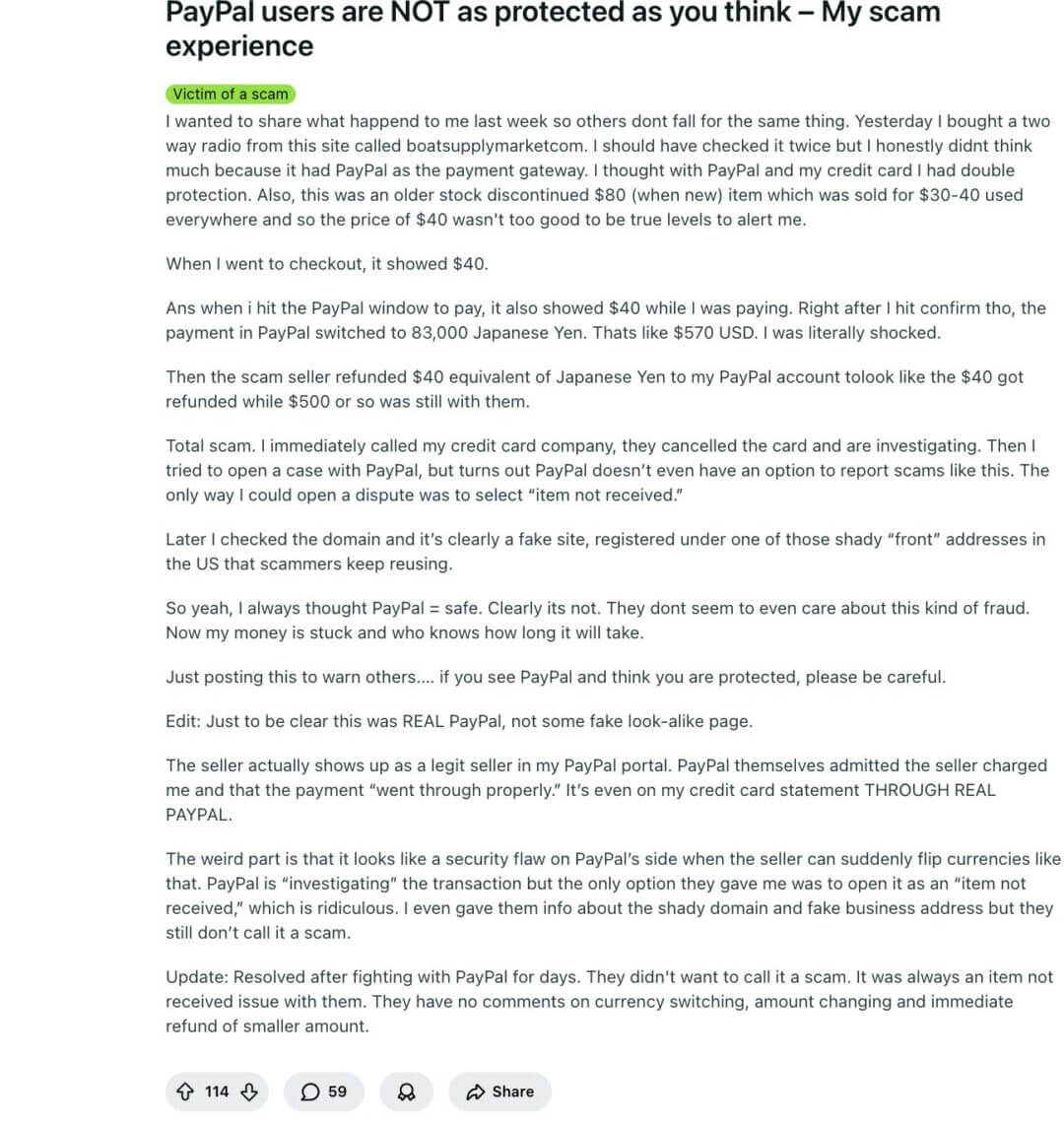
A Reddit user thought they were making a pretty normal purchase: a discontinued two-way radio listed at $40 on a site that looked legit enough, and, importantly, offered PayPal at checkout. They assumed they had “double protection” because it was PayPal plus a credit card.
Here’s what happened next:
- At checkout, the price showed $40.
- In the PayPal payment window, it still showed $40.
- But right after they hit “Confirm,” the final PayPal charge flipped to 83,000 Japanese Yen, around $570 USD.
- Then the seller sent a partial refund equivalent to $40, making it look like the “$40 issue” was resolved, while the remaining ~$500 stayed with the seller.
When the user tried to report it to PayPal, they hit a second problem: PayPal didn’t have a clear option to report this as a scam.
The only dispute route available was “Item Not Received,” even though the core issue was the amount/currency switching and manipulation, not delivery. They contacted their credit card company immediately, canceled the card, and started an investigation.
Later, PayPal acknowledged that the payment technically “went through properly” and that the seller appeared as a legitimate merchant inside the PayPal portal.
The user also checked the domain later and found signs it was likely a fake storefront.
These scams are quite dangerous because:
- It happens inside real PayPal, not a fake page.
- The seller appears as a legitimate merchant in the PayPal dashboard.
- PayPal systems treat it as a completed transaction, not a classic scam.
- Victims are often forced to file disputes under “Item Not Received”, which doesn’t actually match the fraud type.
This is why many users say it feels like a platform blind spot rather than a simple phishing scam.
The “Local Pickup” PayPal Scam: You Lose the Item and the Money
Here’s another brutal experience.
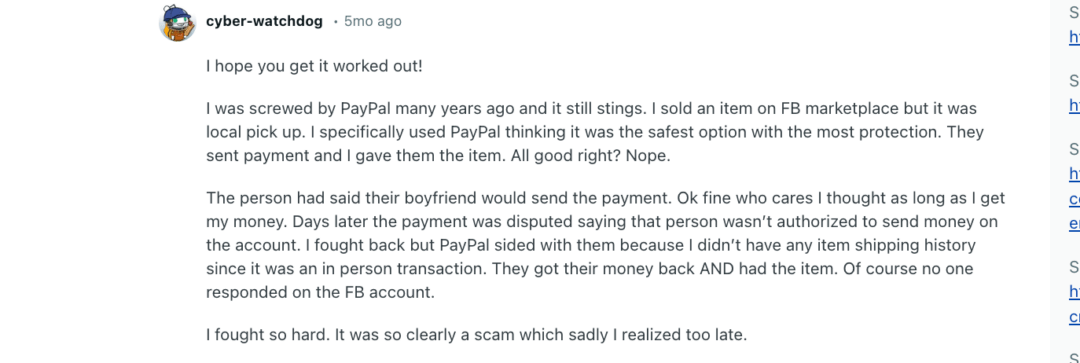
A seller listed an item on Facebook Marketplace and did a local, in-person pickup.
They chose PayPal because they believed it offered strong protection. The buyer said the payment would come from their boyfriend’s account, and the seller handed over the item once they saw the payment.
A few days later, the payment was disputed as unauthorized (the account holder claimed they didn’t approve the payment). The seller tried to fight it, but PayPal sided with the buyer because there was no shipping proof, it was an in-person handoff.
Result: the buyer got the money back and kept the item. The Facebook profile disappeared, and the seller was left with nothing.
If there’s no trackable shipping/delivery proof, PayPal disputes can become extremely hard to win for in-person transactions, even when it’s obviously a scam.
Why are such scams hard to detect and even harder to prove?
Because it hides behind a legitimate PayPal payment, uses a third-party account to create plausible deniability, and exploits the lack of trackable delivery in in-person handoffs, leaving no clear evidence of who actually received the item.
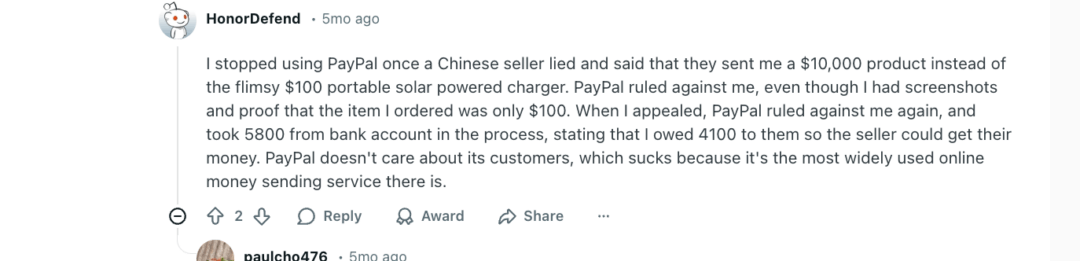
“Wrong Item Sent” Dispute: A $100 Order Gets Treated Like a $10,000 Shipment (A Personal Buyer Experience )
This one is slightly different from the other two examples.
A buyer ordered a $100 portable solar charger from a seller. The seller later claimed they had shipped a $10,000 product instead. The buyer filed a dispute with PayPal and shared screenshots and proof showing the original order was only $100.
PayPal still ruled against the buyer. The buyer appealed, and PayPal ruled against them again. During that process, PayPal allegedly pulled $5,800 from the buyer’s bank account, stating that the buyer owed $4,100 so the seller could get paid.
Why this is so damaging: This goes beyond losing a dispute. It becomes a forced withdrawal from a linked bank account, turning a customer-support issue into an immediate cash-flow shock.
Why is this case hard to fight?
Because in cross-border disputes, platform decisions may rely heavily on seller-provided shipment claims, and once PayPal determines a balance is owed, it can attempt recovery through linked funding sources, creating real bank-account consequences, not just an in-app reversal.
| The Broader Business Impact of PayPal Scams
Beyond the individual incidents, these scams create a set of core business consequences that repeat across industries and business sizes. First, cash flow breaks In the stories we looked at, money didn’t just disappear, it became inaccessible. Funds were reversed, frozen, or pulled from linked bank accounts. That disruption matters because businesses plan around timing. Payroll, rent, vendor payments, and ad spend don’t pause while a platform reviews a case. Second, accounts become restricted in ways that compound over time In the previous sections, you’ve learnt how a single scam or dispute can lead to limitations, rolling reserves, or extended holds. Even when the original issue is resolved, access to funds often remains partial or unpredictable, making day-to-day operations harder to manage. Third, problems spread across platforms When PayPal is tightly integrated into a business, limitations don’t stay isolated. Payment failures can affect Amazon, Shopify, or SaaS tools that rely on PayPal for billing, subscriptions, or payouts, turning one issue into a multi-platform disruption. Finally, there’s a lasting reputational and compliance impact Disputes and risk reviews leave internal flags. Those flags don’t disappear quickly. Future reviews become stricter, appeals become harder, and the business is often treated as higher risk going forward. |
PayPal Fraud Prevention: How to Protect Your Business from PayPal Scams in 2026
As a highly favored online payment platform, PayPal is frequently targeted by scammers seeking to defraud unsuspecting users.
This section offers practical advice and strategies for founders to prevent PayPal scams and safeguard their business operations in 2026.
Use Different Methods for Paying People and Businesses
PayPal provides two main payment options.
Use “For Friends and Family” only for people you know and trust.
For all other transactions, such as buying from businesses or unknown sellers (like on Facebook Marketplace), you must use the “For Goods and Services” option.
This option is designed for purchases like auction wins, merchandise, or digital items, and it automatically qualifies you for PayPal’s Purchase Protection policy.
Be Alert to Fake Charities
Sadly, scammers sink to new lows by impersonating real charities, especially after disasters or high-emotion news cycles, and they often push people to donate through PayPal because it feels quick and familiar.
PayPal itself has published guidance on how charity scams work and how to verify before you give.
If you’re considering donating, do a quick legitimacy check first:
- Verify the organization outside the message you received. Don’t click the link in the email or social post. Search for the charity independently and use the official site you find. (Scammers frequently use look-alike names and pages.)
- Look for transparency. Legitimate charities can explain what they do, how donations are used, and will usually have public documentation (annual reports, financials). Vague answers or refusal to share details is a classic red flag.
- Use third-party watchdogs for a fast credibility scan. Charity Navigator publishes reports and standards to help donors assess accountability and transparency. CharityWatch is another commonly used resource.
- Don’t over-index on “% goes to the cause” alone. Program expense ratios can be helpful context, but they’re not a perfect proxy for impact. Charity Navigator itself notes the “overhead ratio” shouldn’t be the only factor you use.
- If it feels suspicious, report it. The FTC encourages reporting charity scams, as this practice aids in both enforcement efforts and the tracking of scam patterns.
Only Use Your Shipping Account
A lot of PayPal fraud actually looks like a shipping request.
The common move from the scammer’s side is simple: they try to control the label or the shipment, because controlling the shipping allows them to manipulate what your tracking proves.
PayPal’s Seller Protection rules are explicit: you must ship to the address shown on the Transaction Details page. If the package is later redirected to a different address, you may no longer be eligible for protection.
That’s why PayPal recommends not using shipping arranged by the buyer, because you can’t prove delivery the way PayPal requires.
| PayPal’s best-practice rule: Don’t accept customer-provided labels. Their scam guidance says not to accept labels from customers and to ship only to the Transaction Details address. |
Here’s what’s going on, and what to do about it:
✔️ Prepaid label scams are a real pattern
A buyer offers a prepaid label and asks you to use it. PayPal warns that these labels may be purchased with a stolen card and can be used to route packages to untraceable destinations (PO boxes, overseas, etc.).
✔️ Rerouting can wipe out your Seller Protection eligibility
PayPal’s Seller Protection rules are explicit: you must ship to the address shown on the Transaction Details page. If the package is later redirected to a different address, you may no longer be eligible for protection.
That’s why PayPal recommends not using shipping arranged by the buyer, because you can’t prove delivery the way PayPal requires.
✔️ PayPal’s best-practice rule is blunt: don’t accept customer-provided labels
Their scam guidance says not to accept labels from customers and to ship only to the Transaction Details address.
✔️ If a buyer insists on a different address, treat it as a new transaction
PayPal’s own help guidance suggests refunding and having the buyer repay with the correct delivery address if they want it shipped somewhere else.
✔️ For high-value orders, tighten delivery proof
PayPal’s Seller Protection guidance recommends signature confirmation for payments over $750 (in addition to proof of shipment).
Add Extra Layers of Security
This is very important if you want to minimize the risks of scams.
Take a few extra steps that can make it way harder for anyone to access your PayPal app, even if your phone is lost, stolen, or you accidentally click on some phishing links. For example:
Lock Your Phone
Use a screen lock (PIN/passcode/biometric). It might be a basic step, but a surprising number of people still don’t do it.
For example, a Pew Research Center survey found that16% of smartphone users say they do not use a security feature, like a passcode, fingerprint or face recognition.
Here’s what you should do:
Turn on biometric unlock (Face ID / fingerprint) plus a strong passcode fallback.
Plus, enable Find My iPhone / Find My Device and remote wipe, so you can lock/erase data if your phone goes missing.
Use a Strong, Unique Password for PayPal
Your PayPal password should be unique (never reused anywhere) and long enough that it’s not crackable in a realistic timeframe.
| What “strong” should mean in 2026:
Use a passphrase (easy to remember, hard to guess), ideally 15+ characters. NIST’s digital identity guidance recommends a minimum 15 characters for passwords used as a single-factor method. Plus, use a password manager to generate and store unique passwords across accounts, this is how you avoid the “same password everywhere” trap without losing your mind. |
Switch On Two-Step Verification
Enable PayPal’s 2FA (authenticator app is usually safer than SMS where possible).
This way, even if someone gets your password, they still can’t log in without the second factor.
Add a “Speed Bump” for Payments
In addition to 2FA, you should implement the following checks to create a “speed bump” for unauthorized payments or logins. For example:
- Turn on Login/Transaction Alerts: Activate notifications so you are immediately informed of any logins or transactions, allowing for quick action if unauthorized activity occurs.
- Review Connected Devices and Authorized Logins: Regularly check the list of devices and accounts (including apps or services) that have permission to access your PayPal account and remove any you don’t recognize.
- Remove Unknown Linked Information: Delete any unrecognized linked email addresses, phone numbers, or bank cards/accounts from your profile.
Why Proper Business Formation Reduces PayPal Scam Risk
PayPal is a highly regulated financial platform. When anything looks suspicious, it takes two key actions:
- Limits your account (freezes withdrawals, sending, and receiving) to mitigate potential risk.
- Requests documentation to verify your identity and business activity before restoring full access.
Do proper business formation practices prevent scams?
The answer is yes. It helps to reduce (a) the frequency with which your account is flagged and (b) the severity of the consequences when it is flagged because it significantly strengthens your “identity and business proof” in the eyes of PayPal.
In addition, formation reduces false flags that scammers exploit!
Many scammers succeed by taking advantage of the stress a founder feels when their PayPal account is limited, under review, or placed on hold. They send messages like, “Your PayPal is limited, click here,” preying on that anxiety.
PayPal explicitly states that limitations are triggered by unusual/suspicious activity or increased financial risk. They also use limitations to gather necessary information to keep your account open.
Proper business formation and consistent details significantly reduce these “risk signals” that PayPal flags as unusual.
| A Proper Formation Strategy Shrinks the “Blast Radius” by Separating Identities
A lot of PayPal compromises spread because founders don’t seperate personal and business identities, creating unnecessary vulnerabilities. For example: 1. Same email address is used for personal shopping, random SaaS signups, and their primary PayPal account. This single point of failure can lead to a business breach from a personal compromise. 2. The same password is reused across multiple accounts. If a personal email or an unrelated service is breached, the attacker can use the stolen credentials to access the PayPal account, leading to a financial breach. 3. Personal bank cards and business payments are mixed. This comingling of funds complicates accounting and provides a broader attack surface, as a compromise on either side can impact the other. When you properly form a business entity (like an LLC or Corporation), you naturally establish critical boundaries and security measures: ✔️ A dedicated business email address for all business operations, including PayPal, separating it from personal accounts. ✔️ A dedicated business bank account to handle all transactions, clearly separating business assets from personal ones. ✔️ A business PayPal profile tied specifically to the business identity and bank account. ✔️ Cleaner, easier-to-audit accounting trails, which is vital for compliance and for quickly resolving any payment disputes. This separation reduces scam risk and increases resilience in very specific ways with containment and faster resolutions. |
When considering the incorporation of your business, there are essential factors you should be aware of.
- Business Name Consistency: The name on your PayPal account should match your official registration documents.
- Clear Business Type: Your account should clearly reflect whether you are a sole proprietor, LLC, etc.
- Verifiable Ownership: Your ownership information should be easily confirmed.
- Aligned Banking Identity: The name on your business bank account must match your PayPal business profile.
All in all, inconsistencies across your business documentation, such as using a personal name on PayPal, a different business name on invoices, or an address mismatch with your bank create “mismatch signals.”
These signals significantly increase the probability of your account being flagged for potential fraud.
| Proper business formation doesn’t prevent you from receiving scam emails. What it does is:
✔️ Reduces the chances PayPal flags/limits you due to identity mismatches, ✔️ Makes recovery faster because you can produce verification documents immediately, ✔️ Contains damage by separating personal and business identities, and ✔️ Helps you survive disputes/chargebacks with cleaner evidence trails. |
How doola Helps Founders Stay Protected
We’ll be honest here. doola doesn’t promise immunity from scams, no formation platform can.
What it does is remove the exact weaknesses that scammers and payment platforms tend to exploit such as identity gaps, documentation chaos, and slow recovery when something goes wrong.
Here’s what doola’s protection actually looks like:
1. By Locking Down a Verifiable Business Identity From Day 1
Most PayPal issues escalate when a business identity looks incomplete or inconsistent.
doola helps founders establish a clear, verifiable entity with a strong legal name, formation documents, EIN, and ownership structure, so there’s no ambiguity about who controls the business.
Why this changes the outcome?
When PayPal reviews an account (due to unusual activity, disputes, or fraud signals), it looks for consistency across documents. If that identity is already structured and documented, your account is easier to verify and less likely to stay stuck in a limitation maze.
2. By Reducing “Compliance Panic” That Scammers Rely On
Like we mentioned earlier, a lot of phishing and impersonation scams work because founders aren’t sure if their PayPal account is already “non-compliant.”
That uncertainty is exactly what makes fake warnings sound believable, especially messages claiming your account is limited, funds are on hold, or KYC needs to be “completed urgently.”
But when your business formation, tax setup, and records are handled properly, you reduce that compliance panic scammers rely on.
You’re simply clearer and more confident. So, when a sketchy email or SMS screams “urgent action required,” you won’t scramble or click.
You’ll do the sensible thing by default, such as log into PayPal directly, check the Resolution Center/notifications, and confirm what’s real, before you react (emotionally).
3. By Making Recovery Faster When PayPal Flags or Limits an Account
The real damage in PayPal-related incidents often isn’t the scam itself, it’s the downtime. Funds get locked, payouts pause, and support tickets drag on because key documents are missing or inconsistent.
With doola:
- Formation documents are already in place
- EIN and ownership records are clean and accurate
- Business details align across all platforms
So, when PayPal asks for proof, founders can respond immediately instead of scrambling. This preparedness allows them to provide PayPal with thorough documentation, leading to faster reviews and less cash-flow disruption.
Want a PayPal-ready formation setup?
Sign up and we’ll handle formation and compliance for you!
FAQs
Are PayPal scams increasing for businesses in 2026?
Yes, but not because PayPal itself is getting weaker.
The increase is driven by more digital-first businesses, cross-border selling, and AI-powered phishing that closely mimics PayPal’s real emails, invoices, and support flows.
What’s growing fastest isn’t “hacking” but social engineering, tricking founders into handing over access or approving actions themselves.
Businesses with inconsistent profiles or incomplete documentation are hit harder because they stay in review states longer, which scammers exploit.
Does PayPal Seller Protection really protect founders?
It protects founders only within strict boundaries. Seller Protection generally applies to:
- Unauthorized transactions
- Item-not-received claims
- Some chargebacks, if proof requirements are met
It does not cover:
- Digital goods or services in many cases
- “Friendly fraud” where buyers claim non-receipt
- Losses caused by phishing or account takeover
- Disputes where documentation is incomplete or mismatched
Seller Protection helps after a dispute, but it does not prevent scams, freezes, or account limitations.
Can PayPal freeze my funds even if I didn’t get scammed?
Yes, and this is very common. PayPal can limit or hold funds due to:
- Sudden spikes in volume
- Cross-border transactions without history
- Inconsistent business details
- High dispute or refund rates
- Missing or outdated verification documents
These are risk controls, not accusations. But during a freeze, scammers often step in with fake “resolution” messages, which is where real damage happens.
How do scammers win PayPal disputes so often?
They don’t always “win”, but founders often lose by default because:
- Evidence doesn’t match the PayPal business profile
- Invoices are informal or inconsistent
- Digital/service delivery is hard to prove
- Deadlines are missed during account limitations
Scammers know PayPal’s timelines and documentation rules. If you can’t submit clean proof quickly, the system often rules against you automatically.
Is PayPal safe for international founders selling to U.S. customers?
Yes, but international founders face higher baseline scrutiny. Common triggers include:
- IP location mismatches
- Currency conversions
- New U.S.-facing businesses without history
- Payment volume jumps
Without proper formation, EIN, and aligned banking details, normal activity can look suspicious. PayPal isn’t unsafe, it’s less forgiving when context is missing.
What should I do immediately if I suspect a PayPal scam?
- Do not click any links, download files, or call numbers from the message
- Log into PayPal directly (type the URL yourself) and check notifications
- Change your password and revoke unknown devices/sessions
- Enable or reset two-factor authentication
- Report the message inside PayPal
- If funds or access are affected, start recovery inside the Resolution Center
Speed matters, but verification matters more than urgency.
Should founders rely on PayPal as their only payment processor?
No. Relying on a single processor creates single-point failure risk. If PayPal freezes funds, your cash flow stops.
Smart founders:
- Use PayPal alongside another processor
- Keep reserves outside PayPal
- Separate payment collection from operating cash
PayPal is a strong payment processing platform, but it should be part of a stack, not the entire stack.

Table of Contents
Why Founders Are Prime Targets for PayPal ScamsThe Most Common PayPal Scams Targeting Founders in 2026PayPal Policies Founders Often Misunderstand (and Pay For)Real Business Consequences of PayPal ScamsPayPal Fraud Prevention: How to Protect Your Business from PayPal Scams in 2026How doola Helps Founders Stay ProtectedFAQsHow Businesses Stay Compliant.