Shopify Payments Setup for US and Non-US Founders: End-to-End Process

1. Overview
Global e-commerce is projected to to hit $6.4 trillion worldwide in 2026, inviting both US-based and international founders into increasingly competitive markets.
Against this backdrop, the first scalable foundation for any Shopify business is a properly verified and compliant Shopify Payments environment. It is the system that governs onboarding, revenue capture, payout velocity, and downstream financial operations.
This doola Doc outlines a structured, step-by-step framework for both US and non-US founders to set up Shopify Payments correctly, avoid common verification failures or holds, and launch smoothly into accepting payments and receiving payouts.
Today’s guide is intended to:
- Deliver a compliance-focused roadmap for Shopify Payments setup for US and Non-US founders.
- Help founders avoid verification rejections and streamline the approval process.
- Clarify documentation, tax, and banking requirements for both US and non-US entities.
- Ensure founders can launch with full payment readiness, avoiding payout disruptions or compliance flags.
- Provide a repeatable operational framework that supports ongoing compliance and scalability.
By following the outlined process, founders can establish verified Shopify Payments accounts, align with Shopify’s compliance standards, and maintain uninterrupted transaction and payout operations.
Who Is This Guide For?
Founder Type
Business Context and Seller Profile
Key Requirements for Shopify Setup
Objective
US Founders
Individuals or registered business owners operating within the United States.
Valid SSN/ITIN, EIN (for business entities), and a US-based bank account.
Activate Shopify Payments using verified US business and tax credentials.
Non-US Founders
Founders based outside the US who plan to sell to US customers through a US-registered entity (LLC or Corporation).
US entity registration, EIN, US-based bank account, and W-8BEN or W-8BEN-E form.
Set up Shopify Payments through a compliant US business entity to receive payouts.
What This Guide Covers
- Eligibility requirements and country-specific limitations.
- Entity formation and tax documentation prerequisites for both US and non-US founders.
- Step-by-step setup instructions for activating Shopify Payments.
- Verification protocols including identity, business, and banking checks.
- Troubleshooting measures for common verification and payout issues.
- Tax reporting implications based on founder location and entity structure.
By the end of this guide, you’ll walk away with a fully verified Shopify Payments account, configured payout settings, tax documentation in place, and get ready to process transactions.
2. Shopify Payments Eligibility by Country
Shopify provides an official list of supported countries where Shopify Payments can be activated. If your store is located in a country not supported, Shopify Payments cannot be used; you need to choose an alternate payment provider such as PayPal, Stripe, or 2Checkout.
Even in supported countries, bank requirements, documentation, and verification policies vary by jurisdiction.
| Certain local payment methods within Shopify Payments require additional review before activation. Once approved, these methods become available for activation in your Payments settings. |
Note: For non-US founders, merely forming a US entity does not guarantee approval; you need to meet Shopify’s identity, address, and operational verifications (see Section 5).
3. Shopify Payments Prerequisites
As you begin configuring Shopify Payments, start by examining the difference in prerequisites between US founders and non-US founders selling into the United States via a US-based entity:
| Requirement | US Founders | Non-US Founders (selling in US via US entity) |
| Shopify Plan | Shopify Basic or higher (ensure “Payments” activation is available) | Shopify Basic or higher (same) |
| Business Entity | Sole Proprietorship, LLC, Corporation, S-Corp (should match your legal structure) | US LLC, Corporation, or other entity registered in the US (should meet Shopify’s criteria) |
| Bank Account | US-based checking or business account in USD | US-based bank account (in USD) under the US entity |
| Tax Information | SSN (for individual) or EIN (for business) | EIN for the entity; in some cases an ITIN may be needed for individuals |
| Prohibited Business Categories | Shopify’s restricted list (e.g. gambling, weapons, certain adult content) | Same restricted categories apply globally under Shopify Payments policy |
| Document Checklist | Government-issued photo ID (driver’s license, passport), business registration (if entity), bank verification, tax documents | Government-issued ID (passport or national ID), certificate of incorporation, EIN letter, US bank account proof, address proof in the US |
Important: Shopify and its banking partners reserve the right to request additional documents (e.g. lease agreements, utility bills, proof of operations) during or after onboarding.
4. Setup Process for US Founders
US founders need to complete a structured configuration and verification sequence to activate Shopify Payments following a few simple steps.
Step 1: Create and Configure Your Shopify Store
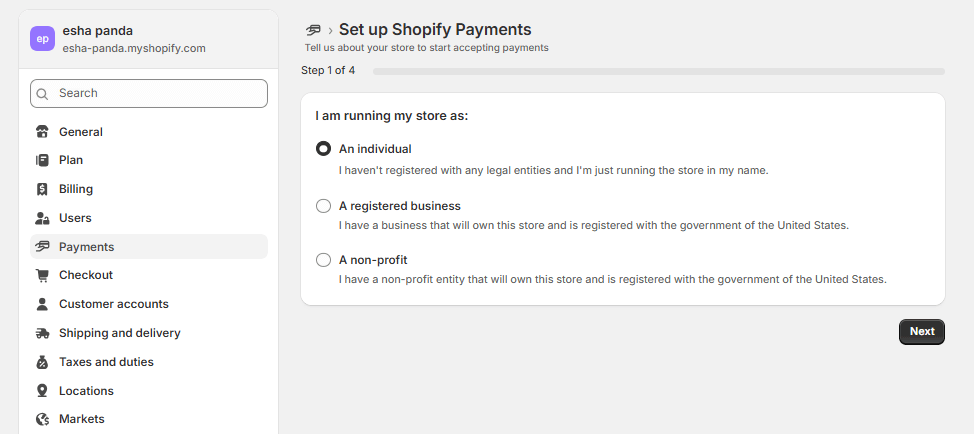
- Log in to Shopify Admin > Settings > Store Details. Here, you’ll need to indicate whether you’re selling as an individual, a registered business, or a non-profit entity.
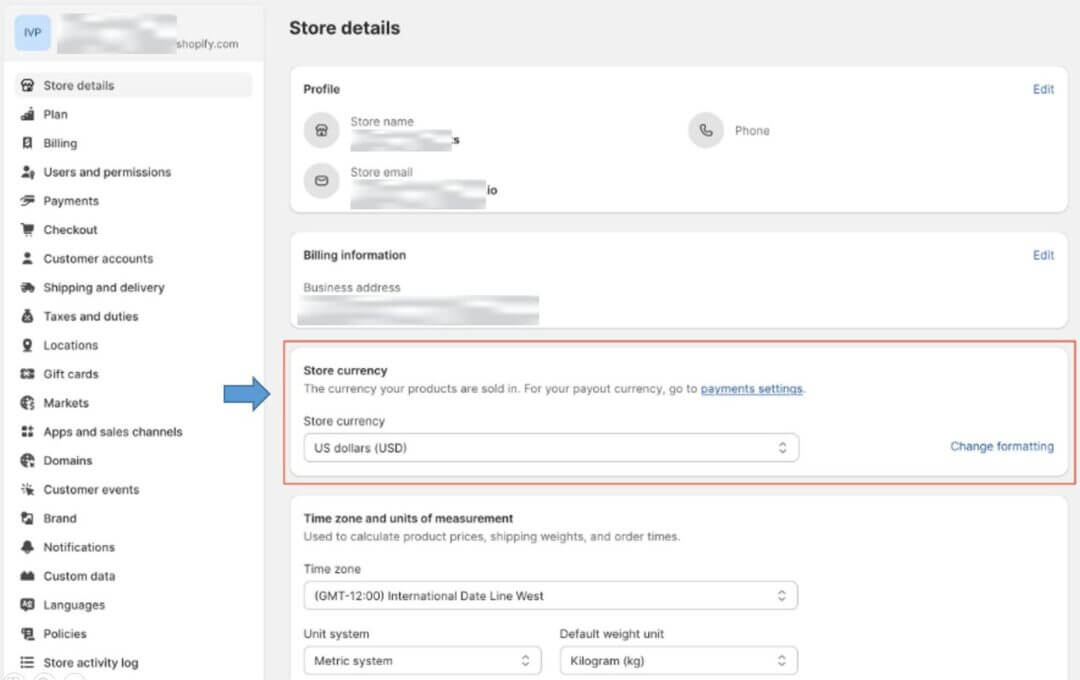
- Set your store currency (USD typically for US operations).
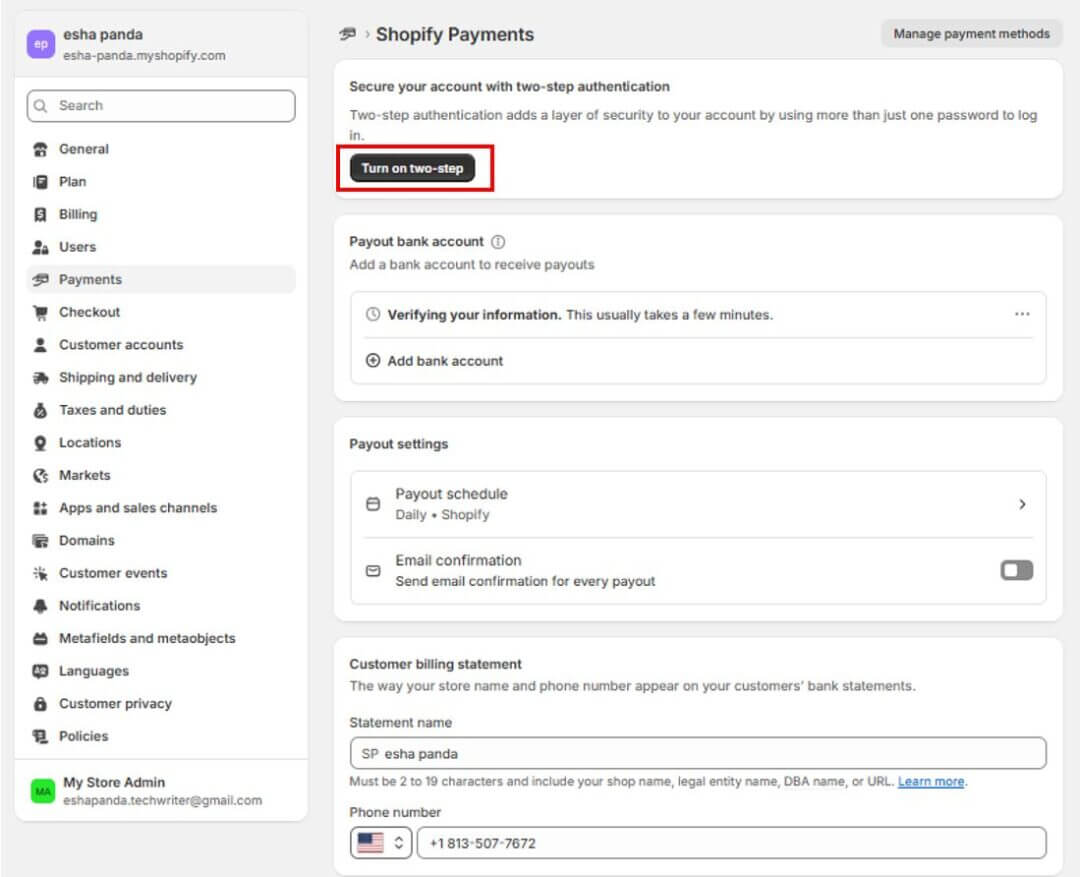
- Ensure two-step authentication is enabled for your store account by clicking the “Turn on two-step” button on the top as shown in the image.
Step 2: Verify Your Business Entity
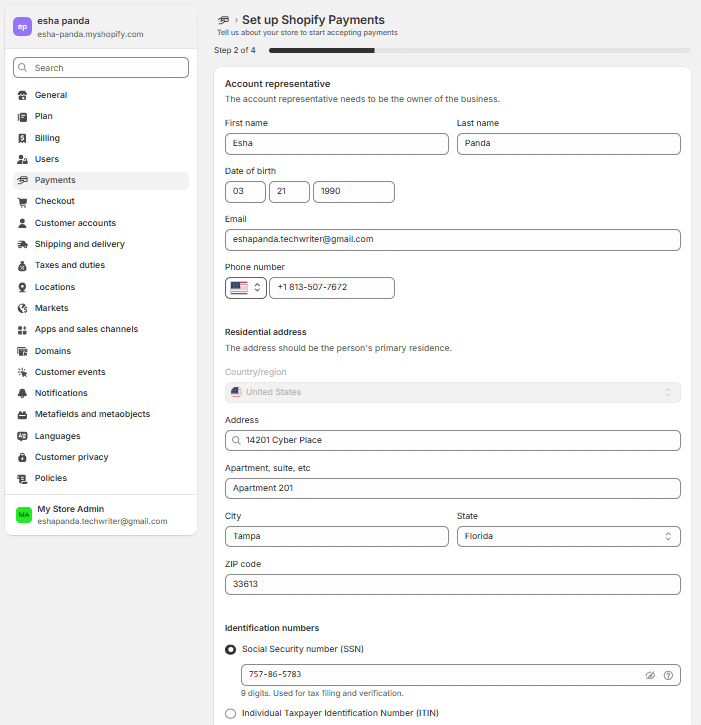
- Enter your business name, legal structure, and registration (EIN or SSN) in your Shopify Payments setup form.
- If you’re operating as an LLC or corporation, provide articles of incorporation or equivalent registration documents.
Step 3: Prepare and Submit Tax Documentation
- For US businesses, Shopify will request a W-9 to collect your taxpayer identification.
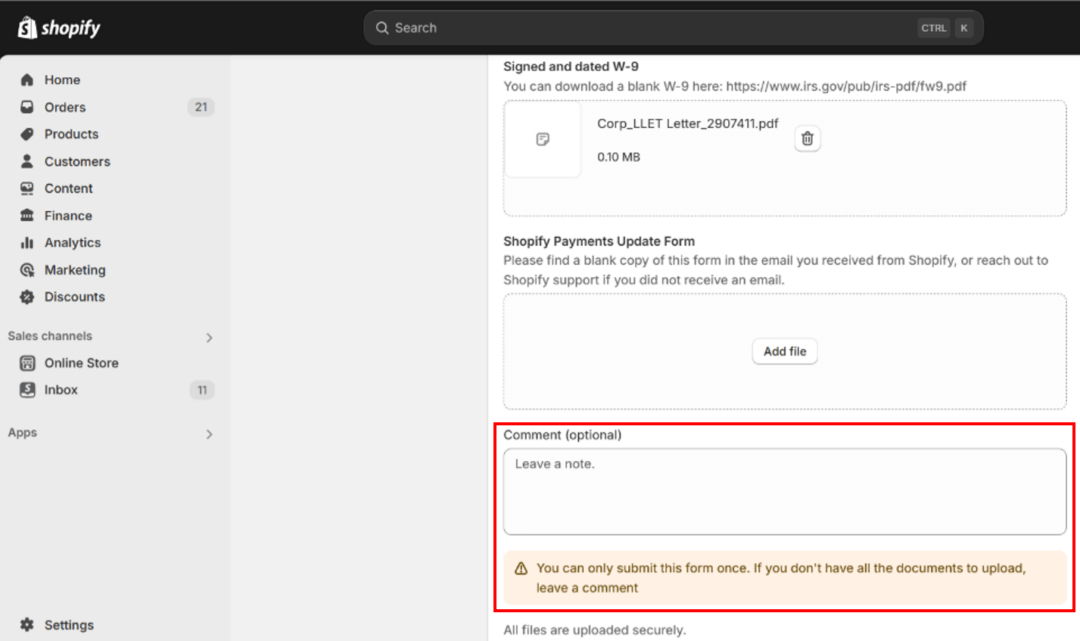
- Shopify will use this information to determine 1099-K issuance at year end.
Important: Make sure you leave a note in the comments section highlighted above if you don’t have all the documents ready to upload.
Step 4: Connect a US-Based Bank Account
In the next step, you can select the option to enter your bank account details manually.
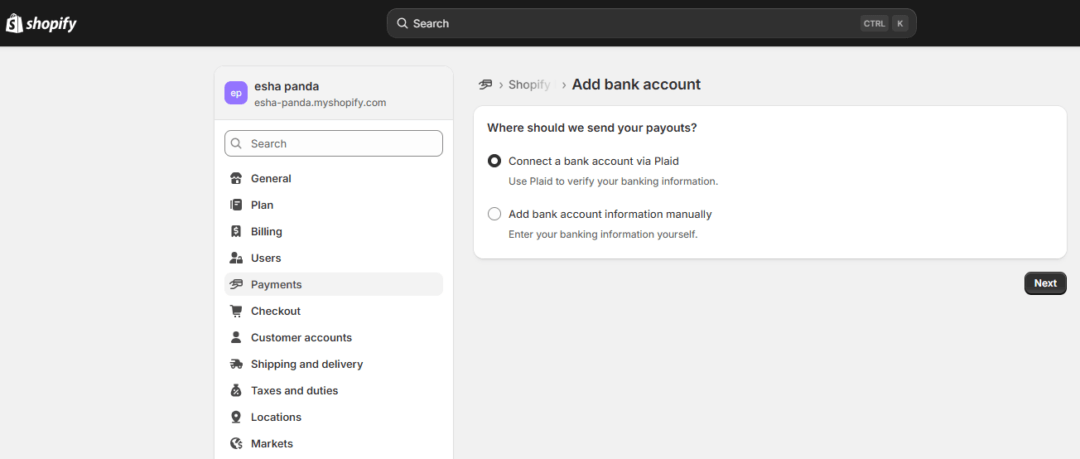
- Provide routing number, account number, bank name.
- The bank must accept USD and be able to receive automated clearing house (ACH) or wire transfers.
- Shopify will verify the account (small test deposit or micro-deposits).
Step 5: Activate Shopify Payments
In Shopify Admin, go to Settings > Payments. If you haven’t added a payment provider on your account yet, click Complete account setup under Shopify Payments.
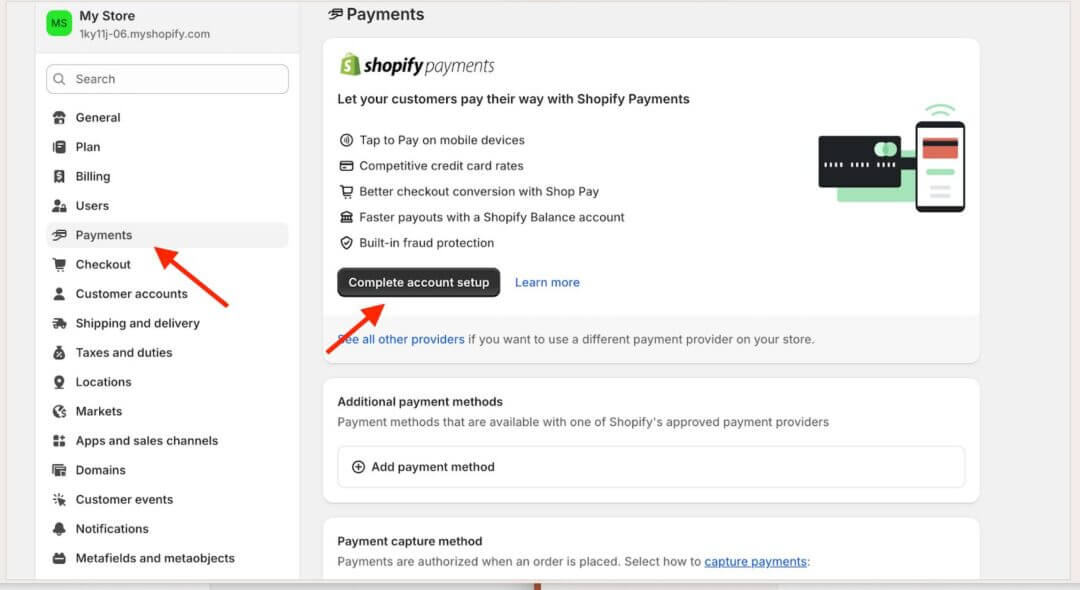
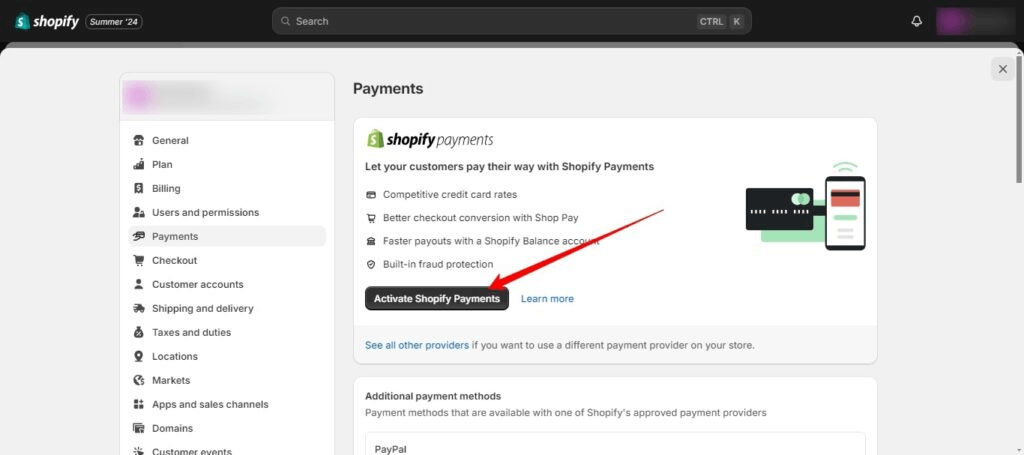
If you’re currently using another credit card payment provider, click Activate Shopify Payments in the Shopify Payments section. Doing so will automatically remove any other payment provider from your account.
Now, enter your product details. Mention the industry you’re operating in, the product category and sub-category, and provide a brief description of the product you’re going to sell on Shopify.
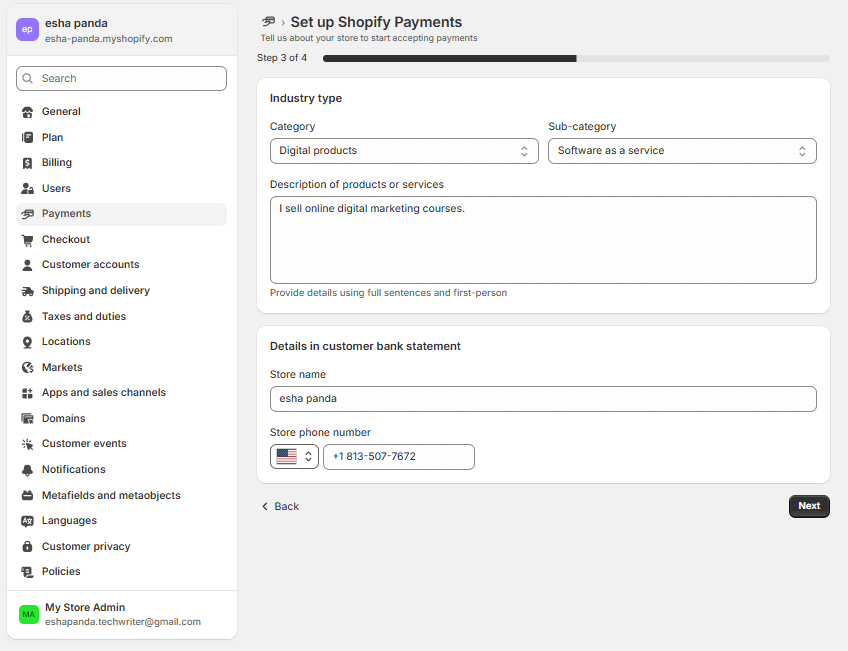
Next, enter the details that will appear on your customers’ bank statement (e.g., business, identity, bank) as prompted.
Step 6: Complete Identity Verification
Once you “submit for verification”, Shopify (or its banking partner) will require an identity verification like a govt-issued ID (e.g. SSN / ITIN, EIN), selfie or liveness check, or other proofs.

Note: Delay or rejection can occur if your photos (or live video) are unclear or mismatched.
Step 7: Business Verification
As a part of the verification process, Shopify may request legitimate proof of your business operations such as utility bills, lease agreements, invoices, bank statements, and other details.
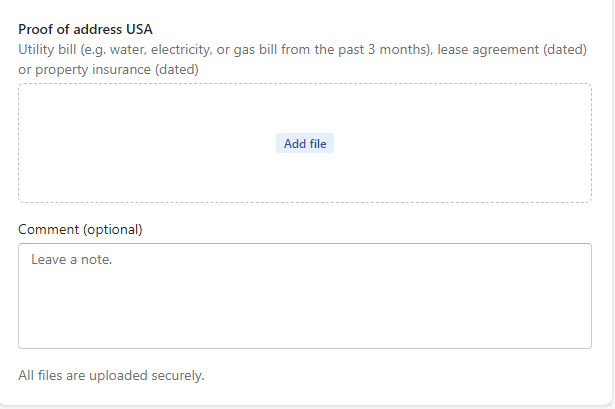
For entity businesses, additional documentation may include ownership structure, EIN assignment letter, etc.
Step 8: Set Payout Schedule
After submitting for verification, you need to configure your “payout schedule” and understand how Shopify processes disbursements. This determines how and when you receive your funds.
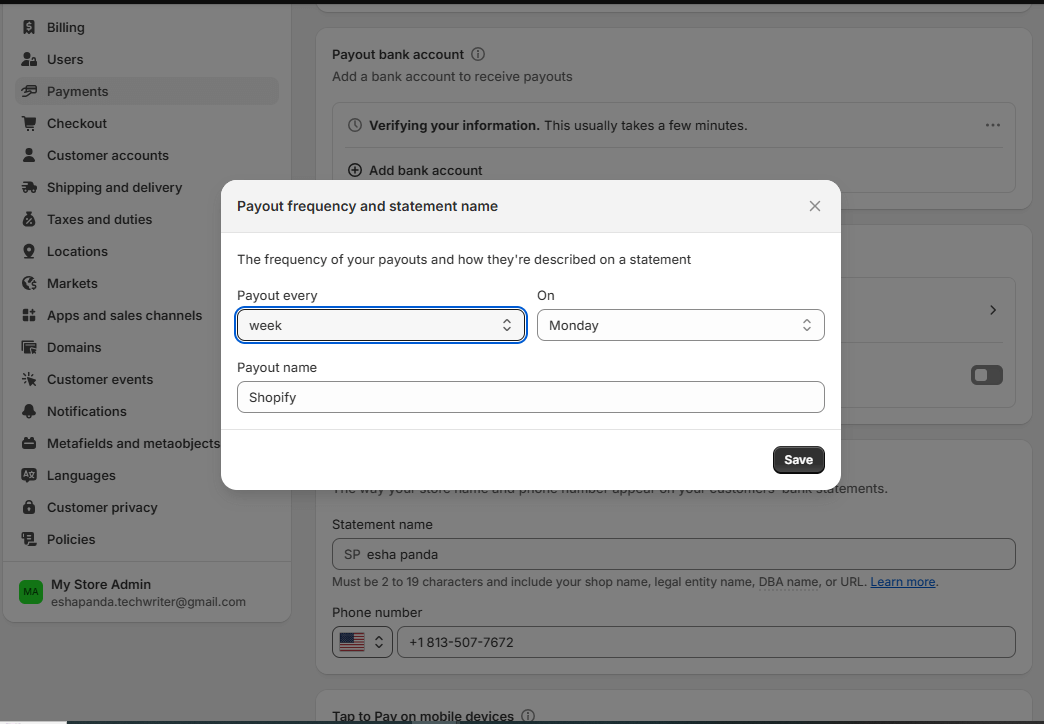
- You can choose between daily, weekly, or monthly payouts (subject to Shopify’s limits and risk profile).
- Shopify may hold your initial payouts for 5–30 days depending on the risk profile.
- You can monitor your payout holds in Shopify Admin > Payments & Payouts.
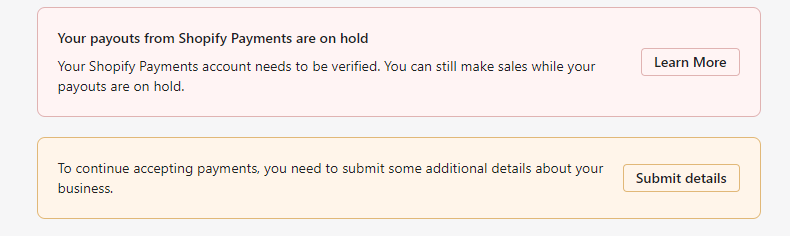
Your payouts will be on hold until your Shopify Payments account is verified. However, you can still make sales until the verification process is complete.
Step 9: Perform a Test Transaction
Before going live, perform a full end-to-end validation of your Shopify store to ensure your checkout and payment workflows function seamlessly.
| What do you need to test?
✔️ Confirm that your domain correctly routes to your store’s homepage. ✔️ Add multiple products to your cart and verify that quantities, prices, and totals update accurately. ✔️ Proceed to checkout and enter test customer details to simulate a real transaction.Validate that shipping rates are calculated and applied correctly to the order total. ✔️ Conduct a “live test purchase” to confirm your payment gateway charges the card on file and that funds are successfully transferred to your connected account. |
You can use a low-value transaction or “test mode” as shown in the image below to validate that money flows fine and no holds occur. This lets you experience the checkout process exactly as your customers will, allowing you to verify that each step functions without hitch in “real time”.
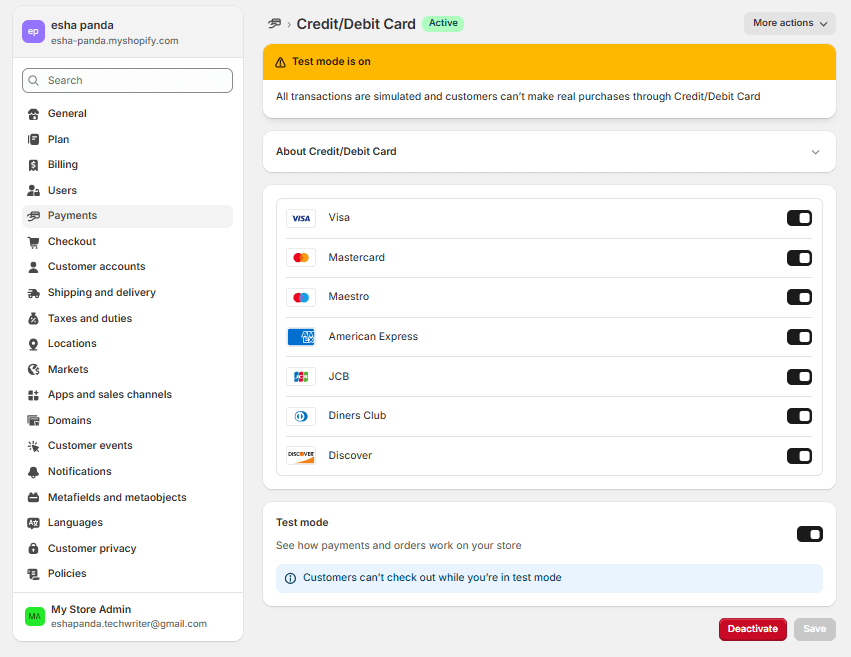
Once you’ve performed a test transaction, make sure you disable the test mode by clicking the “deactivate” button located at the bottom. Your customers won’t be able to carry out any transaction if you forget this step.
| Estimated Timeline for US Founders:
✔️ Setup and documentation: 1–3 business days ✔️ Identity and business verification: 1–5 business days ✔️ Payout activation: 1–3 days after verification Total: ~3–10 business days (depending on responsiveness and document accuracy) |
5. Setup Process for Non-US Founders (Selling in the US via US Entity)
To access Shopify Payments, non-US founders need to operate through a legally registered US entity that meets Shopify’s verification and tax compliance requirements. The steps are simple:
Step 1: Check Country Eligibility
- Confirm Shopify Payments is supported in your target operational jurisdiction (for your entity). Even non-US founders should use a US entity.
- Non-US founders cannot activate Shopify Payments solely from their home country. Many attempts fail without US presence.
Step 2: Register or Form a Business Entity in the US
- Form a US LLC or Corporation in a state of your choice (commonly Delaware, Wyoming, or Florida).
- Obtain an EIN from the IRS for your entity and ensure it remains in good standing through timely state filings and a registered agent service.
Step 3: Open a Supported Bank Account
- Open a US-based business bank account in your entity’s name that can receive USD ACH or wire transfers.
- Some US banks may require a US address, SSN/ITIN, or in-person verification.
- Where permitted, you may use virtual or fintech-based US accounts that meet Shopify’s banking standards.
Step 4: Submit Country-Specific Tax Documentation
- Use Form W-8BEN-E if your entity is foreign-owned to certify foreign status and possibly claim treaty benefits.
- If you earn “effectively connected income” (ECI), you may instead file Form W-8ECI.
- You do not file the W-8 to IRS; you submit it to the payment settlement entity (Shopify).
Step 5: Activate Shopify Payments
- In Shopify Admin > Settings > Payments, select Activate Shopify Payments for your store (which must be under the US entity).
- Enter business, tax, banking, and identity details just like US founders.
Note: Shopify may apply additional verification checks for foreign-owned entities.
Step 6: Complete Enhanced Verification
- Shopify may request further evidence of your US business presence such as a lease, proof of operations, invoices, or inventory documentation.
- Rejections often occur when entities appear inactive or purely virtual, so ensure your documentation demonstrates legitimate business activity in the US.
Step 7: Configure Currency and Payout Settings
- Set your store currency to USD and choose your payout frequency (daily, weekly, or monthly).
- Verify that payouts are directed to your linked US business bank account.
Step 8: Perform a Test Transaction
- Run a low-value transaction or use test mode to validate that payments are processed and payouts flow correctly.
- Watch for holds, verification flags, or rejections.
This step basically replicates your customers’ checkout experience in real time, confirming that the payment gateway, confirmation emails, and fund transfers all operate seamlessly.
| Regional Timelines and Notes:
✔️ Documentation preparation and entity setup: 3–7 days (or more, depending on jurisdiction) ✔️ Bank account opening: may require 1–2 weeks (or in some cases more) ✔️ Shopify identity and business verification: 3–10 business days Total: ~1–4 weeks depending on speed of entity formation, bank setup, and document compliance |
6. Troubleshooting and Rejection Scenarios
Verification holds and rejections serve as compliance safeguards within Shopify’s system. You need to identify the triggers early to address documentation gaps, provide supporting evidence, and minimize your downtime while ensuring payment continuity.
Note: Always confirm that the address linked to your account meets Shopify Payments’ criteria:
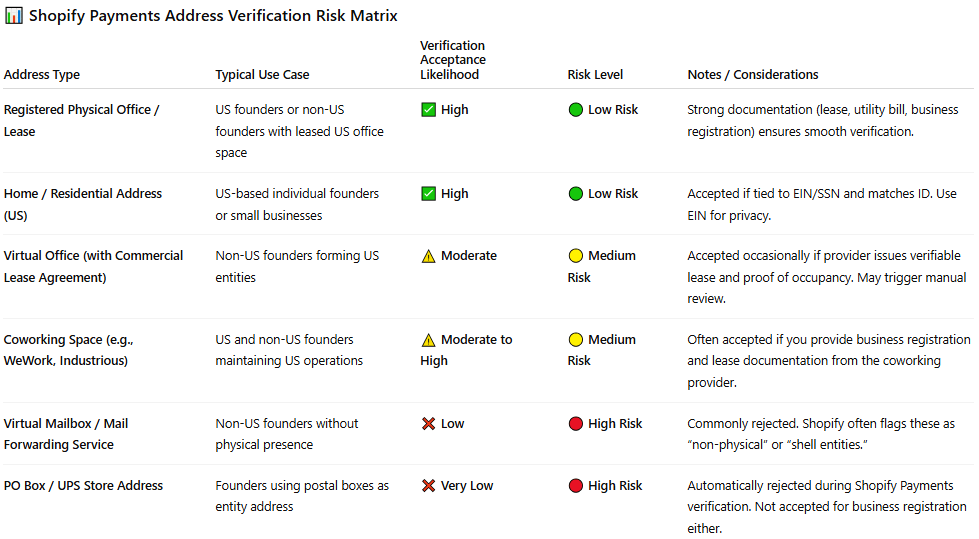
Common Verification Errors & Fixes:
Shopify flags such entities during verification because they may indicate attempts to obscure ownership, evade taxes, or bypass regional compliance, leading to payout holds or account rejection until legitimacy is proven.
Error / Scenario
Root Cause
Resolution
Identity the documents rejected
Poor image quality, mismatched name or address
Resubmit with clear scans, matching exactly your registered name and address
Business documents insufficient
Missing pages, not in English, expired registration
Provide certified translations, current registration, all pages
Bank account mismatch
Bank name or account number doesn’t match legal entity
Use bank account in same entity name; provide verification copy
Address lacking proof
Virtual mailboxes / PO Boxes flagged
Provide physical lease, utility bill, or registered agent document showing the address
“Shell entity” concern
Incorrect completion of W-8BEN or EIN mismatch
Cross-check entries, ensure form matches entity classification
What Is a “Shell Entity”?
A shell entity refers to a company that exists on paper but lacks real business operations, employees, or physical presence.
Escalation Path:
- Respond to Shopify’s document requests promptly via Shopify Admin > Payments > Requests
- If delay persists, open a support ticket specifically for Shopify Payments / Verification
- Request escalation to Shopify’s Payments Compliance Team
- Engage a US-based service provider (lawyer, CPA, entity service) to assist document packaging
7. Tax Implications: US vs. Non-US Founders
Shopify Payments doesn’t just process revenue, it connects your business to tax systems on both sides of the border. And this tax treatment varies significantly between US and non-US founders using Shopify Payments.
For US Founders
US-based founders must comply with federal tax reporting standards tied to their business structure and income source. Shopify Payments integrates directly with IRS reporting requirements, meaning your income data flows into annual reporting forms.
Tax Form: W-9
Obligations:
- Report Shopify Payments income on Schedule C (if sole proprietor) or via corporate returns (1120S, 1065, etc.)
- Shopify issues Form 1099-K to merchants meeting IRS thresholds (in 2024, that’s more than $5,000 in gross payments)
- Reconcile Shopify payout reports with your accounting records and file quarterly estimated taxes if required.
doola Tip: Use an EIN instead of your SSN for privacy, credibility, and easier scaling
For Non-US Founders
Non-US founders selling to US customers via a US entity must comply with both US tax obligations and their home country’s VAT/GST requirements.
Understanding where your income is considered “effectively connected” is critical for compliance and accurate reporting.
Tax Forms: W-8BEN for individuals, W-8BEN-E for entities
Key Implications:
- If your US LLC generates effectively connected income (ECI), you may owe US federal taxes; file Form 1120-F or 1065 accordingly.
- If you maintain no US nexus (no office, inventory, employees), your US tax exposure might be minimal, but having a US bank account and an EIN (to comply with Shopify’s requirements) still establishes a US footprint.
- VAT/GST in your home region: you need to register locally (EU VAT, UK VAT, Canada GST/HST) and remit on cross-border sales. If you have Shopify Tax activated for your business, it can assist with cross-border VAT/GST.
| How to Set Up Shopify Tax?
In your Shopify Admin, navigate to Settings → Taxes and Duties. Under Manage Sales Tax Collection, select your country or region, then click Collect Sales Tax to enable automated tax handling for your store |
doola Tip: Always maintain a clear segmentation of your US vs. non-US revenue, claim treaty benefits where applicable, and consult a US tax advisor.
| Founder Type | Required Forms | US Tax Exposure | Recommended Action |
| US founder | W-9 | Full US taxation | File 1040 (Schedule C) or entity return (1120S, etc.) |
| Non-US w/ US LLC | W-8BEN-E (or W-8ECI if ECI) | Potential ECI exposure | File 1120-F, 1065, Form 5472 reporting |
| Non-US w/o US LLC | W-8BEN | Minimal US exposure | Report income locally; ensure compliance with local tax laws |
Quick Reference Checklist
Step / Requirement
US Founders
Non-US Founders (via US entity)
Shopify plan meets minimum
✅
✅
Legal business entity (LLC, corporation, sole prop)
✅ (in US)
US LLC or corporation
US bank account under entity
✅
✅ (required)
Tax ID (EIN / SSN)
✅
EIN (and W-8BEN-E or W-8ECI)
Identity proof
✅
National ID / passport plus translation if needed
Business proof
✅
Entity registration, operations proof, address proof
Activate Shopify Payments
✅
✅ (subject to stricter review)
Identity and business verification
✅
✅ (often enhanced)
Payout schedule and configuration
✅
✅
Test transaction
✅
✅
Ongoing compliance
1099-K, US tax returns, quarterly filings
1120-F / 1065, treaty claims, local VAT/GST, US reporting
Turn Shopify Payments Into Strategic Advantage
For both US and non-US founders, the long-term reliability of Shopify Payments is tied to the accuracy of underlying records, the consistency of compliance practices, and the strength of governance around payouts and reporting.
Again, as e-commerce operations expand, payment volume, tax obligations, and financial reporting requirements increase in complexity. A high-performing payments stack must therefore be paired with disciplined bookkeeping, timely reconciliations, and a compliance framework that can withstand regulatory, banking, and platform-level scrutiny.
Now, Shopify Payments delivers speed and integrated checkout performance, but it reaches its full operational potential only when founders maintain a clean and verifiable financial backend.
doola provides this financial infrastructure. From ongoing bookkeeping and entity compliance to payout-ready documentation and tax alignment, doola equips Shopify founders with the operational rigor needed to support a scalable payments environment.
So, get ready to transform your Shopify backend into a scalable financial engine today. Sign up with doola and ensure your Shopify business runs on clean books and compliant workflows.


Table of Contents
1. Overview2. Shopify Payments Eligibility by Country3. Shopify Payments Prerequisites4. Setup Process for US Founders5. Setup Process for Non-US Founders (Selling in the US via US Entity)6. Troubleshooting and Rejection Scenarios7. Tax Implications: US vs. Non-US FoundersTurn Shopify Payments Into Strategic AdvantageHow Businesses Stay Compliant.