Amazon FBA Setup for U.S. and Non-U.S. Founders: End-to-End Process

Overview
Purpose of the Guide
This doola Doc provides a step-by-step framework for Amazon FBA setup for U.S. and non-U.S. founders. It covers registration, verification, tax documentation, shipping configuration, and compliance management, ensuring your account is approved and ready for sales without delays.
The guide is designed to:
- Simplify the Amazon Seller Central onboarding process.
- Clarify U.S. tax and identity requirements for both domestic and foreign founders.
- Help you avoid common verification and compliance issues that lead to account holds or rejections.
- Outline shipping, fulfillment, and post-launch setup steps for smooth business operations.
Who This Guide Is For
Founder Type
Description
Primary Goal
U.S. Founders
Individuals or businesses registered in the U.S. with an SSN or EIN
Launch and manage an Amazon FBA business within the U.S.
Non-U.S. Founders
Entrepreneurs or companies registered outside the U.S., selling through a U.S. entity or the Amazon Global Selling program
Enter the U.S. or global Amazon marketplaces legally and compliantly
By the end of this guide, you’ll have a fully verified Amazon FBA account, configured payouts, verified tax documentation, and a ready-to-operate fulfillment system.
Account Types and Requirements
Before starting your Amazon FBA journey, you need to choose the right account type, understand eligibility criteria, and gather the required tax and identity verification documents.
This section outlines each requirement for both U.S. and non-U.S. founders.
1. Seller Account Types
Amazon offers two main types of Seller Accounts.
Your choice determines your monthly costs, selling privileges, and access to FBA (Fulfillment by Amazon).
| Account Type | Monthly Fee | Per-Item Fee | FBA Access | Best For |
| Individual Seller Account | No monthly fee | $0.99 per item sold | ❌ Limited | Hobby sellers, small-volume sellers (<40 units/month) |
| Professional Seller Account | $39.99/month (flat) | No per-item fee | ✅ Full | Established businesses, e-commerce brands, and FBA users |
📌 Recommendation: If you plan to use FBA or sell more than 40 items per month, a Professional Seller Account is required.
You can register directly at Amazon Seller Central – Sign Up.
2. Supported Business Entity Types
To sell on Amazon, whether as a U.S. or non-U.S. founder, you must accurately declare your business entity type during registration.
| Founder Type | Accepted Entity Types | Examples |
| U.S. Founders | LLC, Corporation, Sole Proprietorship, S-Corp | “ABC Products LLC” or “John Doe Sole Proprietor” |
| Non-U.S. Founders | Local business entity (Ltd, Pvt Ltd, GmbH, SAS, etc.) or U.S.-registered entity | “XYZ Pvt Ltd (India)” or “XYZ LLC (Delaware, USA)” |
Amazon validates business legitimacy through business registration documents and tax identification numbers.
📎 Official Reference: Amazon Seller Identity Verification Policy
📎 Official Reference for Global Founders: Global seller identity, address, and business verification
3. Tax & Identity Verification
Amazon requires all sellers to complete tax information interviews and provide identity verification before listings go live.
Tax Information Requirements
Founder Type
Required Tax ID
IRS Form Used
U.S. Founders
SSN (individuals) or EIN (business entities)
Form W-9
Non-U.S. Founders
EIN (if registered in the U.S.) or foreign/local tax ID
Form W-8BEN (individuals) / W-8BEN-E (entities)
During onboarding, you’ll be prompted to complete the Amazon Tax Information Interview.
Identity Verification
You must provide clear, valid documents that match your legal business information.
Accepted Documents:
- Government-issued photo ID (passport, driver’s license, or national ID)
- Recent proof of address (utility bill or bank statement dated within 90 days)
- Business registration document or certificate of incorporation
doola Tip: All documents must be in English or accompanied by a certified English translation.
4. Regional Eligibility & Marketplace Options
Amazon supports sellers in multiple global regions. The marketplace you choose determines your payment currency, tax obligations, and the fulfillment centers available to you.
| Region | Primary Marketplaces | Unified Account Feature |
| North America | U.S., Canada, Mexico | ✅ Unified (NA Unified Account) |
| Europe | UK, Germany, France, Italy, Spain, Netherlands, Poland, Sweden | ✅ Unified (EU Unified Account) |
| Asia-Pacific | Japan, Singapore, Australia, India | ❌ Separate per country |
| Middle East | UAE, Saudi Arabia | ❌ Separate per country |
📎 Official Reference: Amazon Global Selling – Supported Marketplaces
Cross-Registration Capabilities
If you register a North America Unified Account, you can manage inventory, listings, and pricing across the U.S., Canada, and Mexico without separate accounts.
Similarly, a Europe Unified Account lets you manage multiple European marketplaces from a single dashboard in Amazon Seller Central EU.
Summary Table: Core Requirements
Requirement
U.S. Founders
Non-U.S. Founders
Business Entity
LLC, Corp, Sole Prop
Local entity or U.S. entity (LLC/Corp)
Tax ID
SSN or EIN
EIN or local tax ID
ID Verification
Passport / Driver’s License
Passport / National ID
Bank Account
U.S.-based ACH-enabled
U.S. or multi-currency (Payoneer, Wise)
Credit/Debit Card
Required
Required
FBA Access
Available via Professional plan
Available via Professional plan
Tax Form
W-9
W-8BEN / W-8BEN-E
Prerequisites
Before you begin the Amazon FBA registration process, ensure that your business, financial, and product documentation are in order.
Completing these prerequisites early helps avoid verification delays, rejected applications, or account suspensions later.
These requirements apply to both U.S. and non-U.S. founders, with slight variations based on your entity type and location.
1. Registered Business Entity
You must have a legally recognized business entity before registering as an Amazon seller.
| Founder Type | Entity Requirement | Examples / Notes |
| U.S. Founders | LLC, Corporation, or Sole Proprietorship | Register with your Secretary of State. See U.S. Business Registration Guide. |
| Non-U.S. Founders | Local legal entity (e.g., Pvt Ltd, Ltd, GmbH) or U.S.-registered entity (LLC/Corp) | Non-U.S. founders forming a U.S. LLC can apply through their state’s Secretary of State website or IRS EIN application portal. |
doola Tip: If you’re selling primarily in the U.S. marketplace, forming a U.S.-based LLC often simplifies tax and banking requirements.
2. Valid Tax Identification Number (Tax ID)
Amazon requires a valid tax ID to verify your business for U.S. or international compliance.
| Founder Type | Accepted Tax IDs |
| U.S. Founders | EIN (Employer Identification Number) or SSN (Social Security Number) |
| Non-U.S. Founders | EIN (if registered U.S. entity) or local tax ID (TIN, GSTIN, etc.) |
📎 Resources:
3. Business Bank Account
To receive payouts from Amazon, you’ll need a bank account in a supported region and currency.
| Account Type | Accepted For | Notes |
| U.S. Checking Account | U.S. founders | Must support ACH transfers in USD. |
| Multi-Currency Account (e.g., Wise, Payoneer) | Non-U.S. founders | Must support USD payouts and verification. |
| U.S. Entity Account (e.g., Mercury) | Non-U.S. founders with U.S. LLCs | Ideal for seamless Amazon deposits in USD. |
📎 Resources:
4. Government-Issued ID
All Amazon seller accounts require identity verification. Accepted documents include:
- Passport (preferred for non-U.S. founders)
- Driver’s license (for U.S. founders)
- National ID (if not using a passport)
Make sure:
- The document is valid (not expired)
- All four corners are visible in the upload
- The name matches your Seller Central account exactly
5. Business Address Proof
Amazon uses address verification to prevent fraud. You’ll receive a verification postcard or email depending on your region.
Accepted Proofs:
- Recent utility bill within 90 days(electricity, gas, internet)
- Lease agreement
- Business registration certificate
- Bank statement with visible business address
📎 Reference: Amazon Address Verification Policy
6. Valid Credit or Debit Card
Amazon requires a valid internationally chargeable credit or debit card to charge subscription and FBA fees.
Ensure the card:
- Has sufficient available credit
- Matches the name and address on your account
- Is issued by a recognized provider (Visa, Mastercard, Amex)
doola Tip: Use a business credit card to simplify expense tracking.
7. Product Readiness
Before listing your first item, make sure each product meets Amazon’s listing and fulfillment requirements.
Checklist for Product Readiness:
- UPC or GTIN from a verified GS1 provider (GS1 US)
- Product images that meet Amazon’s Image Requirements
- Product packaging details (weight, dimensions, materials)
- Hazmat classification (if applicable)
Note: If your products are custom-made or unbranded, apply for a GTIN exemption directly in Seller Central: Amazon GTIN Exemption Request
Pre-Setup Summary Checklist
| Requirement | U.S. Founders | Non-U.S. Founders |
| Registered Entity | LLC / Corporation | Local or U.S. LLC / Corporation |
| Tax ID | EIN / SSN | EIN / Foreign Tax ID |
| Bank Account | U.S.-based USD account | U.S. or multi-currency account |
| ID Proof | Government-issued ID | Passport or National ID |
| Address Proof | Utility bill, lease | Same + translation if non-English |
| Credit Card | U.S. or international | Internationally chargeable |
| UPC / Product Readiness | GS1 code, packaging | Same |
FBA Setup Process for U.S. Founders
This section outlines the exact steps U.S.-based founders must follow to create, verify, and activate their Amazon FBA (Fulfillment by Amazon) account.
Follow each step in order to avoid delays or verification rejections.
Step 1: Create an Amazon Seller Central Account
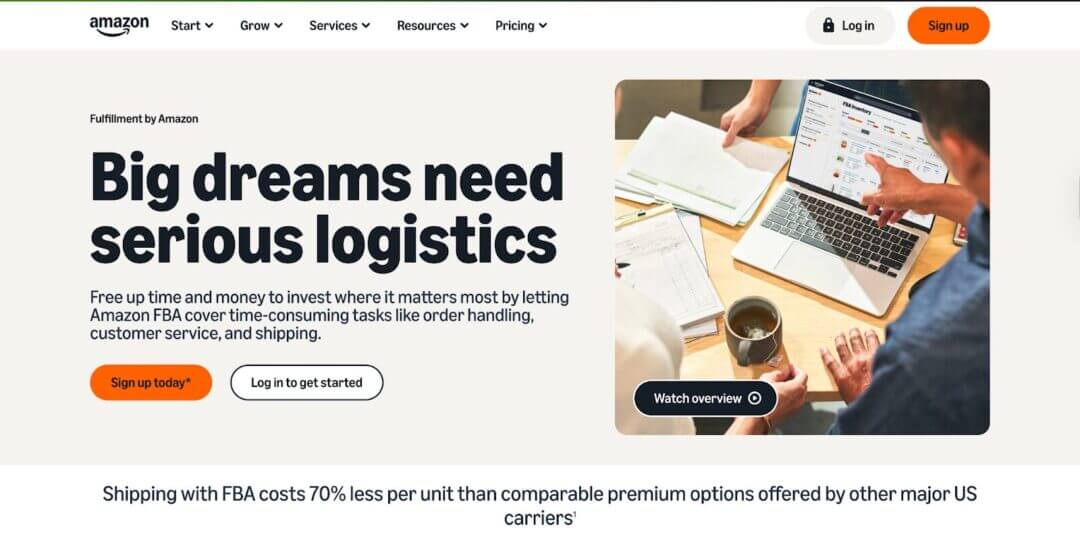
- Go to sellercentral.amazon.com.
- Click “Sign Up” to create a new account by entering your business mobile number or email.
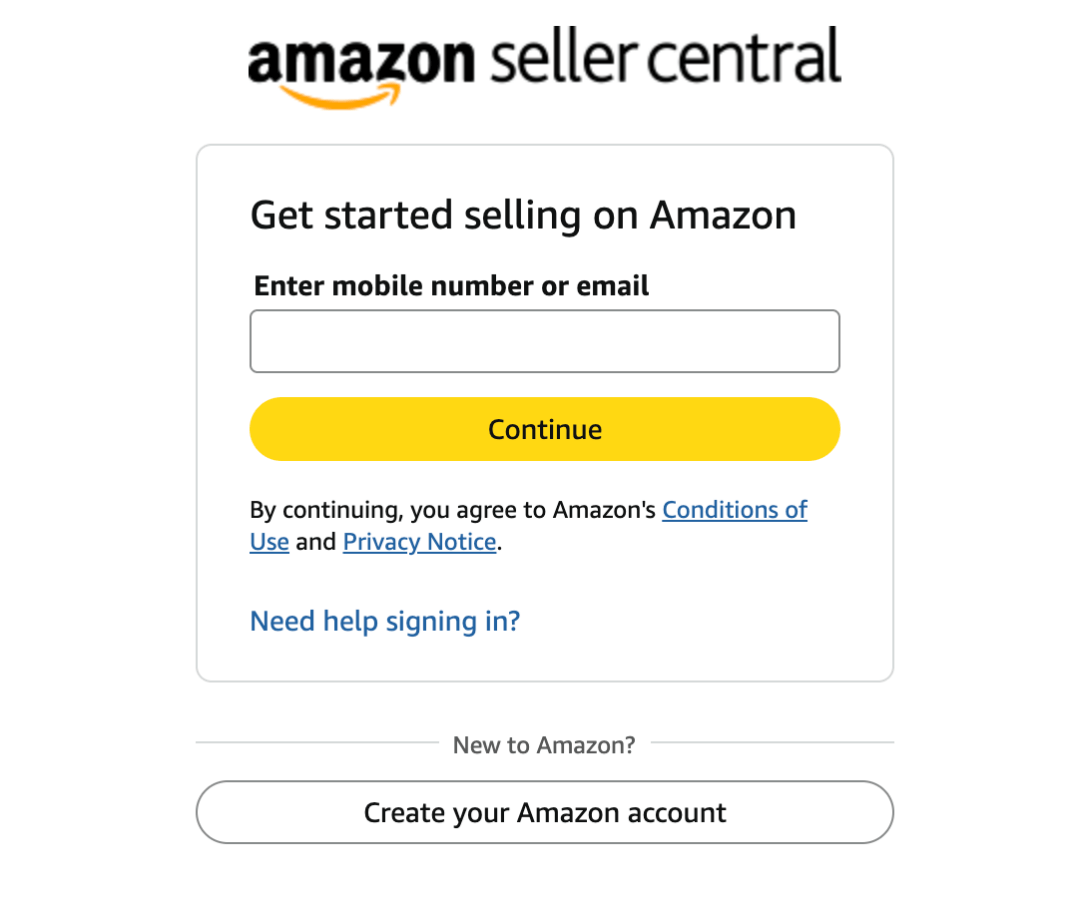
- Enter the verification code sent to your email or mobile number.
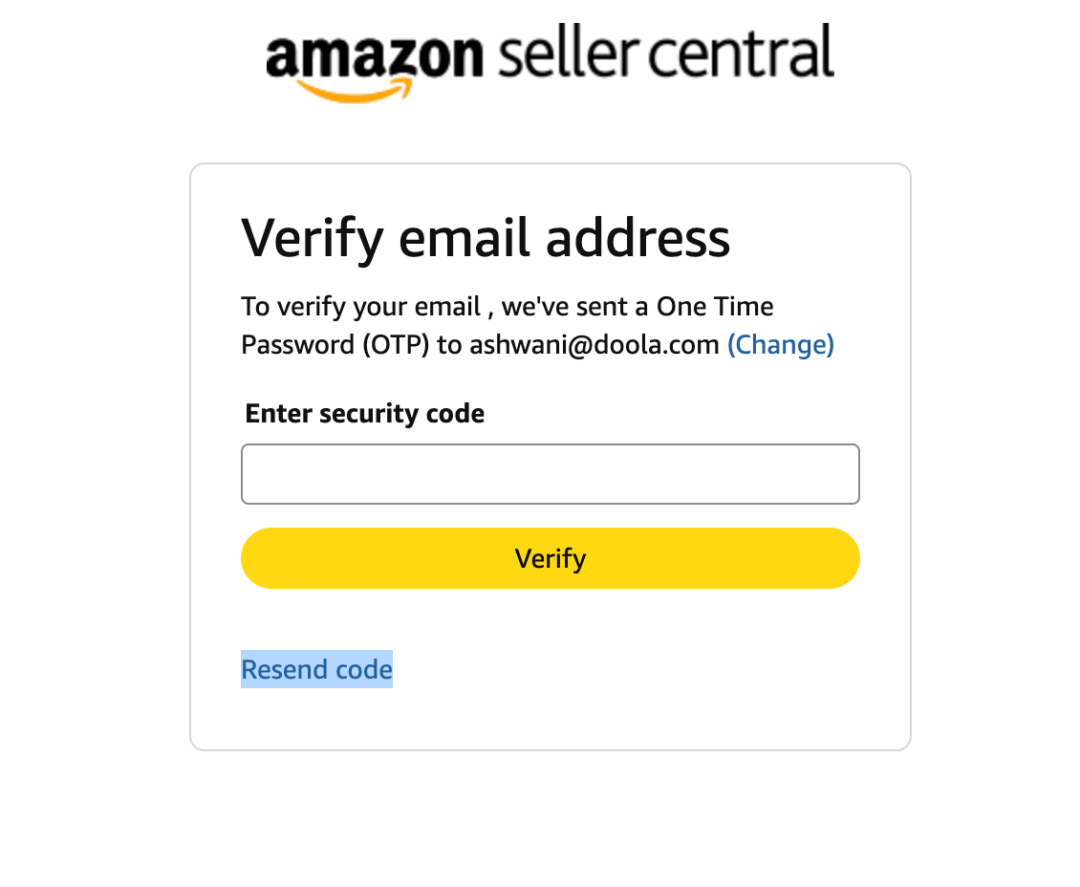
4. Once your email is verified during the signing process, you’ll be directed to complete the mandatory two-step verification process using your mobile number.
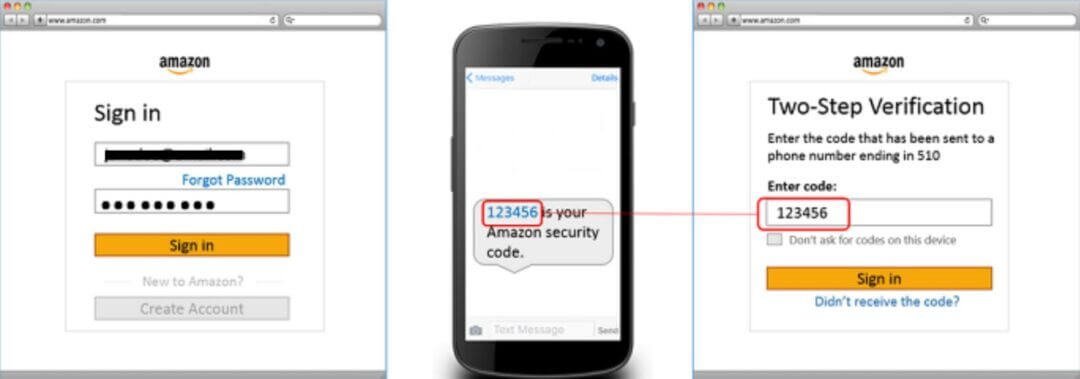
5. After successfully completing verification, you’ll be directed to start the setup process.
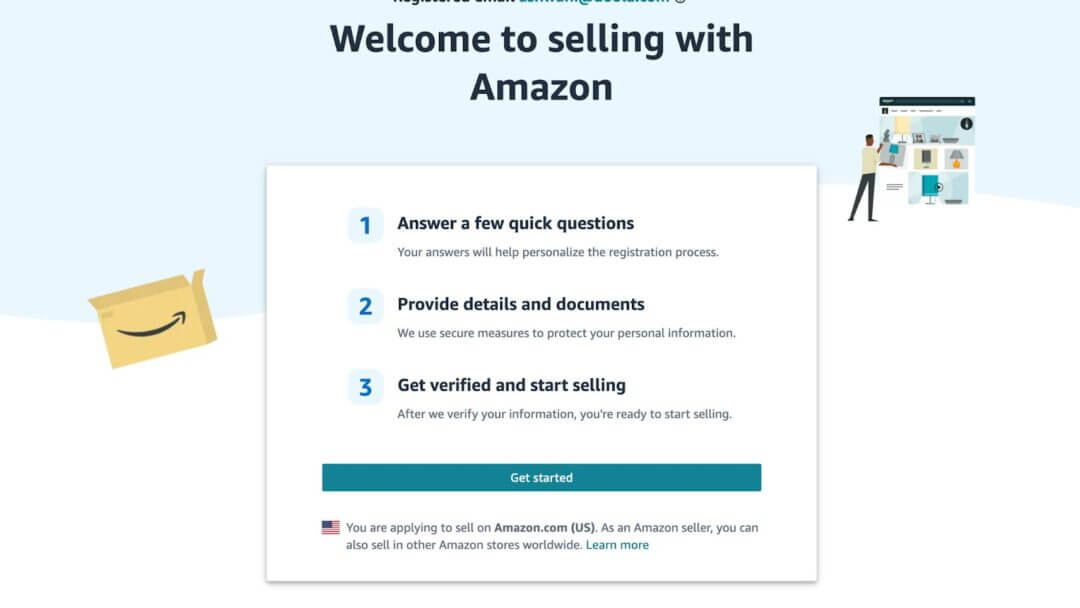
6. Click on Get started and select the type of your business.
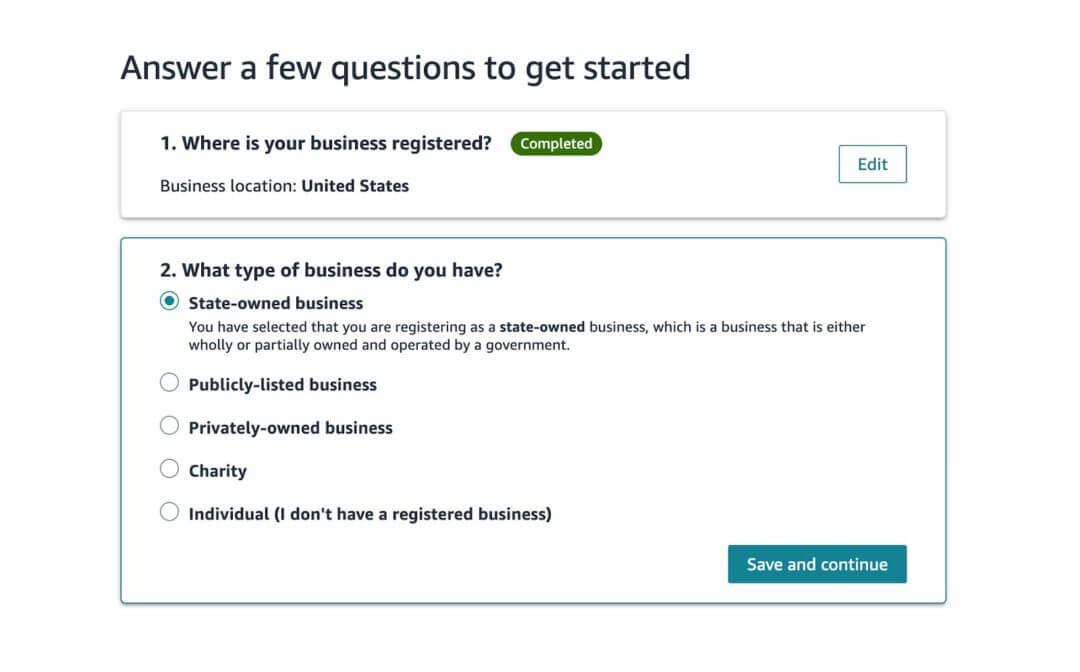
If you’re selling as a business, select Professional Seller Account ($39.99/month, recommended for FBA sellers).
If you’ll be selling an individual, select Individual Seller Account (no monthly fee, limited features)
7. After selecting your business type, you’ll be redirected to enter your legal name, email address, and primary contact information.

8. After entering all the information in the relevant fields, click on the “Next” button to proceed further.
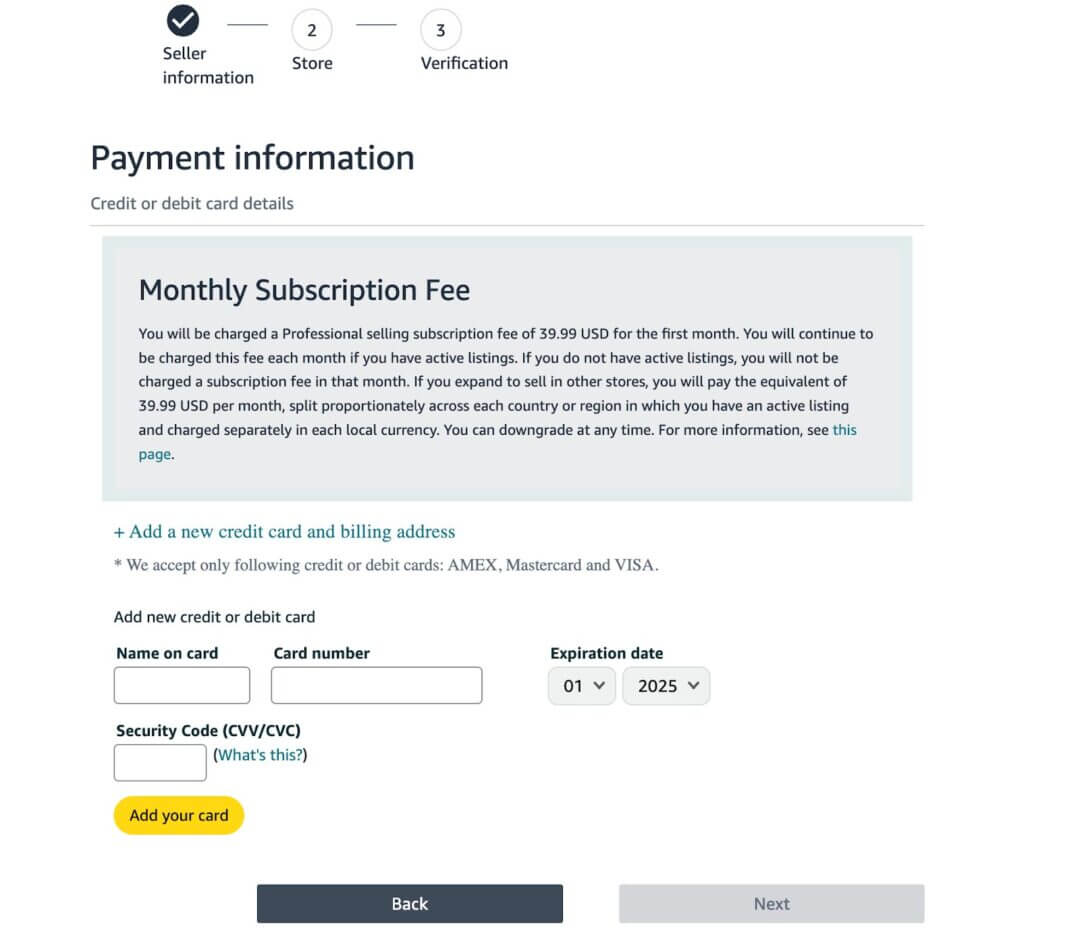
9. Enter your credit or debit card information, such as name on card, card number, expiration date, and security code.
10. Click the Next button to complete the payment and proceed to the next step.
📎 Official Resource: Amazon Seller Account Registration
Step 2: Verify Identity and Tax Information
After creating your account, complete the Tax Interview and verification process in Seller Central.
The interview is designed to obtain the information required to complete an IRS W-9, W-8, or 8233 form to determine if your payments are subject to IRS Form 1099-MISC or 1042-S reporting.
In order to fulfill the IRS requirements as efficiently as possible, answer all questions and enter all information requested during the interview.
Use caution to avoid misspellings or entering incorrect Tax Identification Numbers, which can result in an invalidated tax form.
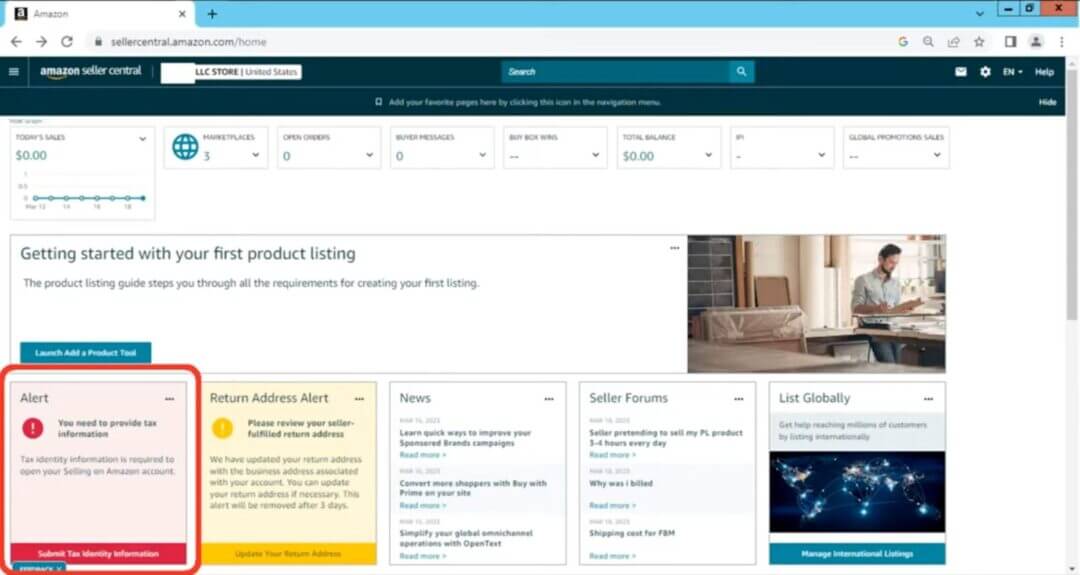
- Navigate to Settings → Account Info → Tax Information.
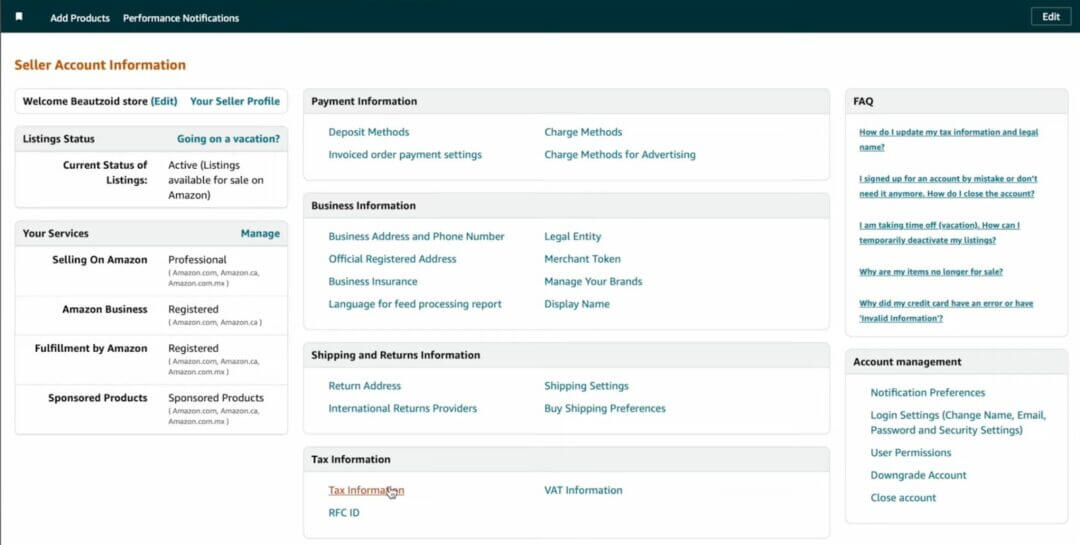
- Start and complete the Tax Interview Wizard to provide business and tax details.
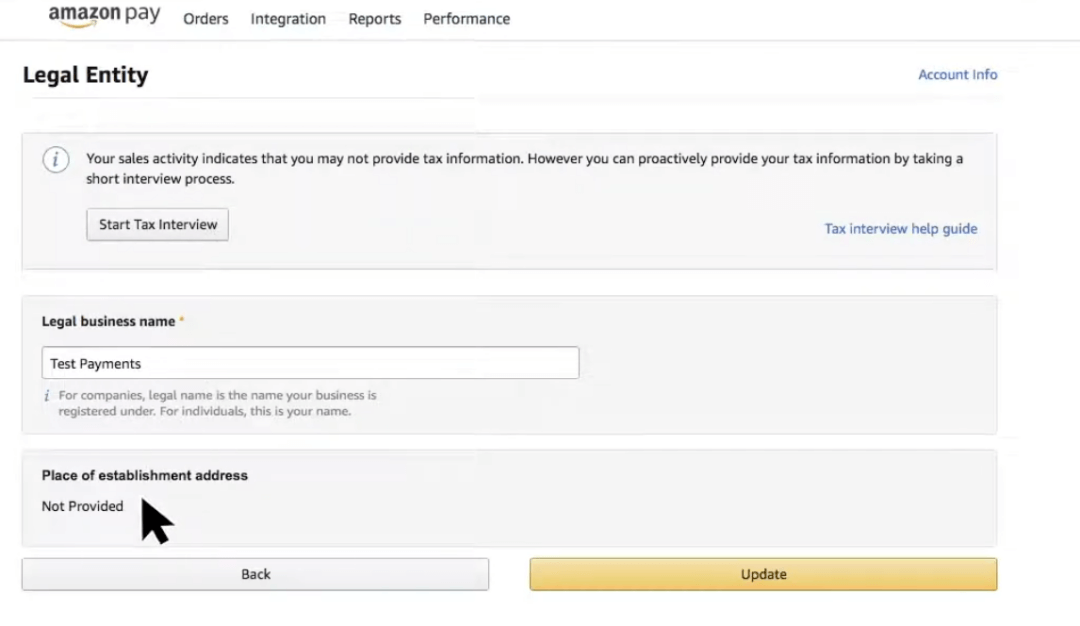
- Select your business type (individual or business) and type of residence (U.S. or non-U.S.).
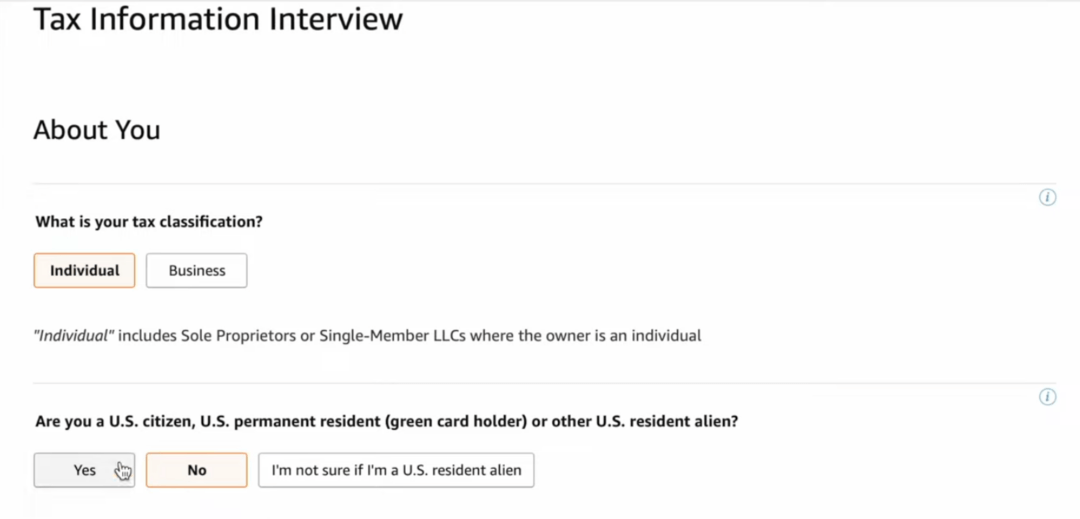
- Provide your Tax Identity Information which includes name, business name, and address.
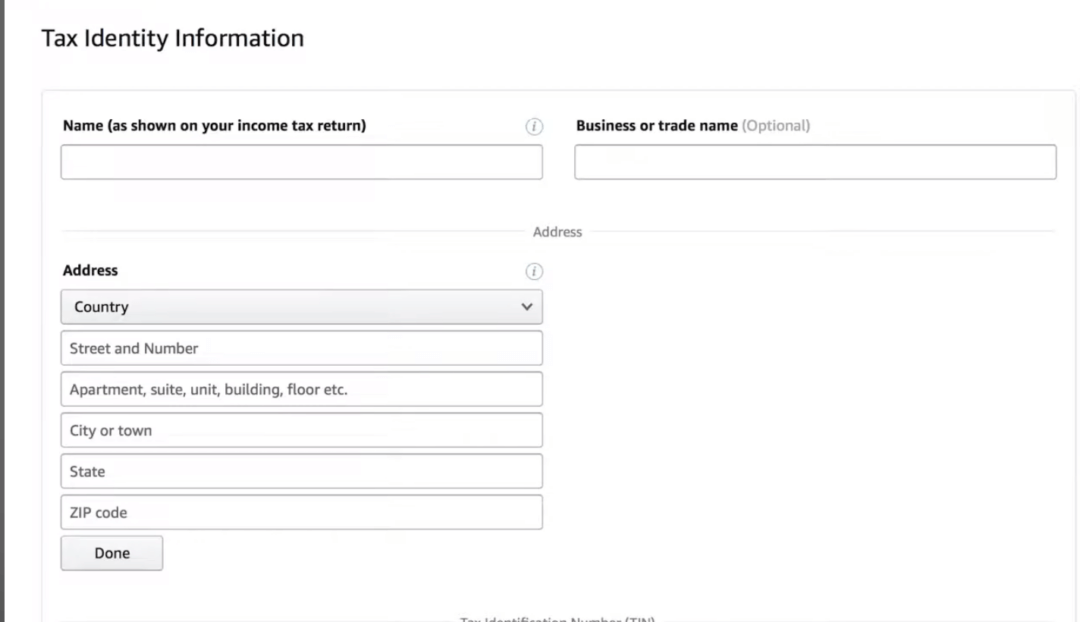
- Provide your EIN (Employer Identification Number) or SSN/ITIN if operating as an individual. Click on continue.
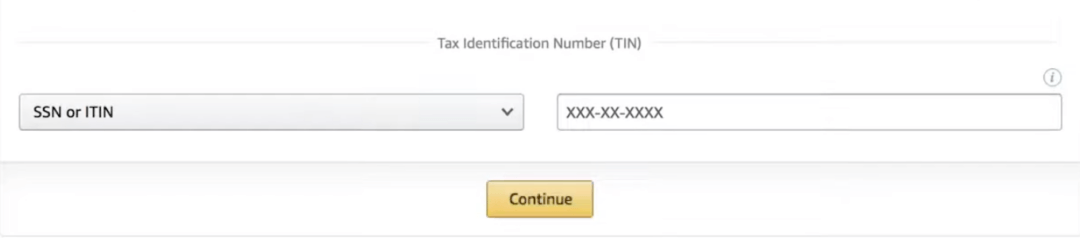
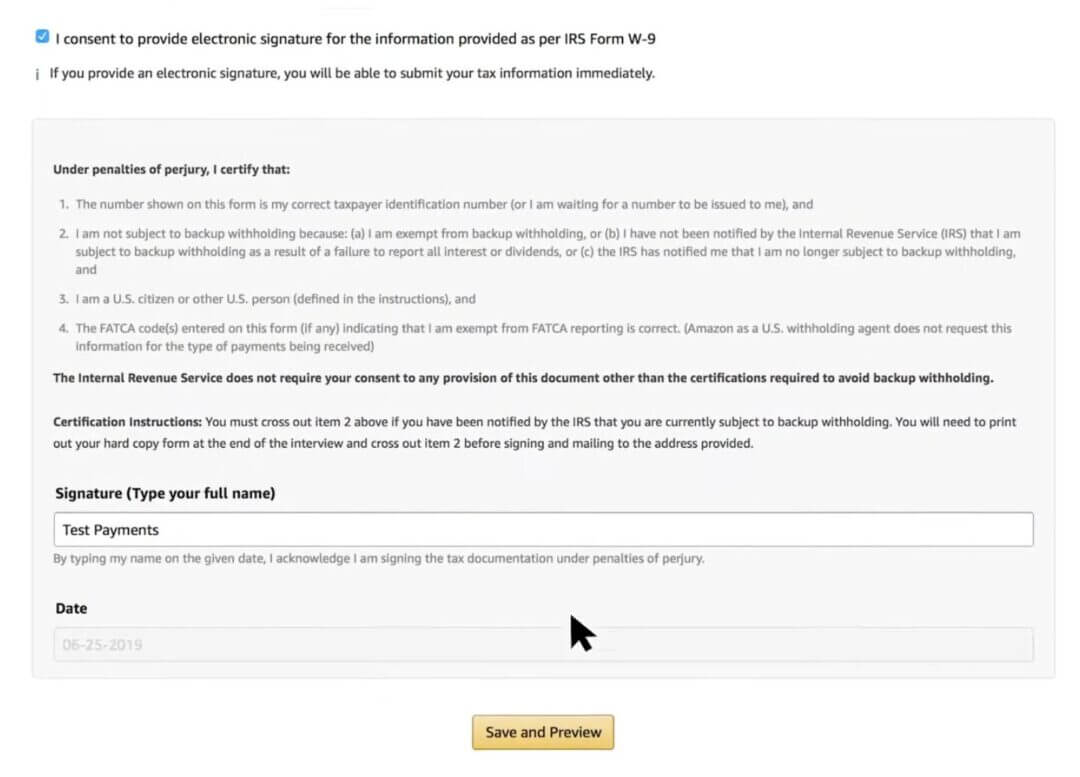
- Sign IRS Form W-9 electronically and click on Save and Preview. (Amazon provides the form within Seller Central).
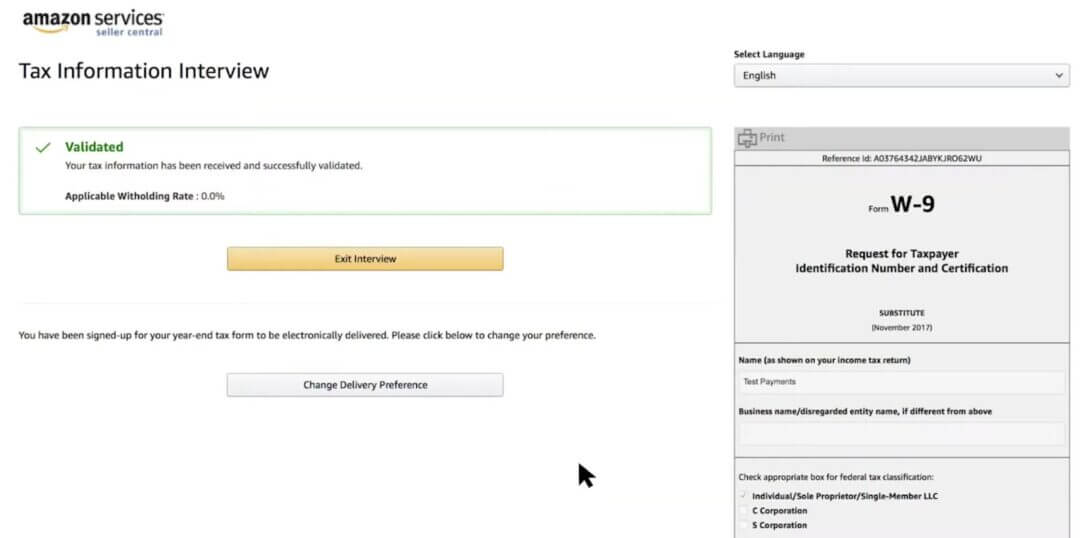
- Your Tax Interview is now complete. Click on Exit Interview.
doola Tip: Ensure your legal business name matches your tax ID and registration documents exactly, since even minor inconsistencies can delay approval.
📎 Resources:
Step 3: Add Payment and Deposit Details
You must add a U.S.-based checking account for receiving Amazon payouts and a credit/debit card for paying subscription and FBA fees.
- Go to Settings → Accounts Info → Bank information.
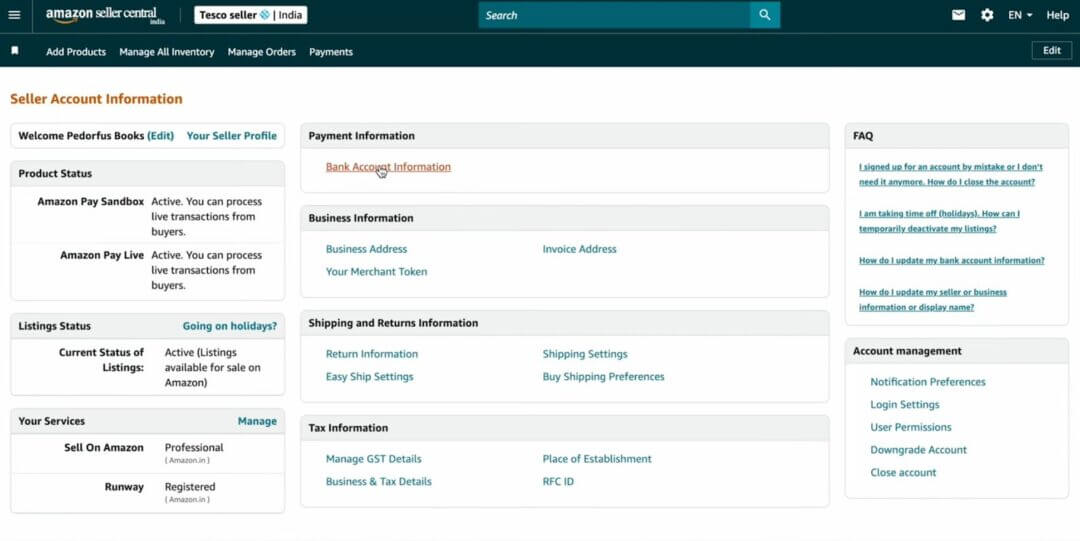
- Click on Add new deposit method. You will need a valid bank account number, which will be used to easily deposit and withdraw money between your bank account and your Amazon Payments account.
Note: Your bank account should be in the name of the primary contact or the business name provided to Amazon.
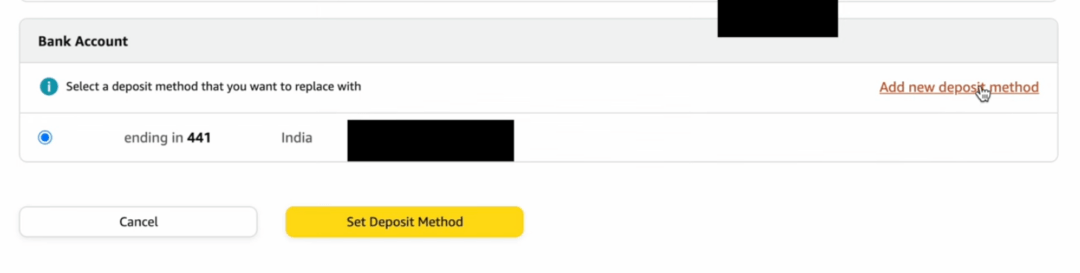
- Add your U.S. bank account, which should be in the name of the primary contact or business name provided to Amazon.
- To verify your bank account, you will need your online banking credentials, such as: bank name, routing number and account number.
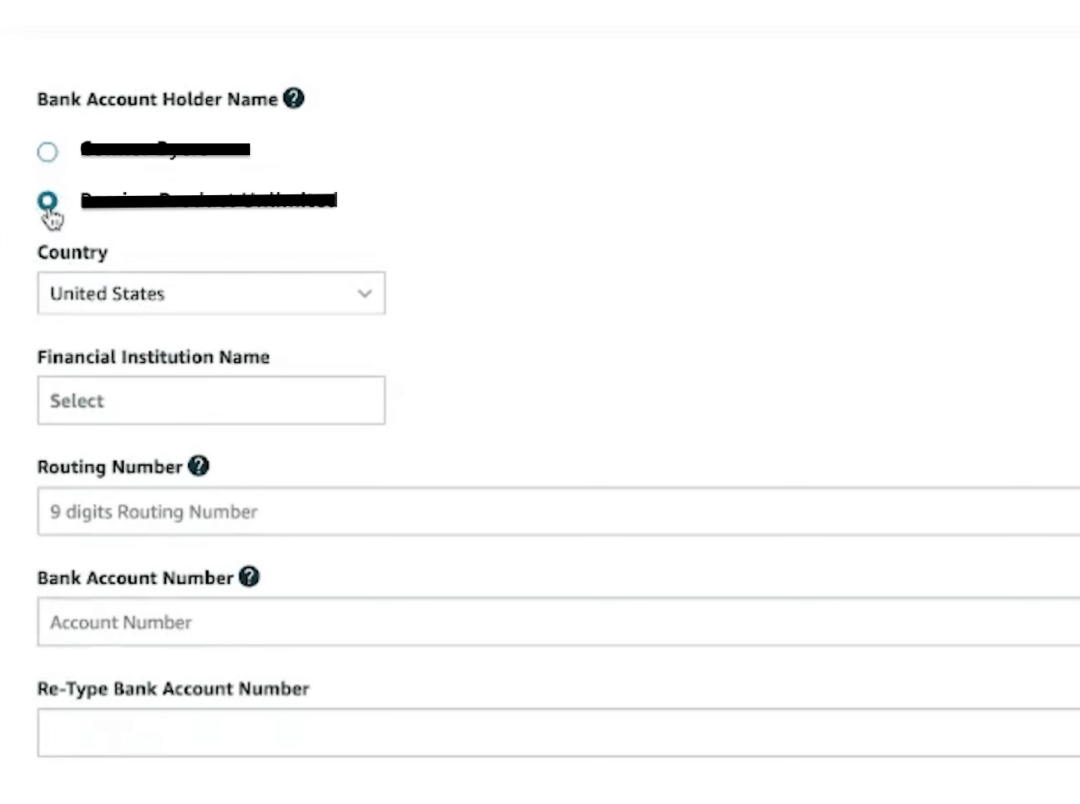
- Amazon will make micro-deposits (two small test deposits) to verify your account.
- Enter the deposit amounts in Seller Central to confirm verification.
- Add a valid credit/debit card for recurring charges under Settings → Charge Methods.
doola Tip: Use a dedicated business bank account (not a personal one) to ensure cleaner bookkeeping and easier tax reporting.
Step 4: Set Up FBA (Fulfillment by Amazon)
Once your seller account is verified, enable Fulfillment by Amazon (FBA).
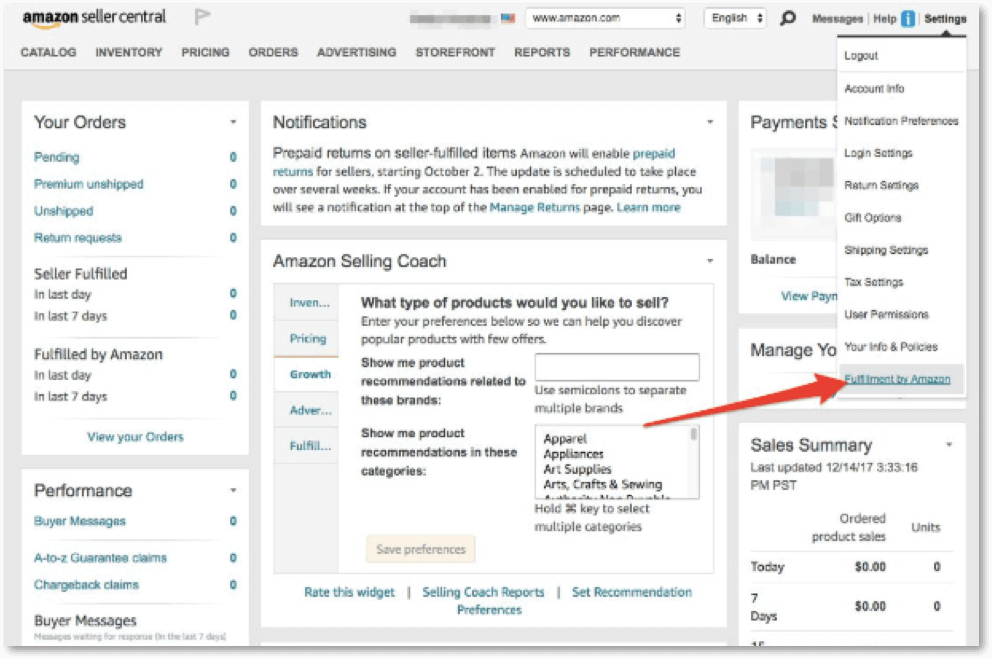
- Go to Settings → Fulfillment by Amazon.
- Click “Register for FBA.”
- Review and accept FBA’s terms and conditions.
- Set your default return address (must be a U.S. address).
- Choose your fulfillment settings:
- Stickered vs. Stickerless Inventory: Decide whether you’ll label products yourself or let Amazon do it.
- Prep Options: Select who will prepare your products. You or Amazon (for an extra fee).
📎 Reference: Fulfillment by Amazon Setup Guide
Step 5: Prepare and Ship Inventory
Before your first shipment, configure your inventory for FBA.

- Go to Inventory → Manage FBA Shipments.
- Create a new shipping plan for your products. Log in to your Seller Central account, navigate to the “Inventory” tab at the top, and select “Send/Replenish Inventory” from the dropdown menu.
- You’ll now be directed to a page where you can either create a “New Shipping Plan” or add to an existing plan.
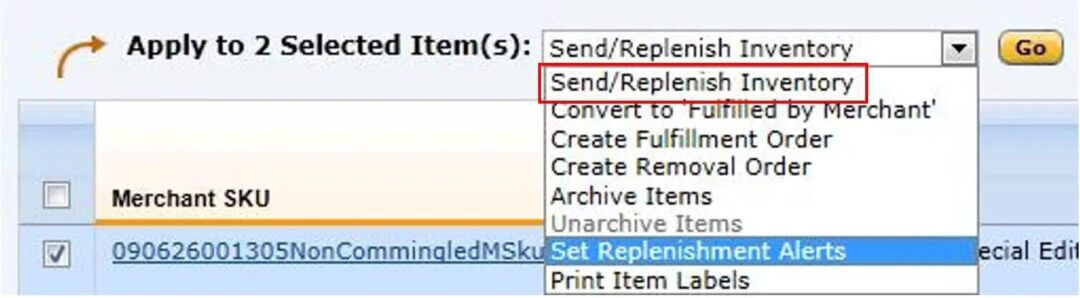
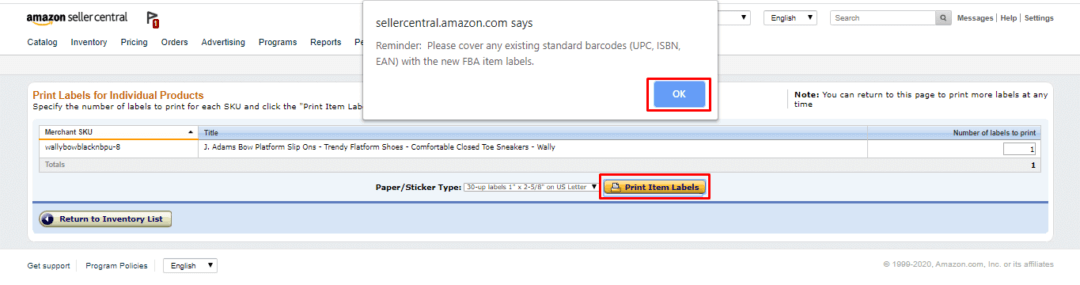
- Print and apply FNSKU barcodes (Amazon’s internal tracking code) to each product. You can print these from the Manage FBA Inventory section. Navigate to Inventory → Manage Inventory, find your product, and select “Print Item Labels” from the dropdown menu.
- Choose who prepares the products:
- Merchant (You): You label and prep products before shipping.
- Amazon (FBA Prep Service): Amazon prepares and labels for a fee.
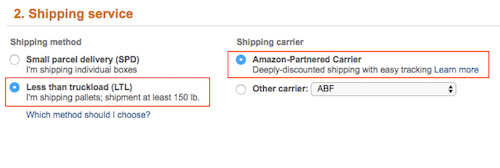
- Select a shipping carrier:
- Amazon Partnered Carrier (UPS preferred): Discounted rates and easy tracking.
- Non-partnered carrier (FedEx, DHL, etc.): Manual tracking entry required.
- Ship your products to the Amazon Fulfillment Center assigned to your region.
📎 Reference: Amazon FBA Shipping & Prep Requirements
Pro Tip: Always double-check your FBA shipment labels, as mismatched or missing labels can cause delays and incur additional fees.
Step 6: Launch Products and Manage Orders
Once your inventory is checked in, your listings will go live.
Under the Available column, you can view all the items that are “in stock” at a glance, as shown in the image below.

Once your first product gains traction, it’s time to shift gears from launching to scaling. From here on, it’s mainly about transforming your FBA business from a newly launched store into a thriving brand.
- Enable inventory restock alerts in Seller Central.

- Your Amazon sales dashboard lets you monitor your sessions, conversion rate, and ad spend to see what’s working, and double down on what’s driving real results. Monitor:
- Order defect rate (ODR)
- Late shipment rate (LSR)
- Buyer feedback
doola Tip: Aim for Prime eligibility since fast shipping boosts ranking and sales visibility.
Estimated Timeline
Task
Estimated Time
Account setup
1–2 business days
Verification (tax, ID)
3–5 business days
Inventory prep and shipping
5–10 business days
FBA check-in and activation
2–3 business days post-receipt
Quick Recap: U.S. Founder FBA Setup Workflow
- Register on Seller Central
- Complete Tax Interview (W-9 form)
- Add bank and card details
- Enable Fulfillment by Amazon (FBA)
- Prepare and ship inventory with proper labeling
- Launch listings and monitor performance metrics
FBA Setup Process for Non-U.S. Founders
If you are a non-U.S. founder planning to sell to U.S. customers through Amazon FBA, you must operate either as a local business entity (in your home country) or a U.S.-registered entity.
This section outlines the steps to set up and activate your FBA account as an international seller.
Step 1: Check Country Eligibility
Before registering, confirm that your country is supported under Amazon Global Selling.
Amazon restricts registration from certain countries for compliance and payment processing reasons.
- Visit the Amazon Global Selling: Supported Countries List.
- Check if your country is listed under eligible selling regions (North America, Europe, Asia-Pacific, or the Middle East).
- If your country is not supported, you must form a U.S.-based entity to gain access to Amazon.com.
- Review any withholding tax agreements between your country and the U.S. to understand how your earnings may be taxed.
📎 Reference: Amazon Global Selling Program
doola Tip: Even if your country is eligible, using a U.S. LLC can simplify FBA setup, tax filing, and banking.
Step 2: Register as an International Seller
- Go to Seller Central – Start Selling and sign up using either a mobile number or an email address.
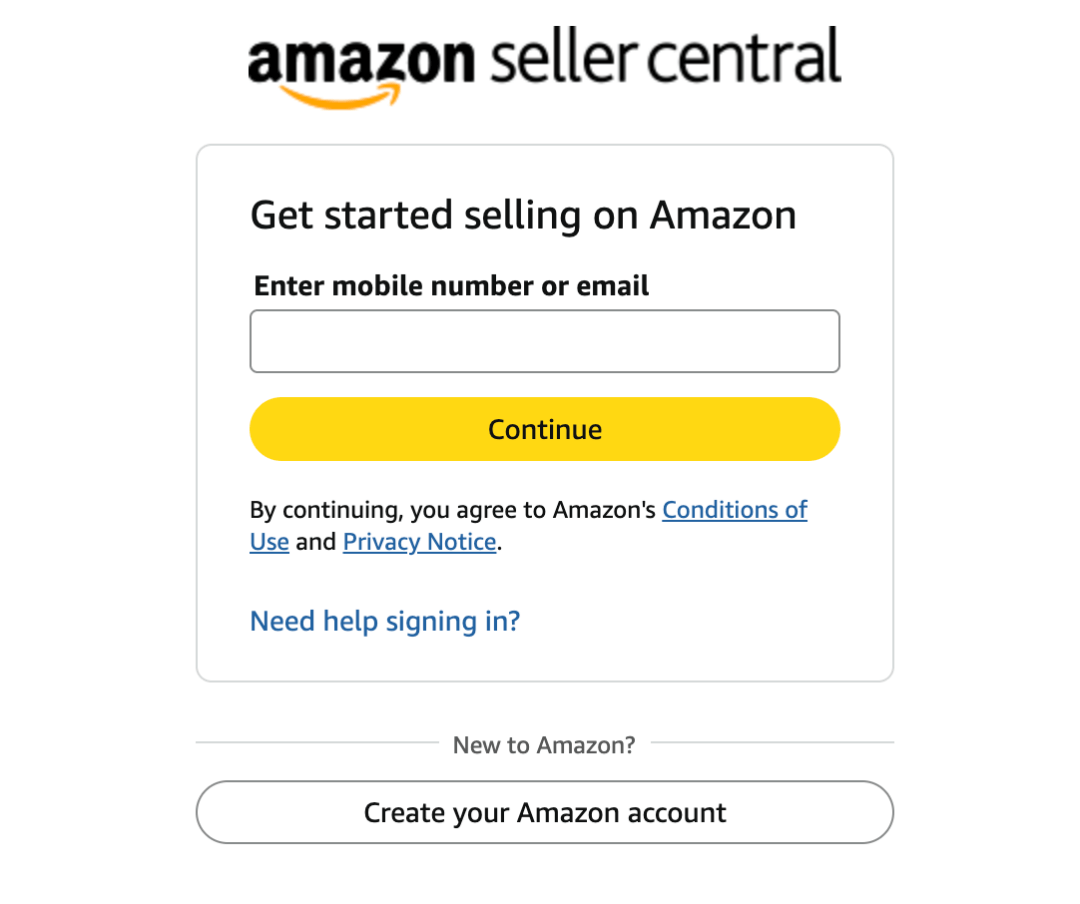
- Go to sellercentral.amazon.com.
- Click “Sign Up” to create a new account by entering your business mobile number or email.
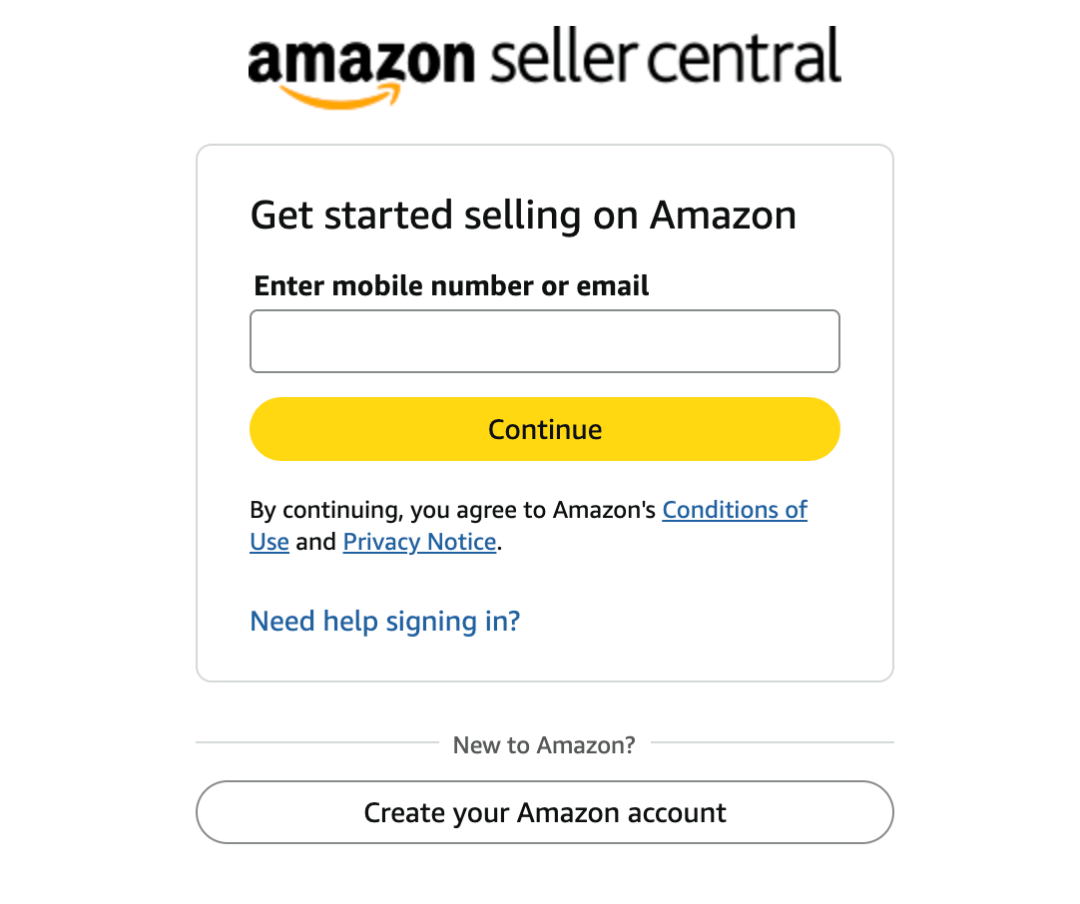
- Enter the verification code sent to your email or mobile number.
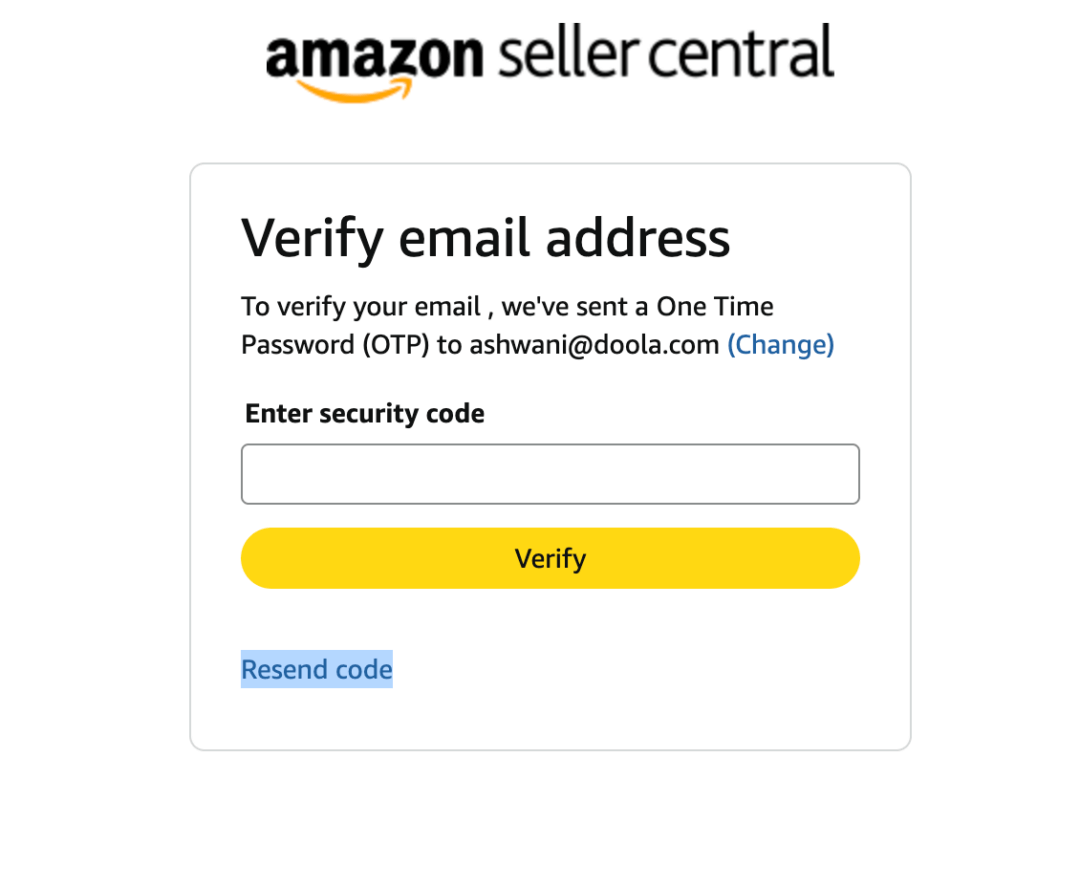
7. Once your email is verified during the signing process, you’ll be directed to complete the mandatory two-step verification process using your mobile number.
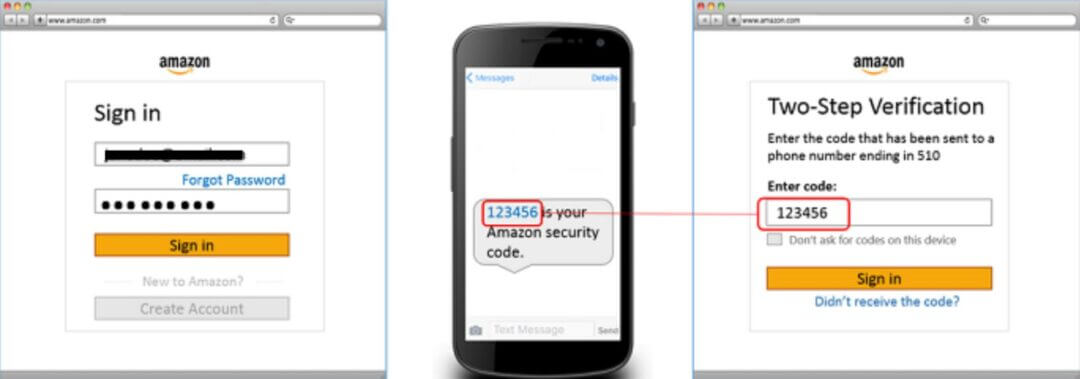
8. After successfully completing verification, you’ll be directed to start the setup process.
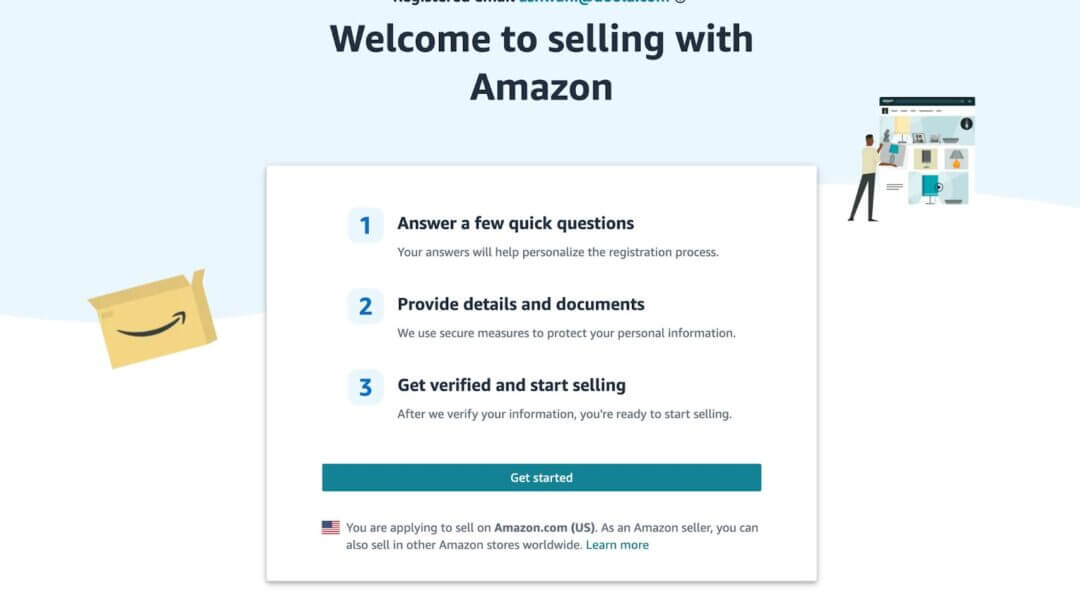
9. Click on Get started and select the type of your business.
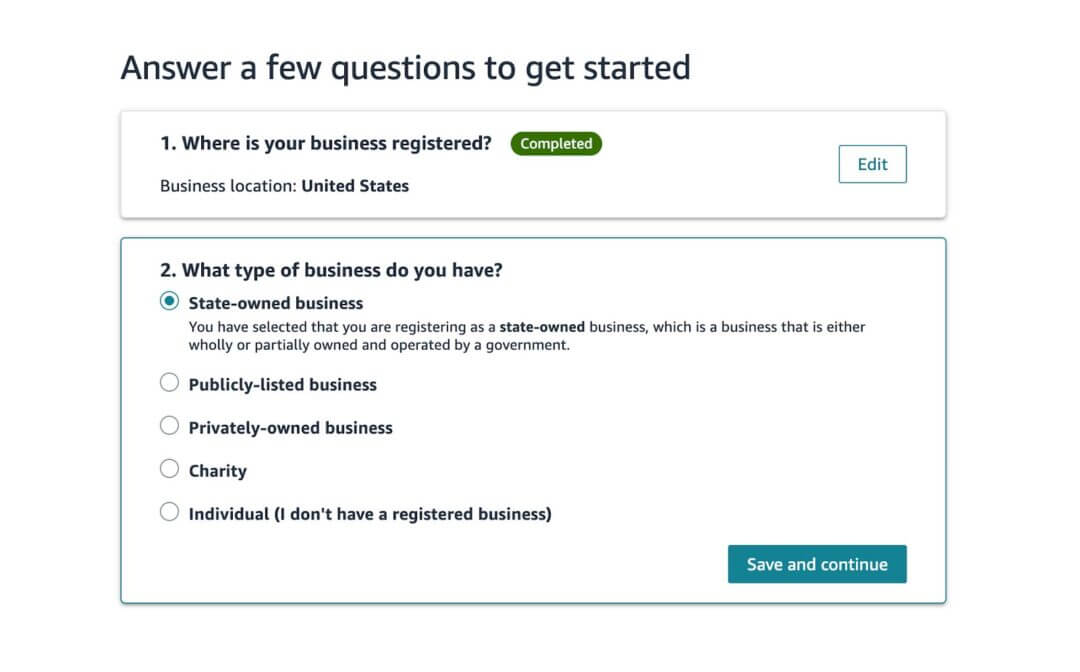
- If you’re selling as a business, select Professional Seller Account ($39.99/month, recommended for FBA sellers).
- If you’ll be selling an individual, select Individual Seller Account (no monthly fee, limited features)
10. After selecting your business type, you’ll be redirected to enter your primary contact information.
- Business name (exactly as it appears on your legal registration documents)
- Registered business address
- Phone number (international format)
- Email and password
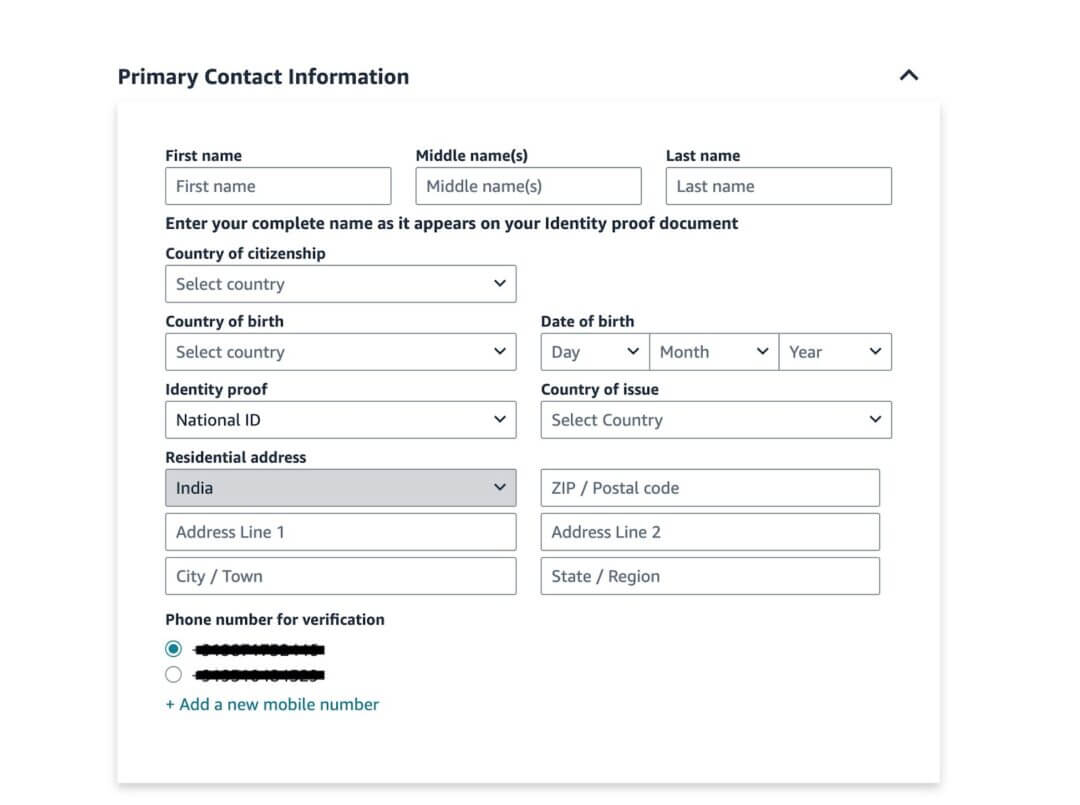
11. After entering all the information in the relevant fields, click on the “Next” button to proceed further.
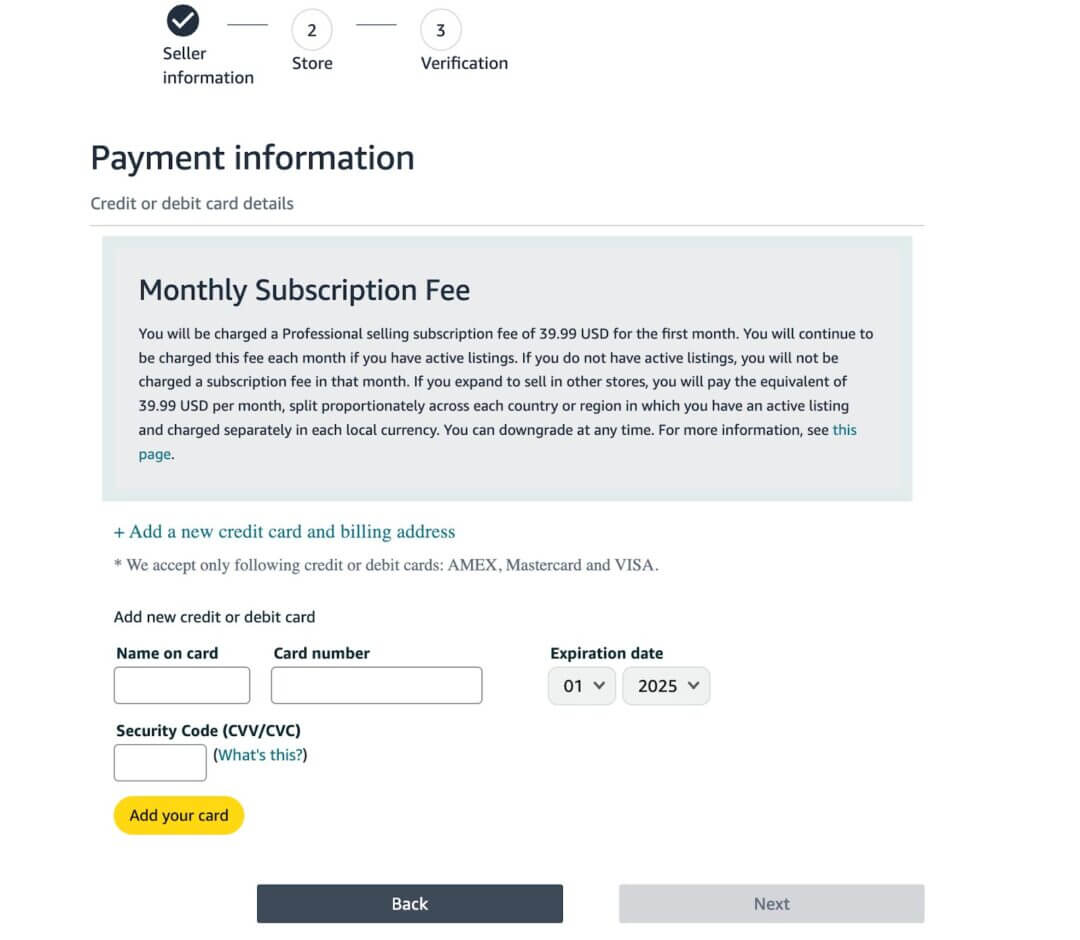
12. Enter your credit or debit card information, such as name on card, card number, expiration date, and security code.
13. Click the Next button to complete the payment and proceed to the next step.
doola Tip: Ensure all information is correct since you’ll need to submit the documents to verify these details later. Mismatched or untranslated files can delay account approval.
Step 3: Provide Business and Tax Documentation
As a non-U.S. seller, you must complete the Tax Information Interview during account setup.
- When prompted, select No to register yourself as a ” non-U.S. person” or foreign entity.
- Provide your foreign tax ID number (or EIN if you’ve registered a U.S. LLC) and your business information.
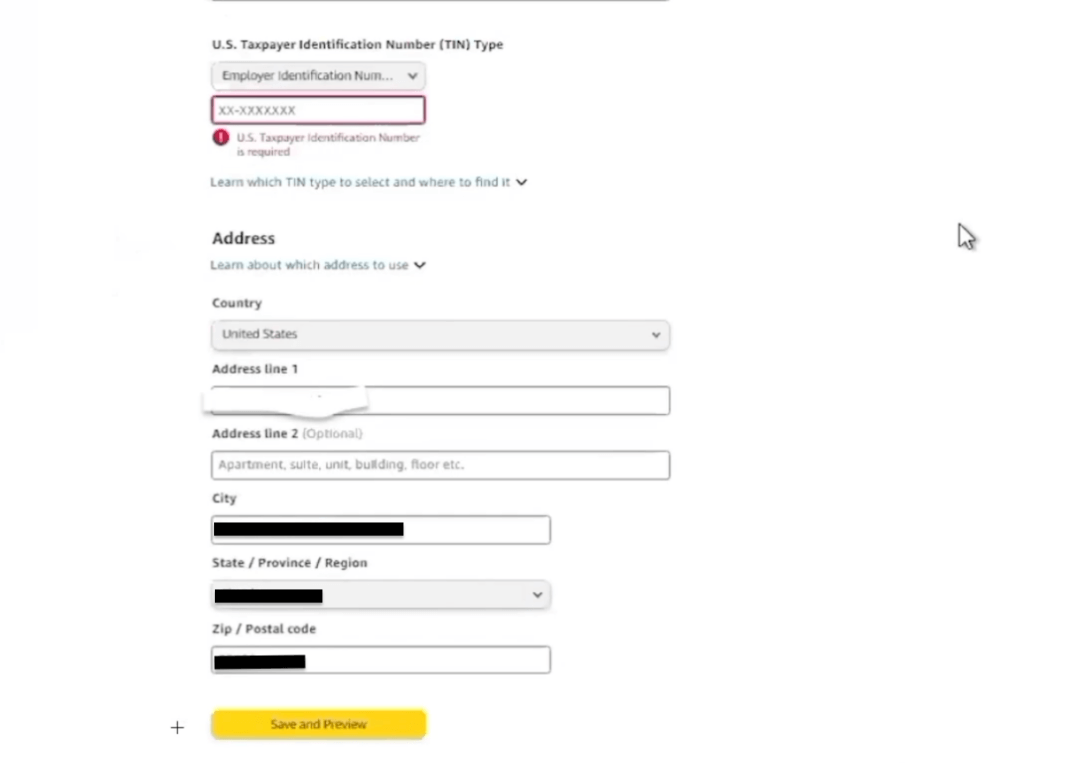
- Click and Save and Preview to electronically sign and submit Form W-8BEN (for individuals) and Form W-8BEN-E (for business entities) to Amazon for validation.
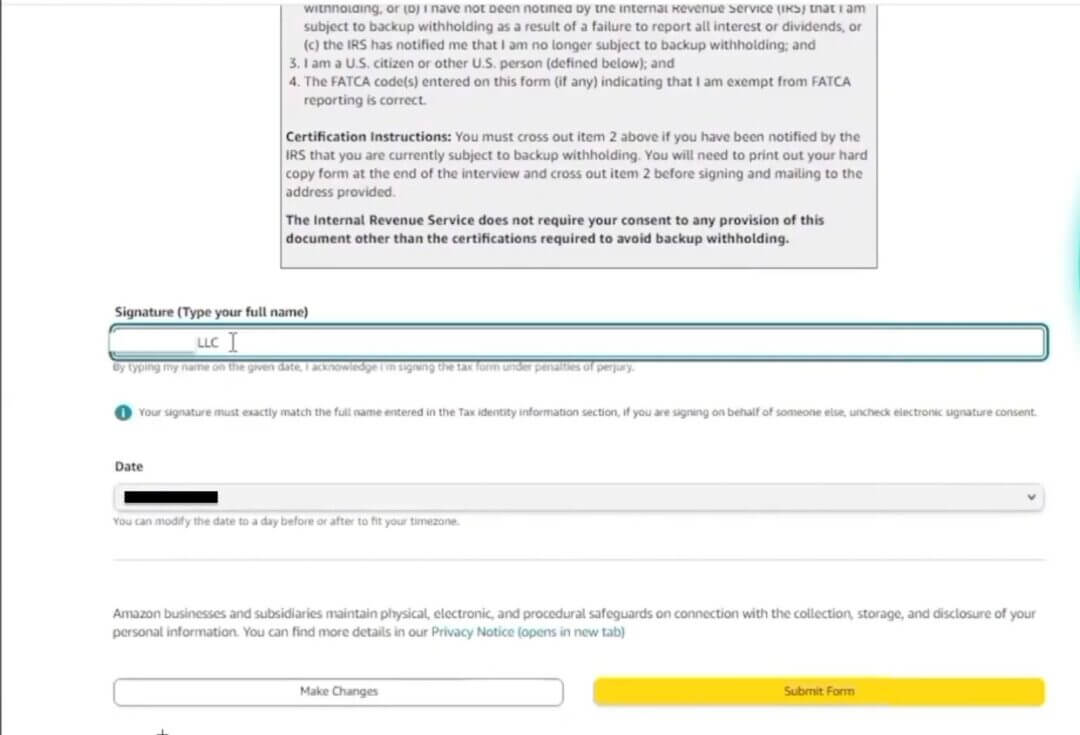
📎 Official IRS References:
doola Tip: If you formed a U.S. LLC, provide your EIN instead of a local tax ID to streamline approval and payout processes.
Step 4: Set Up a Supported Bank Account
To receive your Amazon payouts, you’ll need a U.S. or multi-currency bank account capable of accepting USD payments.
- Go to Settings → Accounts Info → Bank information.
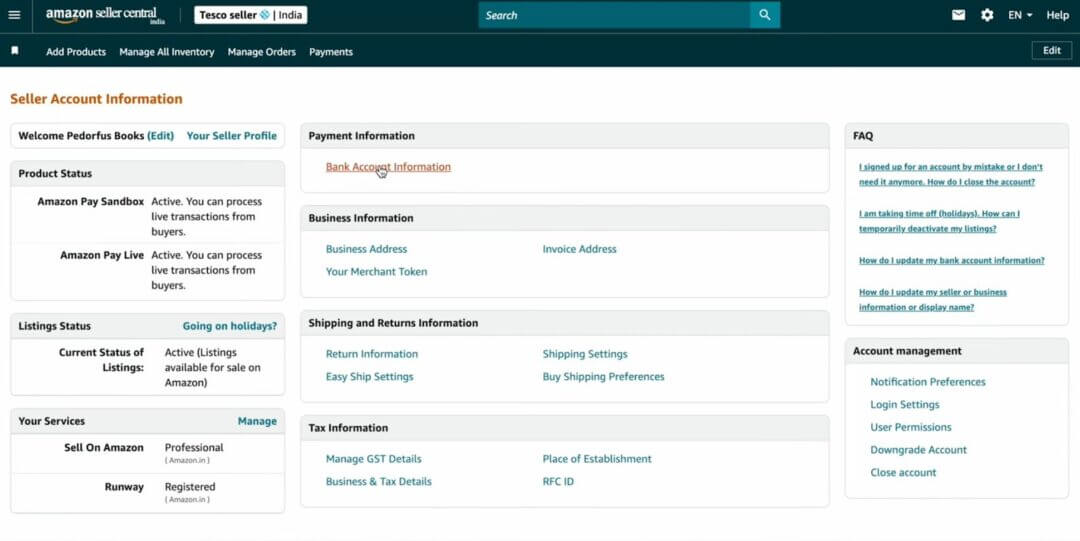
2. Click on Add new deposit method. You will need a valid bank account number, which will be used to easily deposit and withdraw money between your bank account and your Amazon Payments account.
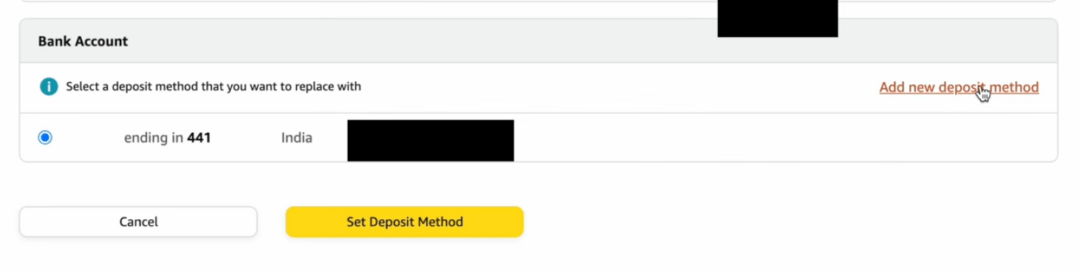
3. Add your U.S. business bank account, which should be in the name of the primary contact or business name provided to Amazon.
4. To verify your bank account, you will need your online banking credentials, such as bank name, routing number and account number.
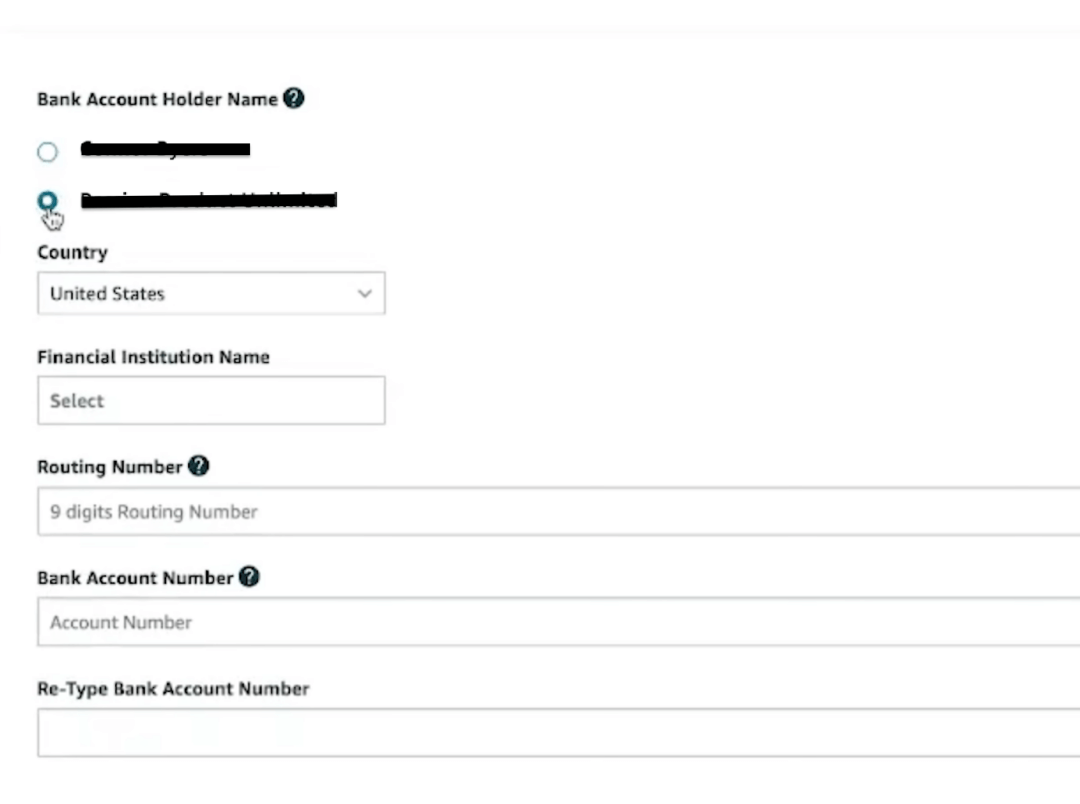
5. Amazon will make micro-deposits (two small test deposits) to verify your account.
6. Enter the deposit amounts in Seller Central to confirm verification.
7. Add a valid credit/debit card for recurring charges under Settings → Charge Methods.
Recommended options for non-U.S. founders:
Banking Solution
Key Benefit
Setup Process
Mercury
U.S. business bank for startups and LLCs
Requires a U.S. LLC; apply online with EIN and documents
Payoneer
Amazon Global Partner; supports 200+ countries
Create an account → Add to Amazon Seller Central → Verify micro-deposits
Wise Business (USD Account)
Multi-currency (USD, GBP, EUR); supports ACH transfers
Create a Wise Business account → Activate a USD account → Link details in Seller Central
📎 Reference: Amazon Accepted Bank Locations
doola Tip: Your bank account name must match the registered legal name or entity name on Amazon. Any mismatch can cause payout holds or account suspension.
Step 5: List Products and Configure FBA
Once your account is verified, you can begin listing products and activating FBA fulfillment.
- Navigate to Inventory → Add a Product.
- Choose whether to create a new listing or match an existing product.
- Under the Fulfillment Channel section, select:
- “I want Amazon to ship and provide customer service for my items (FBA).”
- Complete product details:
- Title, bullet points, and description (optimized for SEO)
- High-quality images (minimum 1000px)
- Dimensions, weight, and pricing
📎 Reference: Amazon Listing Requirements
doola Tip: Enable “Amazon Export Settings” in your FBA dashboard to allow your listings to be visible to customers in other marketplaces (e.g., Canada and Mexico).
Step 6: Ship Inventory to an Amazon Fulfillment Center
- Go to Inventory → Manage FBA Shipments → Create a New Shipment.
- Select your ship-from address (can be your supplier’s warehouse, 3PL, or your business address).
- Download and apply FNSKU barcodes to each product.
- You can print these directly from Seller Central.
- Choose your prep type:
- Merchant-prepared
- Amazon-prepared (additional fees apply)
- Select your shipping carrier:
- Amazon Partnered Carrier (UPS) for discounted rates (available in select regions)
- Third-party carriers (DHL, FedEx, Aramex) for international shipping
📎 Reference: Amazon FBA Shipping Requirements
doola Tip: Always include a box content list and shipment ID label on each box to avoid delays at fulfillment centers.
Step 7: Activate Listings and Manage Orders
Once Amazon receives and checks in your inventory, your listings go live.
- Monitor listing status in Inventory → Manage FBA Inventory.
- Active
- Suppressed (needs correction)
- Inactive (awaiting stock or approval)
- Set pricing in your target marketplace currency (USD for the U.S. store).
- Enable automatic inventory restock alerts under Inventory Planning → Restock Inventory.
- Track metrics like:
- Order Defect Rate (ODR)
- Customer Feedback
- Late Shipment Rate (LSR)
doola Tip: Respond to all customer messages within 24 hours to maintain excellent account health.
Estimated Timeline for Non-U.S. Founders
Process
Estimated Duration
Account registration
2–4 business days
Identity & tax verification
5–10 business days
Bank account setup
3–7 business days
Inventory check-in (FBA)
7–14 business days post-shipment
Common Rejection or Hold Reasons
Reason
Cause
Resolution
Name mismatch
Different names on tax docs and bank
Match all records to business registration
Unsupported country
Country not on Global Selling list
Form a U.S. LLC and reapply
Missing/expired documents
Outdated ID or business cert
Re-upload valid, current copies
Bank verification failed
Account not in entity name
Use an approved banking partner (Payoneer/Wise)
Summary: FBA Setup – Non-U.S. Founders
Key Action
Outcome
1. Check Global Selling eligibility
Confirm country and marketplace
2. Register account as Non-U.S. Business
Seller Central profile created
3. Submit W-8BEN / W-8BEN-E
Tax-compliant seller registration
4. Add bank account (Wise, Payoneer, etc.)
Payout method verified
5. List and enable FBA
Fulfillment setup complete
6. Ship inventory
Goods arrive at the U.S. fulfillment center
7. Activate listings
Store live on Amazon.com
Post-Setup Configuration
Once your Amazon FBA account (U.S. or non-U.S.) is verified and your first shipment is successfully checked in, it’s time to configure your store’s operational, branding, and compliance settings.
These final steps ensure your store runs smoothly, maintains Amazon’s performance standards, and supports long-term scalability.
1. Configure Return Settings
Amazon automatically manages returns for FBA orders, but sellers still need to customize policies for specific product types or special cases.
- Navigate to Settings → Return Settings in Seller Central.
- Choose whether to: Auto-authorize returns (default FBA setting), or manually review return requests (for MFN/FBA hybrid sellers).
- Set up a return address (for U.S. FBA sellers, use a U.S. address).
📎 Reference: Amazon Return Policy Overview
doola Tip: If you operate internationally, partner with a U.S.-based returns consolidation service (like ShipBob, MyUS, or Forward.me) to streamline returns.
2. Set Automated Pricing Rules
Amazon offers an Automated Pricing Tool that dynamically adjusts your prices based on competitor data, Buy Box eligibility, and profit margins.
To configure:
- Go to Pricing → Automate Pricing.
- Choose a pricing rule type (competitive, target-based, or custom).
- Set your minimum and maximum prices to avoid losses.
- Apply rules to selected ASINs or entire categories.
📎 Reference: Amazon Automate Pricing Setup
doola Tip: Keep your minimum price slightly above your landed cost to avoid underpricing due to competitor discounts.
3. Enable Brand Registry (If You Own a Trademark)
If you have a registered trademark, enroll in Amazon Brand Registry to access enhanced brand protection and marketing features.
Eligibility Requirements:
- Active registered trademark in the U.S. (or eligible region)
- The trademark must appear on your product or packaging
- Amazon account must match the brand owner’s name
Steps to Apply:
- Visit the Brand Registry Portal.
- Click “Enroll a New Brand.”
- Provide:
- Registered trademark number (from USPTO)
- Product and packaging images showing the trademark
- Brand website or social profile (optional but helps verification)
- Wait for Amazon to verify ownership (usually 2–10 business days).
Benefits:
- Protects your listings from hijackers
- Unlocks A+ content and brand analytics
- Enables sponsored brand ads
doola Tip: If you haven’t yet registered a trademark, apply through the U.S. Patent and Trademark Office (USPTO). The process can take 6–12 months.
4. Integrate Inventory Management and Analytics Tools
To manage your growing catalog and monitor profitability, consider integrating third-party tools that are compatible with Amazon Seller Central.
Recommended Tools:
| Tool | Purpose |
| Helium 10 | Keyword research, listing optimization |
| Jungle Scout | Product research, sales tracking |
| Sellerboard | Profit analytics, PPC optimization |
| doola Bookkeeping | Accounting and bookkeeping |
| ShipBob | Fulfillment & logistics |
doola Tip: Regularly review your Amazon Business Reports and Inventory Health Report in Seller Central to identify slow-moving items or storage fee inefficiencies.
5. Optimize Tax Collection and Reporting
Even though Amazon automatically collects and remits sales tax in most U.S. states, you’re still responsible for income tax compliance and reporting obligations.
- Go to Settings → Tax Settings in Seller Central.
- Enable Marketplace Tax Collection (MTC) for applicable states.
- If you sell globally, register for VAT/GST in countries where you store inventory (e.g., EU or UK).
📎 References:
doola Tip: Keep records of Amazon’s remitted taxes (available in your “Tax Document Library”) for year-end filings and accountant review.
6. Set Up Customer Service Preferences
Strong customer support helps maintain account health and feedback ratings.
- Navigate to Settings → Account Info → Your Services.
- Set a customer support email that you or your team can access daily.
- Enable automated email responses for common queries.
- Check the Buyer-Seller Messaging Service regularly to respond within 24 hours.
📎 Reference: Amazon Buyer-Seller Messaging
doola Tip: Use clear, polite, and short replies. Consistent, responsive service improves your feedback score and helps win the Buy Box.
7. Activate Reports and Performance Monitoring
Amazon’s reporting suite helps you analyze key metrics across operations.
Essential Reports to Monitor:
| Report | Function | Access Location |
| Business Reports | Sales, sessions, conversion | Reports → Business Reports |
| Inventory Health Report | Storage levels and age | Reports → Fulfillment → Inventory |
| Payments Report | Disbursements and fees | Reports → Payments |
| Return Reports | Return reasons, defect rates | Reports → Fulfillment → Returns |
doola Tip: Export and archive reports monthly for audits or accountant review.
📎 Reference: Amazon Reporting Overview
Quick Recap: Post-Setup Configuration
| Area | Action | Result |
| Returns | Configure policies and addresses | Smoother returns and customer satisfaction |
| Pricing | Set automated pricing rules | Dynamic competitiveness |
| Branding | Enroll in Brand Registry | Enhanced content and protection |
| Tools | Integrate analytics & fulfillment apps | Streamlined operations |
| Taxes | Enable MTC and maintain compliance | Legal and financial accuracy |
| Support | Optimize customer communication | Higher feedback ratings |
| Reports | Track key performance metrics | Data-driven growth decisions |
Troubleshooting and Compliance
Operating on Amazon FBA comes with ongoing compliance and policy obligations.
Even experienced sellers face account suspensions or listing removals due to documentation issues, performance metrics, or tax errors.
This section outlines common pitfalls, how to fix them, and the compliance framework every founder must maintain.
1. Common Account Suspension Reasons
Amazon enforces strict policies to maintain marketplace quality. Seller accounts may be temporarily suspended or permanently deactivated if any of the following issues occur:
| Category | Common Cause | Example / Trigger |
| KYC / Verification | Unverified identity, mismatched documents | Passport and business registration under different names |
| Performance Metrics | Late shipments, high order defect rate | ODR > 1%, LSR > 4%, Pre-fulfillment cancellation > 2.5% |
| Policy Violations | Selling restricted or counterfeit products | Trademark-infringing listings, fake reviews |
| Customer Complaints | Poor packaging, inaccurate listings | “Item not as described,” multiple return requests |
| Inactivity / Dormancy | No sales or updates for long periods | Account flagged for “inactive seller” after 180 days |
📎 Official Resource: Amazon Account Health Policy
doola Tip: Monitor your Account Health Dashboard weekly under Performance → Account Health. Amazon flags issues early so you can fix them before suspension occurs.
2. How to Appeal or Reinstate a Suspended Account
If your account is suspended, you’ll receive a notice from Amazon Seller Performance explaining the reason. Here are the steps to restore your account:
Step 1: Analyze the Suspension Email
- Identify the suspension type: verification, policy, or performance.
- Read the specific violation code or ASIN affected.
Step 2: Prepare a “Plan of Action” (POA)
Your POA should include:
- Root Cause: Why the issue occurred (e.g., document mismatch, supplier issue).
- Corrective Actions: What steps did you take to resolve it?
- Preventive Measures: How you’ll ensure it won’t happen again.
Step 3: Submit via Performance Notifications
- Go to Seller Central → Performance → Performance Notifications.
- Click the notice and choose “Appeal Decision.”
- Upload your POA and supporting documents (in PDF format).
📎 Reference: Amazon Seller Appeal Process
doola Tip: Keep your POA concise (one page). Avoid blaming Amazon, which shows accountability and quick fixes from your end.
3. Ongoing Tax and Reporting Obligations
For U.S. Founders
- File federal and state tax returns (Form 1040, 1120S, or 1065, depending on structure).
- Amazon issues Form 1099-K if gross payments exceed IRS thresholds.
- Track all Amazon fees, FBA costs, and deductions for accurate tax filing.
📎 IRS Resource: 1099-K Reporting Guide
For Non-U.S. Founders
- Submit Form W-8BEN (individual) or W-8BEN-E (entity) annually.
- If your U.S. entity earns “Effectively Connected Income (ECI),” you may need to file: Form 1120-F (Foreign Corporation) and Form 5472 (Foreign Ownership Disclosure).
- Maintain clean records, separating U.S. and non-U.S. income streams.
📎 IRS Resources:
doola Tip: Even if you owe no U.S. tax, filing annually keeps your entity in good standing and avoids IRS penalties.
4. Understanding FBA Fees and Cost Structure
Amazon’s FBA fees include storage, fulfillment, and optional services. Understanding them helps forecast margins accurately.
| Fee Type | Description | Frequency |
| Fulfillment Fee | Per-unit fee for picking, packing, and shipping | Charged per sale |
| Storage Fee | Based on cubic feet of inventory stored in FBA centers | Monthly |
| Aged Inventory Surcharge | For items stored >365 days | Monthly |
| Referral Fee | Percentage of sale price (varies by category) | Per sale |
| Labeling / Prep Fees | Optional: Amazon-prepped items | Per unit |
📎 Reference: Amazon FBA Fee Schedule
doola Tip: Use the FBA Revenue Calculator (link) before sending products to ensure profitability after all fees.
5. Avoiding Common Compliance Mistakes
| Mistake | Why It’s a Problem | Solution |
| Mixing personal and business funds | Violates tax and audit standards | Open a dedicated business bank account |
| Using a non-GS1 barcode | May cause listing suppression | Purchase GS1 barcodes only from gs1us.org |
| Ignoring U.S. state nexus laws | May trigger unexpected sales tax | Use tools like doola for tax and compliance |
| Incomplete product labeling | Leads to delays at FBA centers | Follow Amazon’s labeling checklist |
| Missing annual filings (LLC/Corp) | May lead to entity dissolution | File annual reports and renew the registered agent |
doola Tip: Set calendar reminders for tax filings, FBA restock limits, and compliance renewals every quarter.
6. Building Long-Term Account Health
To maintain strong performance metrics and consistent payouts, focus on:
- Customer Experience: Fast response times, quality packaging, accurate listings.
- Inventory Turnover: Avoid overstocking and check restock limits monthly.
- Performance Metrics: Keep ODR < 1%, LSR < 4%, and maintain good feedback.
- Brand Protection: Use Brand Registry and Amazon Transparency codes.
📎 Reference: Amazon Account Health Dashboard
Quick Recap: Compliance & Troubleshooting Summary
| Area | Best Practice | Frequency |
| Account Verification | Keep ID, bank, and tax docs updated | As required |
| Performance Metrics | Monitor ODR, LSR, policy warnings | Weekly |
| Tax Reporting | File returns and W-forms on time | Annually |
| FBA Fees | Review storage and fulfillment costs | Monthly |
| Entity Maintenance | File annual reports | Yearly |
| Appeals | Submit a detailed POA if suspended | Case-by-case |
Quick Reference Checklist
This checklist summarizes the complete Amazon FBA setup journey for both U.S. and non-U.S. founders, from registration to ongoing compliance.
Use this section as your actionable roadmap; each column aligns with the correct process and document requirements.
| Step / Requirement | U.S. Founders | Non-U.S. Founders (Selling in the U.S.) |
| 1. Business Entity | LLC, Corporation, or Sole Proprietorship registered in a U.S. state | Local company or U.S. LLC/Corporation (Delaware, Wyoming, etc.) |
| 2. Tax ID | EIN (Employer Identification Number) or SSN (for sole proprietors) | EIN (if U.S. entity) or foreign tax ID + W-8BEN / W-8BEN-E |
| 3. Seller Account Type | Choose a Professional account for FBA access | Choose Professional account; select “Non-U.S. Business” |
| 4. Amazon Account Registration | “Create a New Account” | Same platform → select “Start Selling” → “Non-U.S. Business” |
| 5. Identity Verification | Passport, driver’s license, or state ID + business registration proof | Passport or national ID + business certificate (in English or translated) |
| 6. Address Verification | U.S. utility bill, lease, or business license | Local or U.S. address proof (virtual office or registered agent accepted) |
| 7. Bank Account for Payouts | U.S. business bank account (ACH-enabled, in entity name) | U.S. or multi-currency account (Mercury) |
| 8. Credit/Debit Card | Valid card for Amazon fees (U.S. or international) | International card (Visa/MasterCard) accepted for billing |
| 9. Tax Interview | W-9 form (U.S. persons/entities) | W-8BEN / W-8BEN-E form (non-U.S. persons/entities) |
| 10. FBA Activation | Seller Central → Settings → Fulfillment by Amazon → Enable | Same process; verify cross-border shipment eligibility |
| 11. Inventory Preparation | FNSKU labels, prep type (merchant/Amazon) | FNSKU labels, supplier coordination for shipping |
| 12. Shipping to Fulfillment Center | Ship via Amazon Partnered Carrier (UPS/FedEx) | Ship via DHL, Aramex, or Amazon Partnered Carrier (if supported) |
| 13. Product Listing Optimization | Title, bullets, images, keywords | Same process; localize keywords for the U.S. market |
| 14. Tax Filing & Compliance | File federal/state taxes (1040, 1120S, or 1065) | File Form 1120-F or 5472 (if U.S. entity); maintain W-8 forms |
| 15. Returns Management | FBA automated returns or manual review | Use a U.S.-based returns address or a consolidation service |
| 16. Brand Protection | Enroll in Amazon Brand Registry (requires a U.S. trademark) | Register a trademark via USPTO or a local IP office before enrollment |
| 17. Reporting & Analytics | Monitor Business Reports, FBA Fees, Account Health | Same process; track international tax and exchange rates |
| 18. Ongoing Compliance | Annual report (LLC/Corp), renew registered agent | Maintain foreign tax filings, U.S. entity reports, and bank KYC |
FBA Setup Timeline Overview
Stage
U.S. Founders
Non-U.S. Founders
Account Registration
1–2 business days
2–4 business days
Verification (Tax & Identity)
3–5 business days
5–10 business days
Bank Account Setup
1–3 business days
3–7 business days
Inventory Shipping & Check-In
5–10 days
7–14 days
Total Launch Time
~2–3 weeks
~3–5 weeks
Recommended Tools & Resources
Category
Tool / Resource
Purpose / Link
Entity Formation
Wyoming Secretary of State / doola
Register your U.S. LLC or Corporation
Tax Forms & Info
IRS Forms Library
Access all U.S. tax-related documents
Global Banking
Wise Business, Payoneer, Mercury
Open bank accounts remotely
Barcode Registration
GS1 US
Purchase valid UPCs for product listings
Trademark & Brand Protection
USPTO Trademark Search
File or verify trademarks
Tax Compliance
doola
Automate sales tax filings
Shipping & Logistics
Amazon FBA Partnered Carrier Program
Discounted shipping rates for inventory
Analytics & Optimization
doola Analytics, Helium 10, Jungle Scout
Product research and performance tracking
Outcome
By completing every step in this guide, you will have:
- A fully verified Amazon Seller Central account
- An active FBA setup with inventory living in Amazon warehouses
- Tax and payment systems compliant with U.S. regulations
- A foundation for scalable, cross-border e-commerce growth