Mercury Checkings & Savings Account Setup for US and Non-US Founders: End-to-End Process

A Quick Overview
Mercury is a U.S.-based business banking platform built specifically for startups and internet-first businesses. It’s not a traditional bank branch, it’s a tech-first setup that lets you open and run a U.S. business account entirely online, even if you’re a non-U.S. founder.
How Mercury Works
At a high level, here’s how Mercury works: once your company is formed, Mercury verifies your business details, owners, and activity, then gives you a U.S. checking account, debit cards, and tools to move money (ACH, wires, integrations with Stripe, PayPal, Shopify, etc.).
Your money is held with FDIC-insured partner banks, while Mercury handles the product, controls, and dashboard you actually use day-to-day.
What You’ll Get From This Guide
In this doola Doc, we’ll help U.S. and non-U.S. founders with a U.S. LLC or C-Corp with Mercury checkings & savings account setup, end-to-end.
We’ll cover:
- How to apply (and what to prepare)
- What Mercury reviews during approval
- How to describe your business + cash flows clearly
- How to present ownership and control without confusion
- Common compliance pitfalls that cause delays or rejections
Understanding Mercury’s Model | Fintech vs. Bank
Here’s what makes Mercury the top choice for non-residents:
- No in-person visits required
- Quick online application. Open your account in 10 minutes
- Supports non-US residents with valid LLCs or C-Corps
- No hidden fees or complicated terms
- Trusted by over 100,000 startups
Now, let’s try and understand Mercury’s operating structure.
The Partner Bank Structure
Mercury Is a Fintech, Not a Bank
Mercury is a financial technology company, which means:
- Mercury builds the software you interact with
- Mercury handles the onboarding process
- Mercury manages the dashboard, cards, payouts, and automations
- Mercury integrates with tools like Stripe, Shopify, and QuickBooks
- Mercury provides customer support and compliance screening
What Mercury does not do is hold your business’s money.
Your money is held by regulated US banks that Mercury partners with:
- Evolve Bank & Trust (Member FDIC)
- Choice Financial Group (Member FDIC)
These are traditional US banks with full FDIC membership, decades of operating history, and the same regulatory oversight as any major American bank.
With Mercury, you can:
- Open a US checkings and savings account completely online, without traveling to the US
- Send and receive payments through ACH, domestic wires, and international wires
- Create multiple virtual and physical debit cards for yourself and your team
- Connect your account to tools you probably already use, like doola, QuickBooks, Stripe, Shopify, and other finance and ops platforms
- Organize your money with different accounts and track everything from a clean, modern dashboard
It’s built specifically for startups and internet businesses, so it works especially well for remote founders, non-US founders, and global teams who want a US-based account without dealing with traditional branch banking.
Founders often share a common concern, “If Mercury isn’t a bank, then where is my money?”
The simplest answer is: Your money is always inside a US bank, you’re just accessing it through Mercury’s interface. In short, Mercury is simply the bridge/ software layer on top of the banking infrastructure.
When a founder “opens a Mercury account,” what’s actually happening is:
- Mercury collects your information
- Mercury routes your information to the partner banks
- The partner banks open your deposit accounts
- Mercury provides the experience on top of those accounts
This model is extremely common. Stripe, Brex, Square, Ramp, Shopify Balance, all run on a similar architecture.
It separates the technology from the regulated deposit-holding role, which increases reliability and resilience.
FDIC Insurance And The Mercury Sweep Network (Vault)
When you apply through Mercury, here’s the exact sequence behind the money routing scenes:
- You submit your KYC/KYB information on Mercury’s platform. Mercury collects your identity documents, business documents, ownership structure, and business activity details.
- Mercury transmits your application to its partner banks. The partner banks conduct their own due diligence, identity verification, and compliance checks.
- If approved, the partner banks open your actual deposit accounts. These are legitimate, FDIC-insured checking accounts in your company’s name.
- Mercury’s system then connects to these accounts. The balance you see inside your Mercury dashboard is the real-time balance held at those banks.
- All cards, payments, wires, and ACH transfers flow through the partner banks’ rails. Mercury’s job is the orchestration and the user experience, not the custody of funds.
In short, when you log into Mercury and see “Balance: $50,000,” that money is sitting inside Evolve Bank & Trust or Choice Financial Group, not inside Mercury itself. Mercury cannot commingle your funds, lend against them, or move them without the partner banks’ regulatory oversight.
FDIC Insurance: What Protection You Actually Get
FDIC insurance is a US federal guarantee that protects deposits up to $250,000 per depositor, per bank, per account category.
If a partner bank were to fail tomorrow, extremely unlikely, but hypothetically, the FDIC steps in and reimburses your insured deposits directly.
However, Mercury goes a step further to protect businesses that hold larger cash balances, such as startups that have raised capital.
The Mercury Sweep Network (“Vault”)
Mercury uses a sweep mechanism that automatically spreads your deposits across multiple FDIC-insured banks. This increases the total amount of insured protection available to you.
Depending on the sweep availability, your company can receive FDIC insurance of up to approximately $5 million.
This is not a bonus or optional feature, it is built into Mercury’s treasury infrastructure.
Why This Matters After Silicon Valley Bank’s Collapse
After Silicon Valley Bank shut down:
- Founders learned how fragile single-bank concentration can be
- Treasury diversification became a board-level conversation
- Investors now directly ask founders: “Where is the money kept? How is it insured?”
Mercury’s model directly addresses these concerns by spreading deposits across multiple federally insured institutions, reducing concentration risk and increasing the FDIC coverage available to you.
Why This Model Is Especially Important for Non-US Founders
If you’re a non-US founder, this entire model is a massive advantage. In many countries, fintechs aren’t allowed to partner with banks like this or offer regulated deposit protection.
Here’s what you get by using Mercury:
- Your funds are protected under US federal banking laws
- You can operate a US business account without physically coming to the US
- You bypass unstable local banking systems
- You can USD inside the US, not in an offshore jurisdiction
- You get the same insurance protections a US founder gets
The fintech–bank model is not a workaround. It’s the standard operating model for modern US financial platforms, and in many ways, it offers more resilience than a single-bank framework.
Mercury Fee Structure, Limits & Pricing
This section addresses the biggest friction point founders have when evaluating banking platforms like Mercury: “What does it cost me?”
How Mercury Makes Money
Here’s your answer:
1. Mercury Earns a Share of the Interest From Their Partner Banks
As we mentioned earlier, your money is actually kept in FDIC-insured partner banks (like Evolve and Choice), not inside Mercury.
Those banks use your deposits the same way all banks do:
- They lend money
- They invest in safe financial instruments
- They hold reserves
From this activity, the banks earn interest. Now, Mercury gets a small share of that interest, because Mercury brings them customers and handles all the technology and onboarding. Every modern fintech that partners with banks earns this kind of revenue.
So, if you also have this question in your mind “Is Mercury secretly taking my money to earn interest?”
The answer is: No. The partner banks earn the interest, Mercury only gets a share for providing the service. Your entire balance remains yours.
2. Mercury Earns Money When You Spend Using Their Cards
Every time a Mercury debit or IO credit card is used, the merchant (not you) pays a small processing fee.
A small part of that fee goes to Mercury, this is called interchange.
This is how every card company earns money:
- Visa earns interchange
- Mastercard earns interchange
- Paytm earns interchange
- Even Amazon Pay earns interchange
Mercury is no different.
So, when a founder uses their Mercury debit or IO card to pay for software, ads, or travel, Mercury earns a very tiny portion. It’s small, but it adds up across thousands of businesses.
You, the user, don’t pay anything extra for this. The merchant pays.
So, What Does Basic Mercury Banking Actually Cost Per Month?
This is the simplest way to put it:
For standard business checking and savings, Mercury costs $0/month for almost all founders.
Mercury Charges Fees Only for Certain Advanced Services
Like we said earlier, basic banking is free. But some premium features cost money, just like any business.
Things that Mercury charges for include:
- Non-USD international wires (because it requires currency conversion and SWIFT routing)
- Premium treasury products (for companies holding very large balances)
- Paid automation and workflow tools inside Mercury’s advanced business plans
- Certain finance/operations upgrades that are optional
Everyday banking with Mercury is free, but advanced business features have a cost.
Advanced Features & Paid Plans
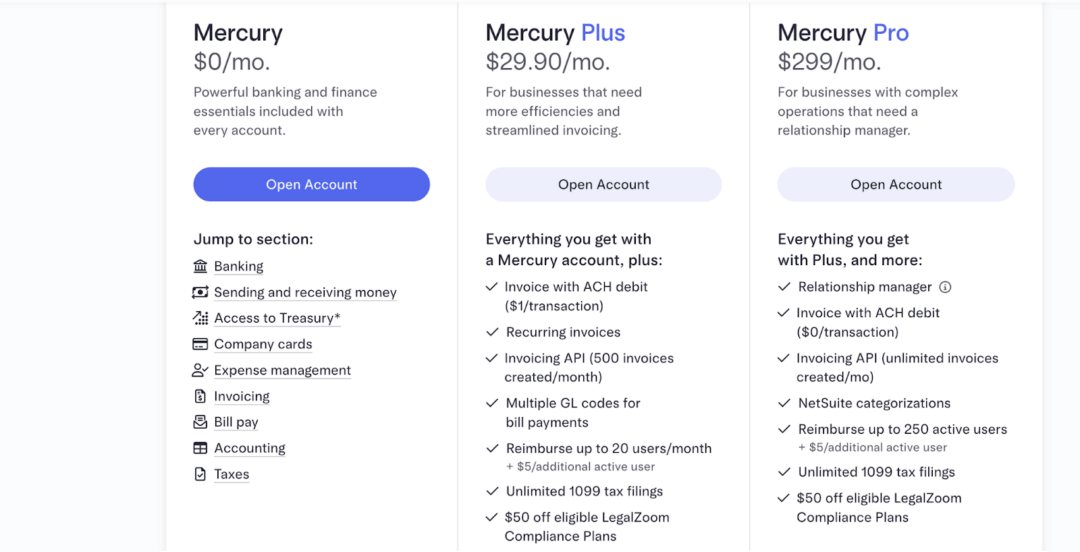
✔️ Mercury Plus
Mercury’s paid plan begins at $29.90/month for businesses that need advanced tools beyond the free account. This plan gives you access to features like richer invoicing, more automation, mass payments via API.
It’s made for startups that are growing and need more than just basic banking.
With Plus, you get upgraded invoicing tools, the ability to send recurring invoices, basic automation features, and the option to reimburse up to 20 team members each month.
You also get access to invoicing through the API (up to 500 invoices), better bill-pay controls, and unlimited 1099 filings.
✔️ Mercury Pro
Mercury Pro is Mercury’s top, premium plan, built for bigger companies that need serious finance tools and personal support.
It costs about $299 per month and gives you your own dedicated relationship manager, free ACH-debit payments on all invoices, deep integrations with advanced accounting software like NetSuite, and the ability to reimburse up to 250 team members.
What Advanced Features You Pay For
What It Means for Most Startups
- If you’re just doing basic US business banking, paying vendors in USD, receiving payments in USD, no global currency complexity → you likely stay on the free plan.
- If you grow to the point where you’re managing large flows or cross-border payments, the paid plan is there, starting at $35/month, plus the transaction/FX fees that apply.
- It’s good to budget for these advanced costs when you expand into non-USD transactions, global vendors, or complex payroll flows abroad.
Mercury Wire Fees | Domestic & International
When founders Google “Mercury wire fees,” they’re usually looking for three things:
- How much does it cost to send a domestic USD wire?
- How much does it cost to send a USD international wire?
- What does Mercury charge for foreign-currency wires (non-USD)?
Here’s the detailed, simple explanation you should include:
Domestic USD Wires (US → US)
Most traditional US banks charge anywhere from $15 to $30 per outgoing wire.
Mercury stands out because incoming and outgoing domestic USD wires are free
This is exactly how Mercury describes it in their help center and pricing page, domestic wires are one of the main “free” features that Mercury highlights across its blog posts and guides.
Non-USD International Wires (Foreign Currency Transfers)
If you send a wire in another currency (EUR, GBP, INR, etc.), Mercury charges 1% currency conversion (FX) fee to convert USD into that currency and route it internationally.
Monthly Maintenance Costs
Founders constantly search for things like “Mercury monthly maintenance fee” or “minimum balance Mercury,” especially when they’re comparing it with big banks like Chase, Wells Fargo, or Bank of America.
And the answer is assuring.
Mercury doesn’t charge a monthly fee, doesn’t ask for a minimum balance, doesn’t make you pay to open an account and doesn’t hit you with overdraft fees.
This is a huge difference from traditional banks that usually charge $10–$30 a month unless you keep a few thousand dollars sitting in the account, and sometimes even add fees for low activity or too many transactions.
With Mercury, none of that applies.
For basic business banking, the cost stays the same whether you have $20 or $200,000 in your account: $0 per month.
ACH Limits on Mercury
ACH stands for Automated Clearing House, it’s just the U.S. system for normal bank-to-bank transfers.
When you open a brand-new Mercury account, Mercury doesn’t immediately let you push huge amounts through ACH.
Not because they don’t trust you, but because ACH reversals are a common source of fraud and errors in the U.S. banking system.
So, every account begins with a “safe” limit.
Your limit grows as your business builds a pattern.
Mercury assigns initial limits for ACH, wire transfers and other payment types when you open your account.
These limits are not fixed across all customers, they depend on your business profile, verification status and activity.
If you hit a limit, you can use Mercury’s dashboard to request a temporary increase.
Moreover, your limits tend to grow as your account builds history: consistent balances, stable payments and a clear business model all signal lower risk, which in turn helps Mercury raise your limits internally.
Debit Card Limits, Controls and Exceptions
If you’re an admin or account holder, you can easily adjust the spending limit of any debit cards associated with your Mercury account. This allows you to keep a tighter control on spending and stick to daily or monthly budgets.
You can open any card in your Mercury dashboard and set a daily, weekly, or monthly limit, either temporarily or permanently, depending on how tightly you want to manage spending.
If you ever need to make a purchase that’s larger than the dashboard allows, you can email Mercury with the invoice or contract, and they’ll review the request and raise the limit if it’s reasonable.
For ATM withdrawals, each card can take out up to $500 per day, but the entire company is capped at $3,000 per day across all cards.
| If a Charge Exceeds Your Limit
Card limits on your Mercury debit card are there to control spending, but they don’t block every valid transaction. In some cases, a merchant, meaning the business or service charging your card (like a subscription app, utility company, government office, petrol pump, delivery app, or online store), can still process a charge above the limit you set. This can happen in a few specific situations: ✔️ Recurring charges or subscriptions If you previously allowed a business to charge your card (for example, a monthly subscription), that original authorization can remain active even if you later change your card limit. To stop these payments, you need to cancel directly with that business. ✔️ Force posts Sometimes a business can push a transaction through using a previous authorization code. This is most common with governments and utility providers, and is also used when they need to refund money back to a canceled card. ✔️ Pre-authorizations (like fuel or deliveries) Some businesses first place a temporary hold for an estimated amount (for example, at a fuel pump or with a delivery service). The card system allows them to adjust the final amount by up to 20% (for tax, tips, or final totals) before it would be blocked for going over your limit. If you ever see a charge that looks wrong or fraudulent, Mercury can help you investigate and resolve it. |
Eligibility and Requirements to Open a Mercury Account
Mercury positions itself as a banking platform for modern companies, but approval is not automatic. Every application goes through a compliance review that checks the company’s formation, ownership, identity documents, and overall risk profile.
This section outlines who qualifies for a Mercury account and what documentation both U.S and non-U.S. founders must provide.
Universal Requirements for All Founders
These requirements apply to any company applying for a Mercury account, regardless of where its founders live.
- U.S.-Incorporated Entity
Mercury only opens accounts for companies registered in the United States or a U.S. territory. This includes LLCs, C-Corps, and other formal business entities. Sole proprietorships without formation documents are not supported.
- Valid EIN
A federal Employer Identification Number (EIN) issued by the IRS is required. EIN confirmation letters or IRS notices are acceptable.
- Official Formation Documents
You must upload the foundational documents for your company, e.g., Articles of Organization (LLC) or Articles of Incorporation (C-Corp). Mercury uses these to verify legitimacy and ownership.
- Clear Business Purpose
Mercury asks for a short description of what your business does, how it operates, and who it serves. This helps determine whether your business model fits within their risk framework.
- Business Website and Domain Email
A functional website and a domain-based email address strengthen credibility. Mercury uses these to validate that the business is real and operational.
- Ownership Structure and UBOs
All individuals who own or control 25% or more of the company must be disclosed. Mercury requires identification and verification for these individuals as part of its KYC/KYB obligations.
- Government-Issued ID for All Owners
Founders and UBOs must upload a valid government ID (passport or national ID). Mercury uses this to verify identity and run compliance checks.
- Physical Address
A real residential or commercial address is required. Mercury does not accept PO boxes, UPS boxes, or registered-agent-only addresses.
Additional Requirements for U.S.-Based Founders
Founders living in the U.S. must provide additional information to satisfy U.S. banking compliance.
| Requirement | What Mercury Checks | Common Mistakes to Avoid |
| U.S. Government-Issued ID | Validity, name match, expiration date | Uploading low-quality or blurry images |
| Social Security Number (SSN)* | Identity verification and screening | Using an ITIN in place of SSN when not applicable |
| Personal Residential Address | Must be a real, traceable address | Using a PO box or coworking space as home address |
| Company’s U.S. Address | Must reflect where the business operates | Submitting only a registered agent’s address |
*Mercury states that SSNs are required when available. They do not require all founders to be U.S. citizens or SSN holders.
Additional Requirements for Non-U.S. Founders
Mercury supports global founders, but non-U.S. applicants must provide more detailed identity and verification documents.
Take a look below:
| Requirement | Accepted Documents | Tips to Avoid Rejection |
| Passport (Mandatory) | Government issued passport | Ensure full photo page is visible without any glare |
| Foreign Residential Address | Utility bill, bank statement, phone bill, rental agreement | Upload documents dated within the last 90 days |
| Proof of Ownership & UBO Disclosure | Cap table, operating agreement | Make sure ownership percentages are clearly visible |
| U.S. Business Address | Any legitimate residential or commercial address | Don’t use PO boxes or registered agent addresses |
| Additional Verification (case-by-case) | Short business description, links, invoices, or planned U.S. operations | Provide clear explanations; vague business model descriptions slow down reviews |
Non-U.S. founders are not required to have a U.S. SSN, U.S. visa, or U.S. residency. However, Mercury may ask follow-up questions to understand the legitimacy and planned activity of your U.S. company.
Restricted Countries
Mercury cannot onboard companies or beneficial owners from certain restricted or sanctioned jurisdictions.
Founders should review Mercury’s official restricted-countries list here.
If any founder, director, or UBO is connected to a restricted country, the application will be declined.
Pre-Application Checklist
Mercury’s review team checks your website, your formation documents, your EIN, and your ownership information within the first few minutes.
If anything looks unfinished like a half-built website, mismatched addresses, missing UBO details, the application is slowed down or rejected.
This checklist helps you fix the common failure points before you submit, so your application moves through verification without avoidable questions or document requests.
Must-Have Items Before Applying
- U.S.-registered legal entity (LLC or Corporation).
- Valid EIN proof from IRS. Acceptable proofs include IRS confirmation letter, SS-4, or other official IRS documentation.
- Foundational formation documents.
- Government-issued ID for each owner with ≥ 25% ownership.
- Real, traceable business or residential address (not P.O. box or virtual only).
- Clear ownership structure / UBO disclosure.
What Mercury Publicly Requires ?
- To open an account, your company must be formally registered in the U.S. or a U.S. territory (LLC, Corporation, etc.).
- You need to submit company formation documents (e.g. Articles of Incorporation or Organization) as part of the onboarding.
- You must provide a valid IRS-issued Employer Identification Number (EIN). Acceptable proofs include IRS confirmation letter, SS-4, or other official IRS documentation.
- Each owner or stakeholder with ≥ 25% ownership or control must upload a government-issued ID (passport, state ID, or equivalent) for identity verification.
- Mercury requires a real, non-P.O.-box business address (residential or commercial valid address in the U.S. or internationally, but not just a registered-agent or virtual mailbox).
Mercury supports applications from founders anywhere, you don’t need to be based in the U.S. to use Mercury, as long as you meet entity/address/documentation requirements.
| 💡 Things to Keep in Mind
Mercury does not guarantee approval for all U.S.-registered companies. Even with valid documents, some applications, especially from high-risk sectors or unclear business models, can be flagged or rejected. This is implied in their FAQs and notes about restricted countries or business activities. For non-U.S founders, while Mercury allows remote onboarding, there is no publicly guaranteed “passport + LLC in US = approval”. Compliance gateway process still looks at the business’s stated operations, ownership transparency, and legitimacy. Mercury may request additional documentation depending on business activity, ownership structure, beneficial owners, or perceived risk. The exact triggers are not publicly disclosed. Mercury does not publish a public, universal list of “approved business models” (i.e., exactly which industries are always accepted vs which are always rejected). The decision appears to depend on a case-by-case compliance review. |
Step-By-Step Mercury Application Process
Once your US company is formed and you’ve gathered the basic documents (like your formation papers, EIN, and ID), the Mercury application is pretty quick.
Most founders finish the online form in under 15 minutes. After that, their compliance team usually reviews everything within a few business days, sometimes faster, sometimes a bit longer if they need extra verification.
Mercury isn’t a traditional bank, so the whole process is done online.
Here’s what that process typically looks like:
Step 1: Go to Mercury’s Website
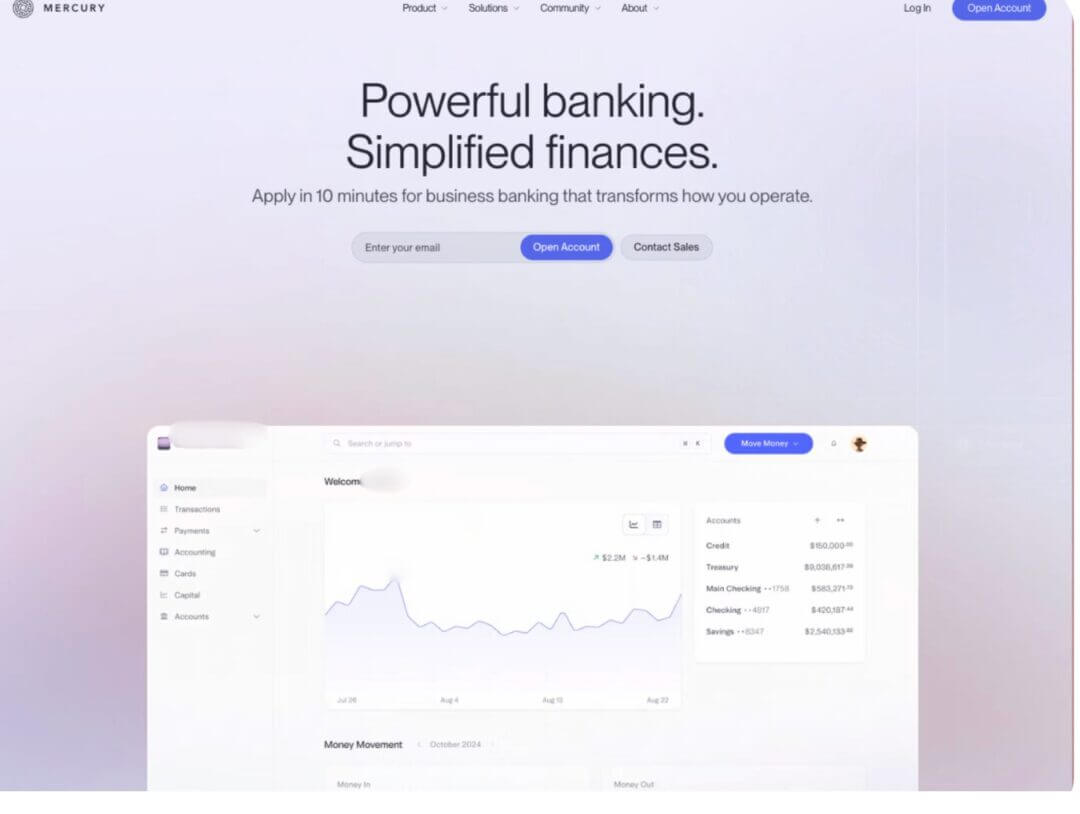
Head over to Mercury’s website and click on “Open Account” to start your application. You’ll first be asked to create a login using your email and a password.
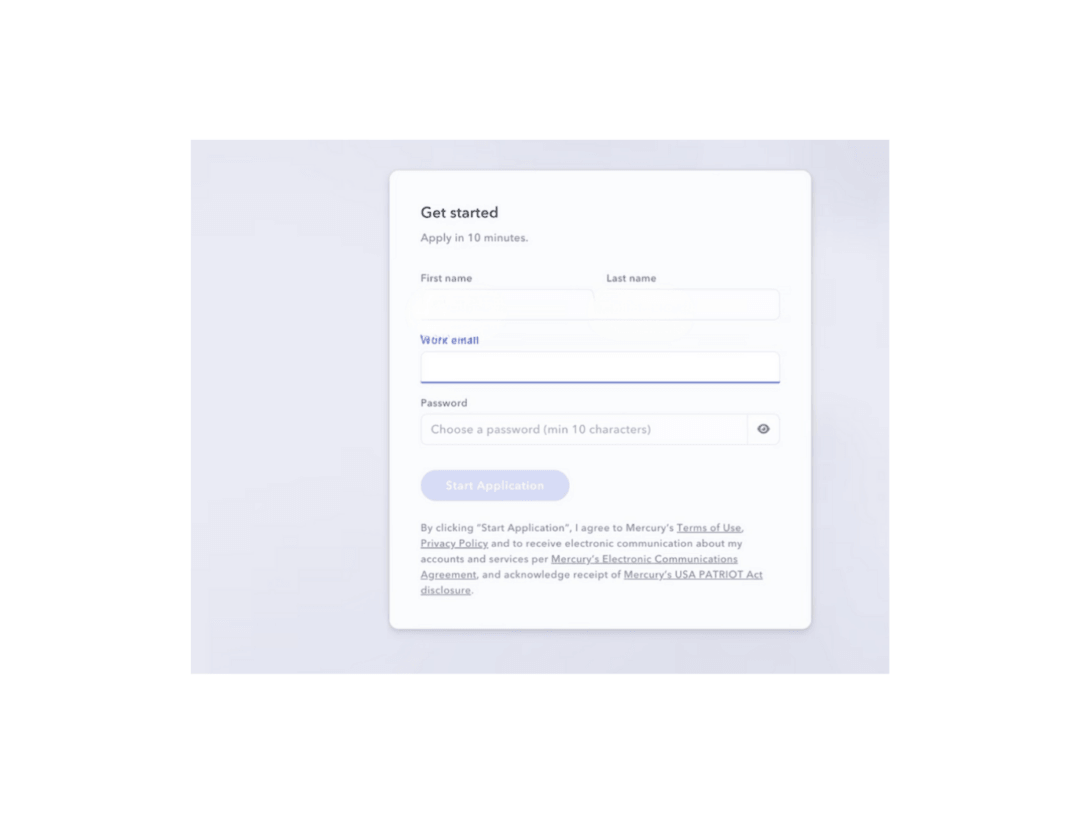
Once that’s done, you’ll be taken into the actual application flow where you enter your business and personal details.
Step 2: Enter Your Basic Business Details
Next, Mercury will ask for the core info about your company.
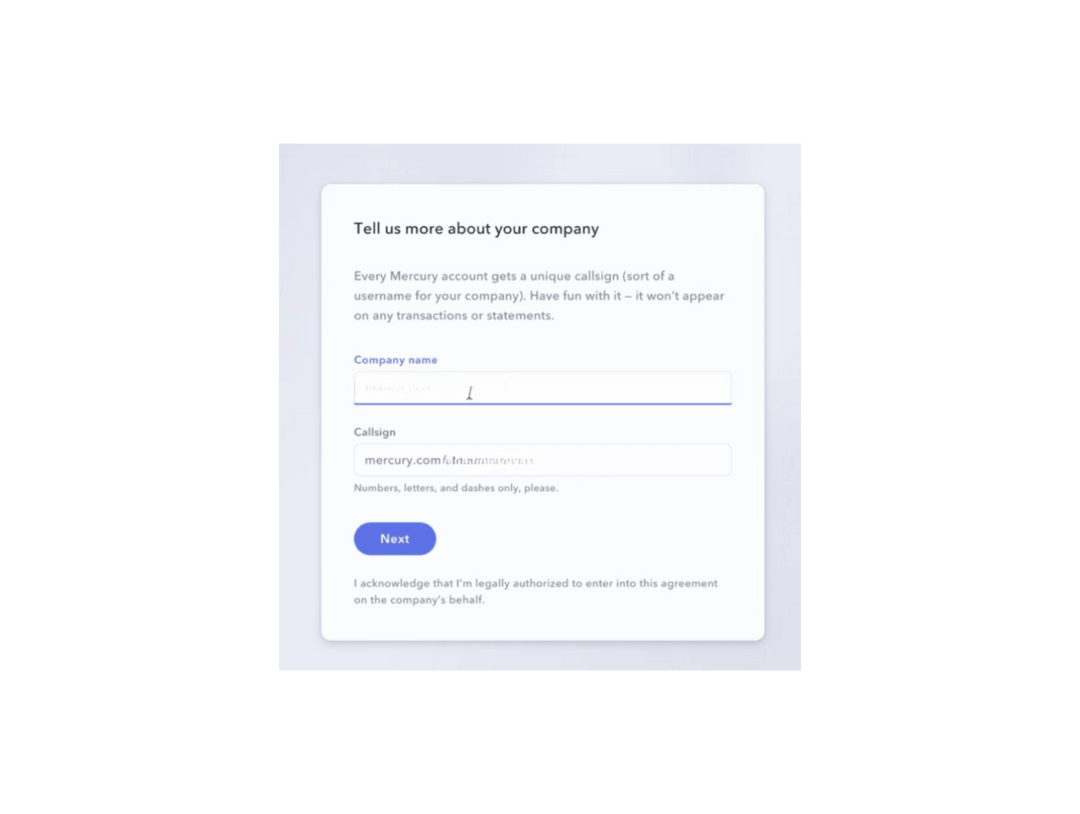
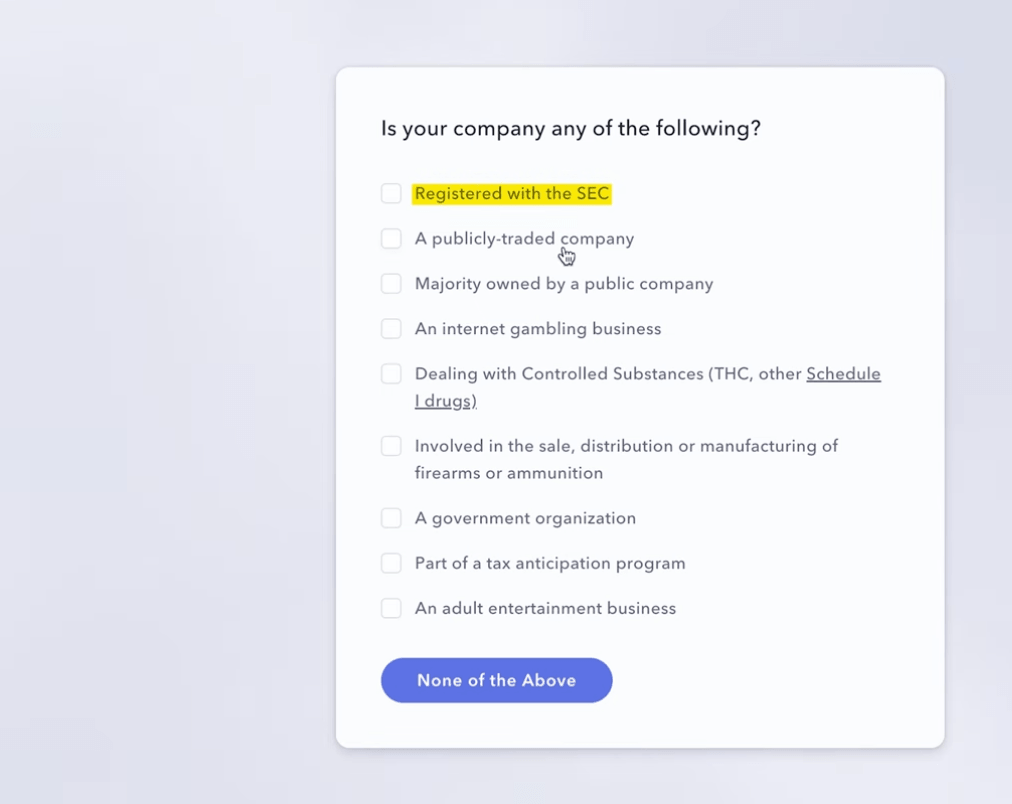
This usually includes:
- Your legal business name
- Country of incorporation (for example, United States)
- Entity type (LLC, C-Corp, etc.)
- Your industry and a short description of what your business actually does
- Your estimated monthly transaction volume
- Company Website and Company Address
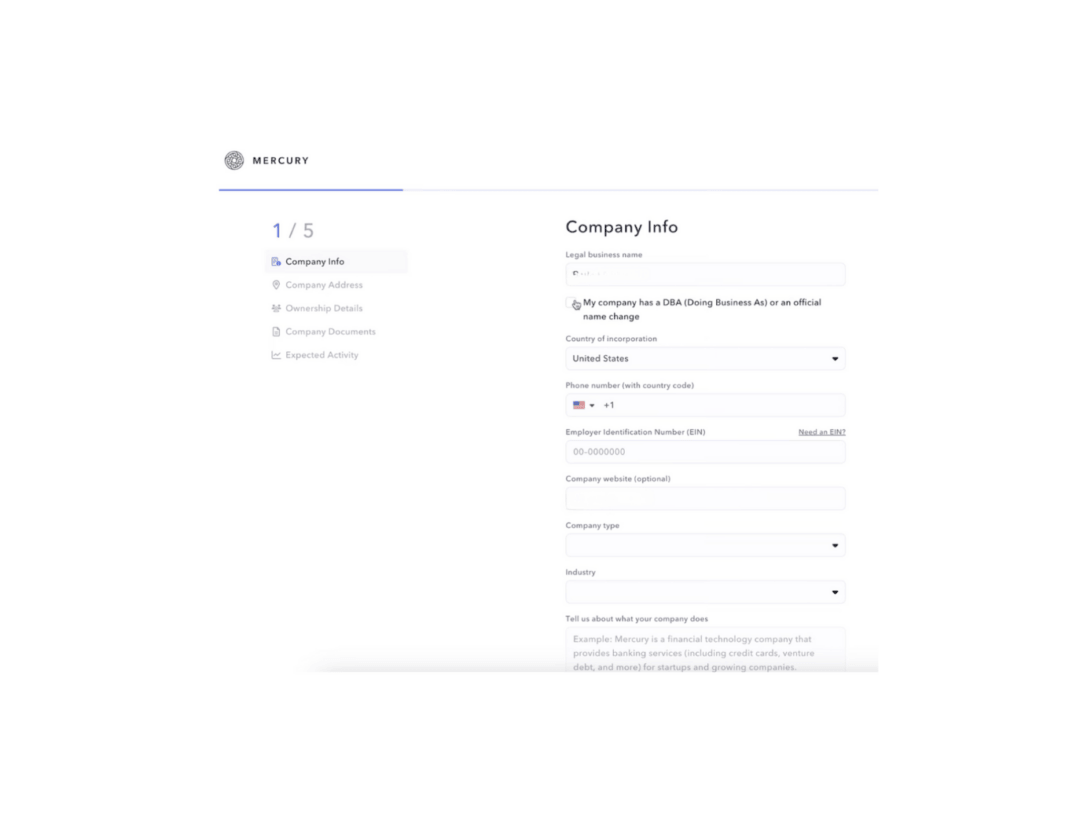
It’s worth slowing down a bit on this step. The clearer and more accurate your description is, the less likely Mercury is to come back with extra questions or delays during the review.
Step 3: Add Personal Information for Owners
After the business info, they’ll collect details about the people behind the company. Typically, anyone who owns a significant share of the business (for example, 25% or more) will need to provide:
- Full legal name
- Date of birth
- Residential address and Ownership percentage
- A passport or government-issued ID (uploaded as a clear photo or scan)
- Political Exposure
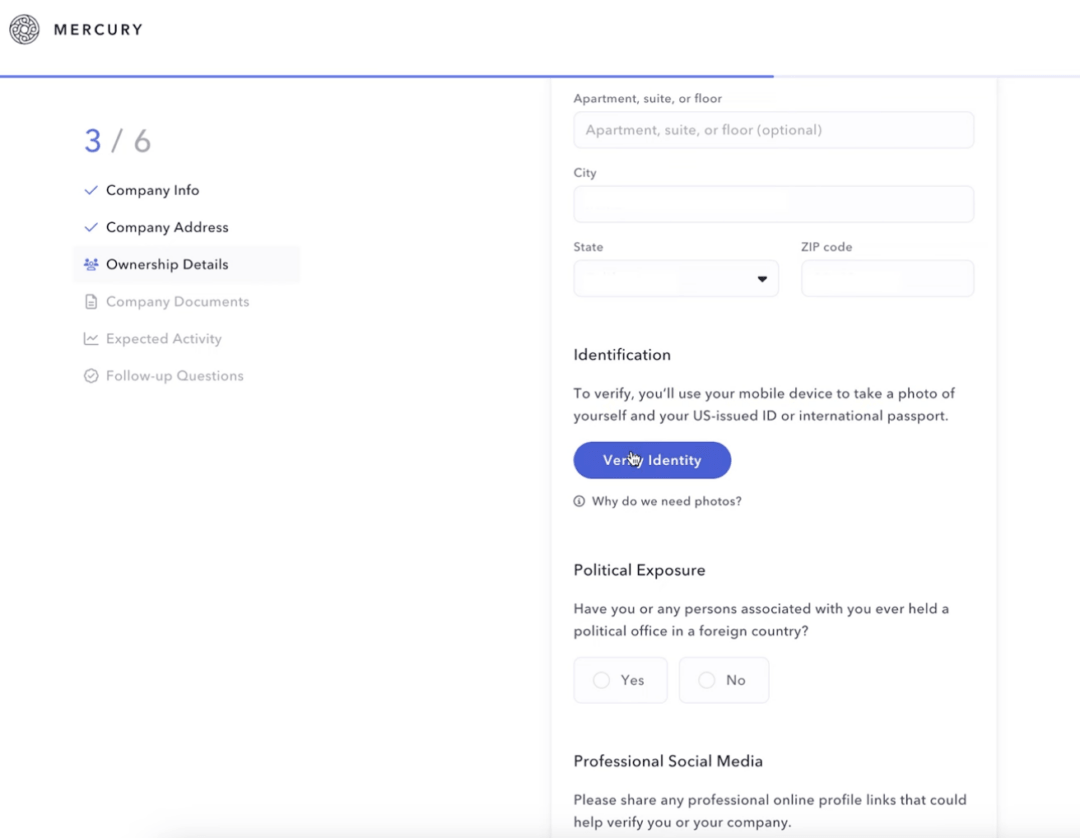
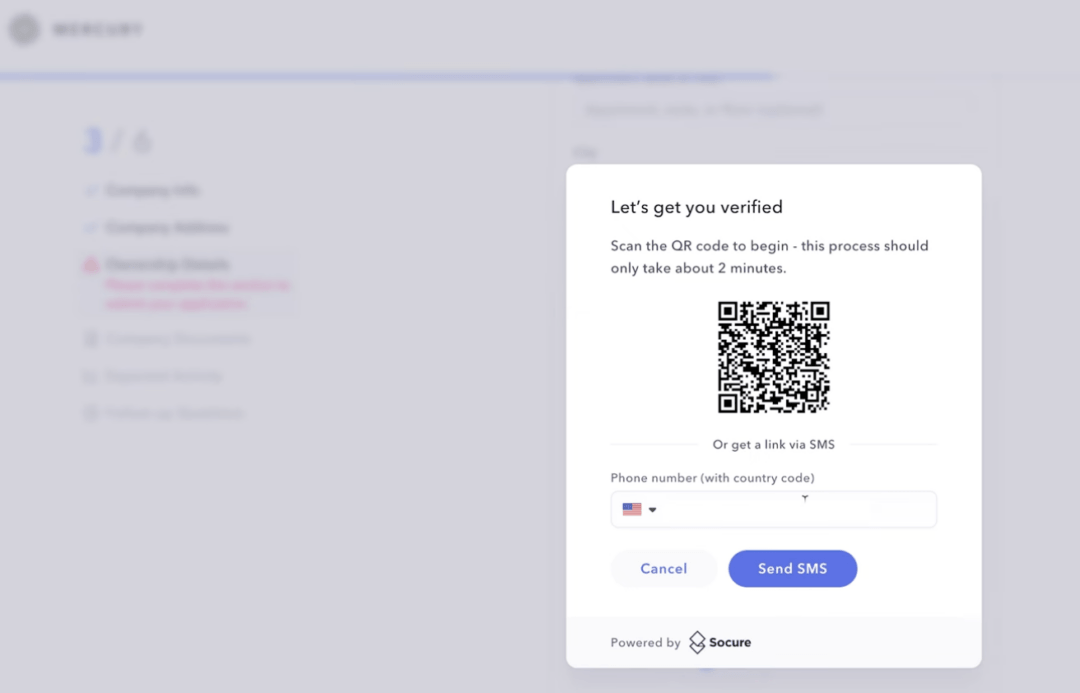
Next, you’ll need to verify your identity using a QR code or your phone number.
Step 4: Upload Supporting Documents
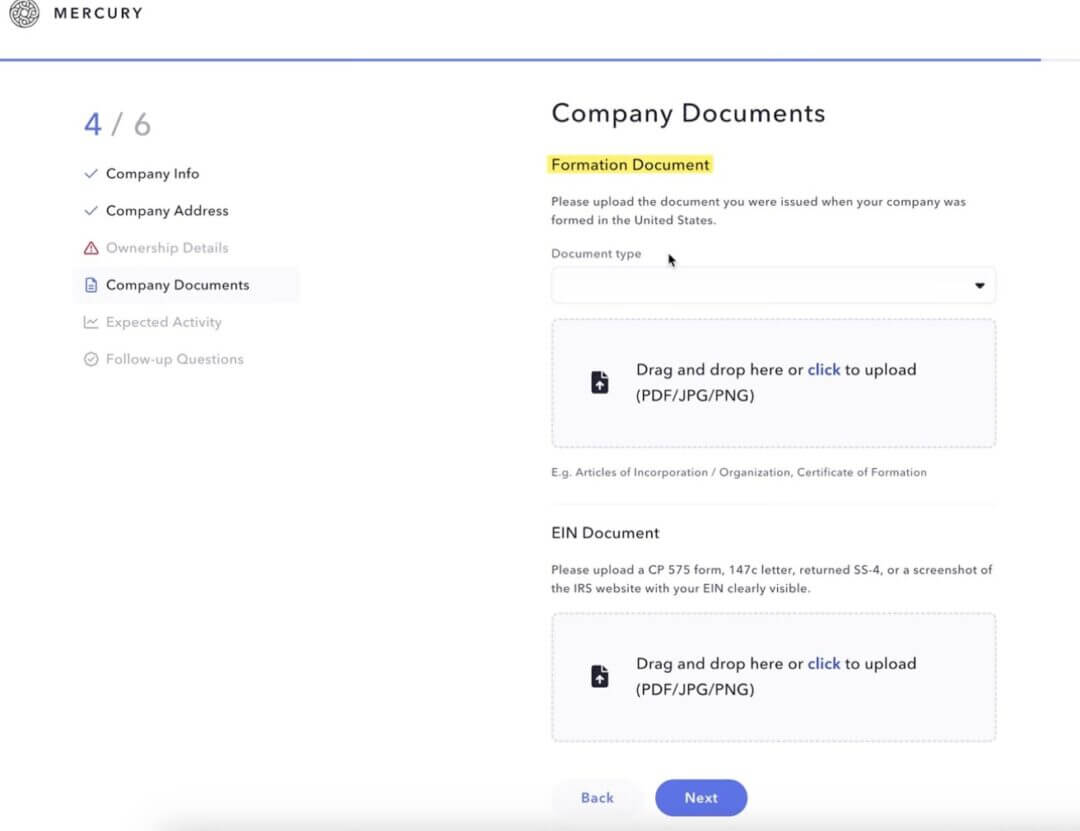
You’ll then be asked to upload a few documents so Mercury can verify your company:
- Your EIN confirmation letter from the IRS
- Your formation documents (like Articles of Organization or Incorporation)
- Proof of address for the business or owners, if they ask for it
Depending on your business model or where you’re based, Mercury might follow up with a couple of extra questions or request additional docs.
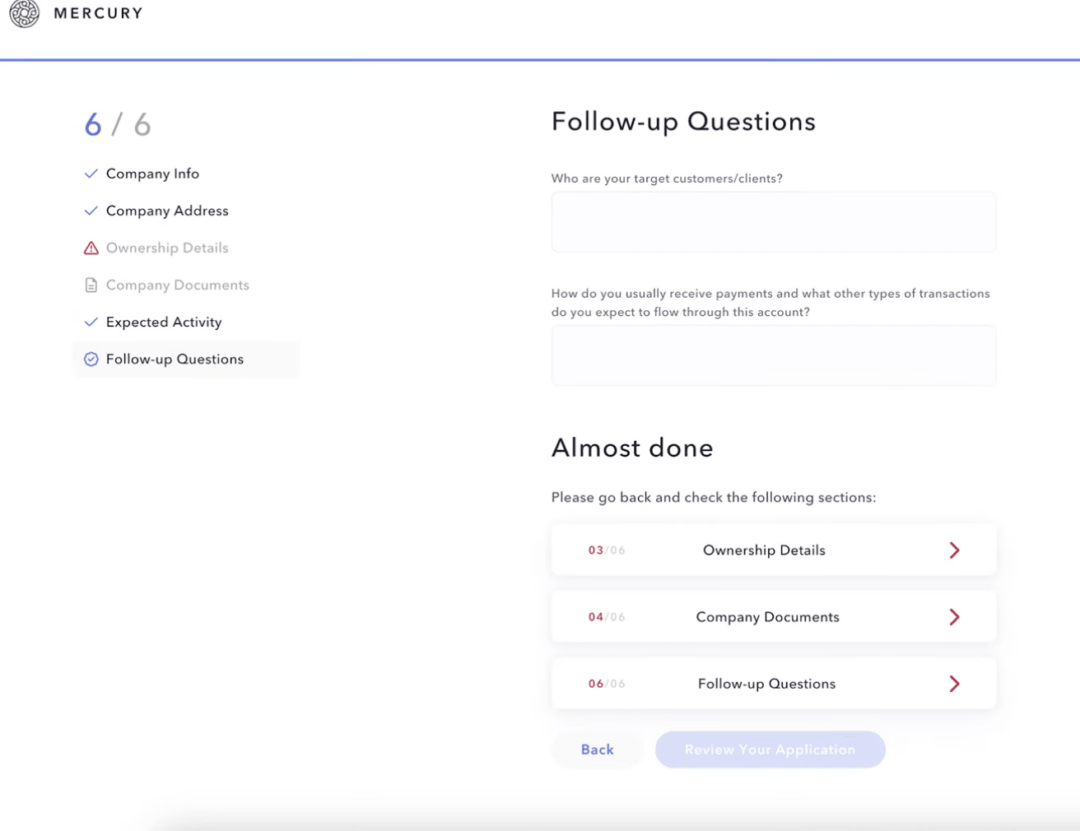
That’s pretty standard, especially for non-US founders or businesses in more regulated industries.
Step 5: Wait for Review and Approval
Once everything is submitted, Mercury’s compliance team will review your application.
In many cases, accounts are approved within a few business days, as long as the documents are clear and the business fits their criteria.
When you’re approved, you’ll get access to your Mercury dashboard, where you can:
- View your account and routing numbers
- Start sending and receiving ACH and wires
- Create virtual cards
- And connect your tools (like doola, Stripe, Shopify, QuickBooks, etc.)
From there, your account is live and you can start actually using it seamlessly.
| How To Make Your Mercury Application Go Through Smoothly
Here’s your mini checklist before you submit your application process: ✔️ Names match exactly across all documents (no missing middle names, no spelling differences) ✔️ Addresses are consistent across your EIN letter, ID, and application ✔️ Your business description matches what’s on your website, LinkedIn, or any public presence ✔️ Ownership percentages add up to 100%, with no gaps or missing people ✔️ All required documents are uploaded clearly (no blurry scans, shadows, cropped edges) If everything looks clean and logical, click “Submit” and you’re good to go. |
Step 6: Verification Timeline & What to Expect
After you have submitted everything, your application moves to Mercury’s compliance review.
Here’s the realistic breakdown of the timelines:
✔️ US founders: Approvals typically take 1–3 business days, sometimes even same-day if everything is straightforward.
✔️ Non-US founders: Expect around 3–7 business days, depending on the documents and region. Mercury may ask a few extra questions for clarity.
During review, your dashboard will show “in review”, which just means their team is verifying your details against public databases, KYC rules and your uploaded documents.
If Mercury needs anything, they’ll email you, usually asking for:
- A clearer scan of your ID
- A better business description
- A link to your website
- Or clarification about owners/activities
As long as you respond quickly, the process keeps moving.
Why Mercury Approvals Get Delayed (And What Really Slows Things Down)
If your Mercury application is taking longer than expected, it’s almost always because of one of a few predictable issues.
Here’s what actually slows down approval:
Weak or Incomplete Website
Your website is one of the first places Mercury looks to verify what your business does. Delays happen when your site:
- Looks half-finished
- Has vague or placeholder text
- Doesn’t match the business description you submitted
- Doesn’t explain your product, target customer, or revenue model
If Mercury is reviewing your website, they want a clear answer to this question “Does the business described in the application actually exist?” A clean one-page site with basic clarity goes a long way.
Unclear or Higher-Risk Business Model
This is one of the biggest reasons applications get pulled into manual review.
If you describe your business with vague labels like “online services,” “digital products,” or “consulting,” the compliance team can’t immediately see:
- What exactly you sell
- Who your customers are
- How money moves through your business
So, they take time to look deeper into your information.
On top of that, if your business touches or even sits close to certain categories, it almost always triggers extra review:
- Crypto or blockchain
- Financial services, remittances, or money movement
- Trading, investments, or anything involving client funds
- Gambling or adult categories
- Business models known for high chargebacks (certain info products, “make money fast” offers, etc.)
A longer review here doesn’t automatically mean “you’re getting rejected.” It usually just means: “We need a clearer picture of your risk profile before we say yes.”
The fastest way to reduce friction is to be specific upfront. A tight 2–3 sentence explanation like this usually does the job:
“We sell pre-built Notion templates and downloadable resources to small business owners via our website. We don’t hold customer funds or process payments ourselves, everything goes through Stripe and PayPal. Our customers are primarily US and EU-based solopreneurs.”
Specific, boring and clear beats vague every time.
Missing Or Unreadable Documents
This is the easiest problem to avoid and one of the most common reasons Mercury approvals slow down.
When documents aren’t clear, the reviewer simply can’t finish the checklist, so your file just sits there.
Typical issues that trigger delays:
- Blurry ID photos. The text, dates, or face aren’t sharp enough to verify.
- Glare on passports or IDs. Light reflecting on the document hides key details (name, number, expiry date).
- Cropped EIN letters. The top or bottom of the IRS letter is cut off, so the EIN or business name isn’t fully visible.
- Formation documents missing pages. You upload only page 1 and forget the page with signatures, stamps, or state approval.
- Broken or unreadable PDFs. The file uploads, but when opened, it’s blank, corrupted, or shows an error.
From compliance’s point of view, if Mercury’s team can’t clearly read a document, they can’t sign off on the account. So, they either email you asking for better copies, or, park your application until you respond.
Both add days you don’t actually need to lose.
Here’s a simple way to avoid this:
- Use a scanner app (or the built-in scanner on your phone) instead of random photos.
- Make sure the entire document is visible, all four corners, all text.
- Check that names, dates, and numbers are sharp and legible.
- Open each PDF after saving to confirm it loads properly.
Inconsistent Information Across Documents
This is one of those issues that feels small from your side, but it’s a big red flag for compliance.
Mercury doesn’t just read what you type into the form, they cross-check it against your documents and anything that’s obviously visible online.
When those pieces don’t match, the application stops and gets kicked into manual review.
Typical inconsistencies that slow things down:
- Different business addresses everywhere. Your EIN letter has one address, your formation documents have another, and your website shows a third. On their side, this looks like: “Which one is real?”
- Ownership percentages that don’t add up. For example: 60% + 30% + 15% = 105%. Or you list yourself as 100% owner, but your website says “Co-founder & CEO” next to someone else.
- Public co-founders not listed in the application. If your LinkedIn or website clearly shows another founder, but only you appear as an owner in Mercury’s form, that needs to be reconciled.
- Names that don’t match your ID. You apply as “Sam Sharma,” but your passport says “Sameer Arvind Sharma.” To a human, it’s obvious. To a compliance process, it’s a mismatch.
From Mercury’s perspective, inconsistent data is not just “messy admin”, it can signal sloppiness at best, or fraud at worst. That’s why they slow down and ask questions.
How to keep your application moving:
- Decide on one primary business address and use it consistently across EIN, formation docs, and the application.
- Make sure ownership percentages total exactly 100% and reflect reality.
- If someone is a meaningful co-founder or owner publicly, include them or be ready to explain why they’re not an equity holder.
- Always use your full legal name from your passport/ID in the application, even if you go by a shorter version elsewhere.
When names, addresses, and ownership line up cleanly, your application feels straightforward and straightforward files move through compliance much faster.
Troubleshooting & Rejections: Common User Issues and How to Resolve Them
This section outlines the most common areas where founders experience friction during the Mercury account opening process.
Each issue includes:
- What the issue is actually about
- Practical troubleshooting steps a founder can follow to resolve it
Issue 1: Eligibility-Related Rejections
What this issue is about: Some companies or founders do not meet Mercury’s baseline eligibility criteria. This includes living in a prohibited country, operating in a restricted industry, or not having a U.S. legal entity.
Typical user concern
“My business is legitimate and properly formed. Why did Mercury reject me without details?”
Troubleshooting Steps
- Confirm that the company is a U.S. entity (LLC or Corporation). Foreign entities alone cannot be onboarded.
- Verify that no founder or key owner resides in a restricted or embargoed country, as Mercury’s partner banks cannot support onboarding from those jurisdictions.
- Reassess whether the business model falls under restricted categories (e.g., certain financial services, gambling, high-risk regulated activities).
- If any eligibility factors cannot be changed (e.g., founder location or business type), it is more efficient to explore alternative banking solutions rather than reapplying.
Issue 2: Document Mismatches or Inconsistencies
What this issue is about: Mercury performs strict KYB/KYC checks. Even small discrepancies across formation documents, EIN letters, addresses, or uploaded details can trigger a rejection.
Typical user concern
“Mercury says my documents don’t match, but I checked them and everything looks correct.”
Troubleshooting Steps
- Conduct a line-by-line consistency check across formation documents, EIN letter/CP575, operating agreement/incorporation document and application information.
- Ensure the legal business name appears identically in all places (including punctuation and “LLC” or “Inc.” suffix).
- Check whether the address being used is a physical operating address. Virtual mailboxes, PO boxes, or registered agent addresses are often rejected.
- If mistakes originated with your formation provider (e.g., incorrect city/ZIP), correct them at the state or IRS level before reapplying.
Issue 3: Business Model Not Clearly Understood
What this issue is about: If Mercury cannot fully understand what a company sells, how it earns revenue, or how money flows, they default to caution. Vague or overly broad descriptions frequently fail compliance review.
Typical user concern
“Mercury said they couldn’t determine our business model, even though we explained it.”
Troubleshooting Steps
- Instead of using broad or high-level language (“AI solutions,” “digital services,” “consulting”), Mercury expects a direct, verifiable explanation of how your business actually works.
This means clearly describing:
✔️ What your company provides: the specific product or service you sell.
✔️ Who your customers are: the segment or market you serve.
✔️ How the business earns revenue: whether customers pay through subscriptions, one-time purchases, service fees, or another model.
✔️ How money moves through the business: from the customer’s payment method to your company’s account, including whether you ever hold, transfer, or process client funds.
- Explicitly state what you do NOT do, especially if your industry could resemble a restricted category (e.g., “We do not hold customer funds”).
- Ensure your website mirrors your application description so compliance officers can verify your story quickly.
Issue 4: Weak or Incomplete Online Presence
What this issue is about: A business without a complete website, working product pages, or a clear value proposition often appears “unproven” to compliance officers.
Typical user concern
“Our website is still under construction. Could that cause the application delay or rejection?”
Troubleshooting Steps
- Publish a minimum viable website with about page, service/product details, pricing or business model explanation and contact information.
- Ensure your online presence reflects a real, operational business.
- Reapply only after the website and brand materials are aligned with your business description.
Issue 5: Extra Scrutiny for International Founders
What this issue is about: Mercury supports non-U.S. founders but requires a stronger verification trail, including clear identity documents and evidence of U.S. business intent.
Typical user concern
“They asked for more documents and still declined the application. Is it because I’m based outside the U.S.?”
Troubleshooting Steps
- Provide a high-quality passport scan, selfie, and proof of residential address (utility bill or bank statement).
- Clarify your U.S. business rationale, such as target customers, market entry plans, U.S. contractors, or expected revenue flows.
- Align your website, LinkedIn profiles, and application description so your operational intent is verifiable.
- If your documents are inconsistent or incomplete, address those gaps thoroughly before reapplying.
If none of the troubleshooting steps above resolve the issue, you can always reach out directly to Mercury Support for clarification.
Mercury’s team can confirm whether additional documents are required, whether the application can be reconsidered, or if a re-application is appropriate.
Communicating With Mercury Support
In this section, we’ll tell you exactly how to communicate with Mercury Support, including which channel to use, what information to provide, and how to structure your message so you receive a clear and timely response.
How to Contact Mercury
When a founder reaches out to Mercury, the aim is to show that they have done their homework, fixed whatever they could on their side, and now simply need clarity. The tone should be calm, factual, and concise.
If you already have access to the Mercury dashboard, even if your application is still under review or was previously declined, the simplest way to get support is through the in-app chat.
This is usually the most efficient option because the support team can immediately see your company details, previous submissions, and any documents you’ve already uploaded.
If you do not have login access, or the application never progressed far enough for an account to be created, then the next best step is to reach out through Mercury’s public contact form and Help Center, or email help@mercury.com.
In both cases, the structure of the message matters more than the length.
What to Include So Your Message Gets a Useful Response
Support teams work much faster when your message is structured.
A good message should answer four questions up front:
✔️ Who are you?
- Legal company name
- Entity type and state (e.g., Delaware C-Corp)
- Email used for the application
✔️ What is the issue?
- “Application stuck in review since [date]”
- “Application not approved; documents now corrected”
- “Address rejected; updated operating address provided”
✔️ What have you already fixed or changed?
- Corrected address with the state and IRS
- Uploaded new EIN letter
- Fully updated website and business description
- Added documents for all 25%+ owners
✔️ What exactly are you asking them to do?
- Example: “Can you confirm if any additional information is required to complete the review?”
- Or: “Can you confirm whether we are now eligible to reapply with the updated information?”
Follow that with a short paragraph summarising the main changes you have made so they can see that the underlying issues have been addressed.
Close with a single, clear question such as: “Could you let us know if there is any additional information you need from us to complete your review or reconsider the application?”
Post-Setup Best Practices For Founders
Once your Mercury account is live, the next step is to design the financial operating system around it.
You’ll need clear visibility into the following:
- Number of accounts you maintain
- Purpose of each account (operating expenses, payroll, tax reserves, runway)
- How funds move between accounts
- Tools connected to Mercury (accounting, payroll, payment processors, spend management)
- Who has access to view, initiate, and approve payments
Here are some key post-setup best practices you can follow to keep your Mercury setup clean, scalable, and aligned with your company goals.
Keep Company and Ownership Information Current
As your company evolves, the information Mercury relies on should evolve with it. You may change offices, add directors, bring in new investors, or shift decision-making roles.
Make sure your Mercury account details, company address, ownership structure, authorized signers, and control roles, are always up to date and aligned with your official corporate records.
This consistency matters in day-to-day operations: high-value transfers, adding new users, and certain payment approvals all depend on accurate ownership and control information.
It also matters during larger milestones. Fundraising, audits, and periodic bank reviews often involve checking your company information across multiple systems.
If Mercury already mirrors your updated legal records, you avoid time-consuming reconciliation work and reduce the risk of last-minute questions that slow down critical decisions.
In other words, keeping your Mercury profile current isn’t administrative housekeeping; it’s how you keep financial operations smooth, predictable, and aligned with how your company is actually evolving.
Maintain Clear Financial Records and Transparent Transaction Trails
Once payroll, vendor payments, subscriptions, and customer receipts all start flowing through Mercury, it effectively becomes the front door to your financial data.
The way you record and interpret that activity will shape how confidently you can budget, manage cash, report to your board, and respond to investors or auditors.
Make sure you integrate Mercury with your accounting platform and maintain a consistent reconciliation rhythm. This step alone gives you accurate financial data at all times.
When every transaction is categorized, labeled, and documented, you can monitor burn more clearly, track vendor exposure, identify unusual activity faster, and give external stakeholders clean statements when needed.
In turn, this gives you a high level of transparency when you need to do regular reporting, undergo third-party reviews, or invest in deeper financial planning.
Add Additional Accounts, Cards and Tools as Your Operations Mature
In the early stages, a single operating account is usually enough. You have a small team, limited spend categories, and relatively simple cash flows.
As revenue grows, more people join, and your cost base becomes more diverse, that same structure can start to blur important distinctions in how money is used.
At that point, it helps to let your Mercury setup mirror the way your business actually runs.
Mercury gives you the flexibility to add multiple accounts, team cards, and spend controls, and you can use those deliberately to create clarity rather than complexity. For example, you might first introduce a separate payroll account so salaries are clearly ring-fenced from your main operating funds.
From there, it can make sense to isolate tax reserves or long-term runway in another account, so those balances are visible and protected from day-to-day payments.
As you begin delegating budgets, you can extend this structure with team cards that have clear limits and defined purposes. That allows functional leads to manage their own spend while you still retain visibility and control at the company level.
Finally, once you are consistently holding more cash than you need for near-term obligations, you can look at Mercury’s options for managing idle funds, so surplus capital is working for the business without compromising liquidity.
Using Mercury Day-To-Day
Once your account is active, Mercury becomes the hub for managing payments, cards, balances, documents, and team permissions.
This section explains how to navigate the core areas you’ll use every day, how to connect Mercury to revenue platforms, and how to send and receive transfers securely.
Mercury Dashboard Overview
This section orients you in Mercury’s dashboard, so you can find the right tab in seconds, understand what belongs where, and avoid missteps when moving money, managing cards, storing documents, or assigning team access.
✔️ Accounts
Where your checking/savings accounts live, balances, transactions, statements from the account view, and account organization (nicknames, multiple accounts, etc.)
✔️ Cards
Once your Mercury account has funds, you can issue debit cards for day-to-day business spend, hardware, office costs, subscriptions, or team purchases. Virtual cards are generated instantly for immediate use, while physical cards can be ordered for in-person transactions.
To create one, open the Cards tab and select Create Card. From there, you can name the card (e.g., “Software,” “Ad Spend”), choose the funding account, and set spending limits.
✔️ Payments
Where you send money (ACH/wires/check), manage recipients, and track outgoing payments. Mercury also routes “Send” via Move Money, and notes you can access sending from the Payments page.
✔️ Treasury / Vault (if applicable)
These are separate sections/products for cash management and/or expanded insurance, and Mercury documents them as Treasury & Vault (not always a default tab for every account).
✔️ Documents & Data
Where you download monthly statements and access account documentation. Mercury explicitly calls this Documents & Data in the dashboard navigation.
✔️ Team (in Settings, not always as a standalone tab)
Team member access is managed under Settings → Team, per Mercury’s FAQ (“Team tab in your Settings page”).
Connecting to PayPal
You can connect your Mercury checkings and savings account to PayPal in two ways:
Option 1: Instant linking (Bank Login)
- PayPal may let you link your bank instantly by signing in with your bank login.
- PayPal uses a third-party provider to confirm your bank details and, if needed, check your balance and transactions to help payments go through.
- You can revoke these permissions anytime in your PayPal Settings.
Option 2: Manual linking (micro-deposits)
- If you don’t want to use bank login, choose Link your bank another way.
- Enter your Mercury routing and account number.
- PayPal will send two small deposits within 3 business days. You can confirm those amounts in PayPal to verify your Mercury account.
Related Read: PayPal Payments Set-up for US and Non-US Founders
Sending And Receiving Transfers
Think of this like sending money from your business account to a vendor, landlord, contractor, or anyone in the U.S. Mercury lets you do it from the dashboard or the mobile app.
Sending Domestic Payments: Before You Start (What You’ll Need)
- The recipient (who you’re paying). You can select an existing one or add/invite a new one.
- Your payment method: ACH (bank-to-bank transfer), Check (Mercury mails a check) or Wire (bank wire transfer)
- The amount and which Mercury account you want to pay from (e.g., Operating vs Payroll).
Option 1: Create a Payment From the Mercury Dashboard
Step 1: Open the Send Payment Flow
You can start in either place:
- Go to Move Money (upper left) → select Send
- Or go to Payments (left menu) → click Create Payment (near the top)
Step 2: Add a Bill or Choose a Recipient
You can:
- Upload a bill you want to pay, or
- Select, create, or invite a recipient
Step 3: Choose the Payment Method
In the Recipients section, choose how you want to send the payment:
- ACH
- Check
- Wire
Step 4: Enter Amount and Schedule
In the Amount step, set:
- Payment amount
- Account to pay from
- Send date (immediate or scheduled)
To make it recurring, toggle Repeat This Payment and choose a schedule. Mercury will then process it automatically.
Step 5: Add Payment Details (Optional)
In the Details step, you can:
- Add a memo
- Attach supporting files (like invoices)
- Add email addresses to receive a payment receipt when it processes
Step 6: Review and Send
Review the details, then click Send Payment or Schedule Payment.
Option 2: Create a Payment From the Mercury App
Step 1: Start the Payment
Tap the middle ⇄ icon in the bottom menu, then tap Send.
Step 2: Select or Create a Recipient
Choose an existing recipient or create/invite a new one.
Step 3: Enter Payment Details
Select the payment method, amount, and account, and add any extra details.
Step 4: Review and Submit
Review everything, then submit the payment.
Sending International Payments With Mercury
Mercury allows you to send international wire payments to 40+ countries, either in USD or in the recipient’s local currency.
This section explains how to send an international wire, what information you’ll need, how long payments take, and the eligibility rules you should be aware of.
Step 1: Start a New Payment
From your Mercury dashboard, you can begin in either of these ways:
- Go to Move Money (top of the dashboard) → select Send
- Or go to Payments from the left menu → select Send Money
Step 2: Add a Bill or Choose a Recipient
- Upload a bill or invoice, or
- Select, create, or invite a recipient
Step 3: Choose the International Wire Type
In the Recipient section, select one of the following payment methods:
- International Wire – USD
- International Wire – Foreign Exchange
Then click Next.
Step 4: Enter Bank Details
- Enter the recipient bank’s SWIFT code. Once entered, Mercury automatically updates the form to request the correct details based on the bank and country.
- Provide the IBAN (International Bank Account Number). Double-check this with the recipient, incorrect IBANs commonly cause delays or rejections.
- Optional: Add a correspondent or intermediary bank’s SWIFT code only if the recipient specifically instructs you to. Adding unnecessary intermediary details may result in a failed payment.
Step 5: Set Amount and Currency
In the Amount step:
- Select the currency (if sending non-USD)
- Enter the amount
- Choose the Mercury account you’re sending from
- Select the send date
- Optional: Toggle Repeat this payment if you want to schedule it as recurring
Step 6: Provide Documentation (If Required)
For certain countries, Mercury requires additional information. If prompted:
- Select I’d like to provide additional information
- Enter the payment reason
- Indicate whether you plan to pay this recipient again
- Upload supporting documents (such as an invoice or contract)
Step 7: Select the Purpose of the Wire
Use the dropdown to specify the purpose of the wire. This is required for compliance and routing.
Step 8: Add Optional Details
In the Details step, you can:
- Add memos
- Upload attachments
- Add email addresses to receive a receipt when the wire processes
Step 9: Review and Send
Review all details carefully, then click Send Wire or Schedule Wire.
| 💡 Tracking Your International Payment International wires typically process within 1–3 days of the scheduled send date. In some cases, delivery can take up to 5 business days. Once sent, you can track the payment from your Transactions page. The transaction will reflect the USD amount deducted from your Mercury account. 💡 Where You Can Send International Payments Some countries are fully blocked Mercury may update these lists over time to meet security and compliance requirements. 💡 Who Can Send International Wires on Mercury You are not eligible to send international wires if your Company Legal Address is outside the U.S. or U.S. territories You are also not eligible if your Company Physical Address, or any Beneficial Owner (BO) address is located in one of the restricted countries listed by Mercury. |
Start & Scale Your Business With Mercury + doola
If you already have a U.S. LLC or C-Corp, or you’re planning to form one soon, Mercury can be a reliable choice for day-to-day business banking, especially if you’re operating remotely or outside the U.S.
That said, the biggest thing to get right is the application itself. Don’t rush the application process.
In most cases, delays or rejections don’t happen randomly. They usually come down to a few common issues: an unclear business description, mismatched names or addresses across documents, missing ownership details, or documents that are hard to read.
When you take a little extra time to fix these upfront, you’ll save yourself days of annoying back-and-forth.
Once you’re approved, use Mercury like your finance home base. Keep things simple and organized, separate accounts for operating money, payroll, and taxes, card limits that stop accidental overspending, clean payment workflows, and access that matches who actually makes decisions in your company.
Set it up this way and you’ll have fewer surprises later, cleaner books, and a setup that still holds up when your business grows (and people start asking more questions).
If you want your U.S. company to be bank-ready from day 1, and stay that way as you scale, you can set it up with doola, then run it on Mercury for your banking needs.
If you’d like, you can sign up for a quick demo to see how it works in practice.


Table of Contents
A Quick OverviewUnderstanding Mercury’s Model | Fintech vs. BankThe Partner Bank StructureFDIC Insurance And The Mercury Sweep Network (Vault)FDIC Insurance: What Protection You Actually GetMercury Fee Structure, Limits & PricingEligibility and Requirements to Open a Mercury AccountPre-Application ChecklistStep-By-Step Mercury Application ProcessTroubleshooting & Rejections: Common User Issues and How to Resolve ThemCommunicating With Mercury Support Post-Setup Best Practices For FoundersUsing Mercury Day-To-DayStart & Scale Your Business With Mercury + doolaHow Businesses Stay Compliant.